185
DE
13.3.2 Inserting/removing the
battery from the side
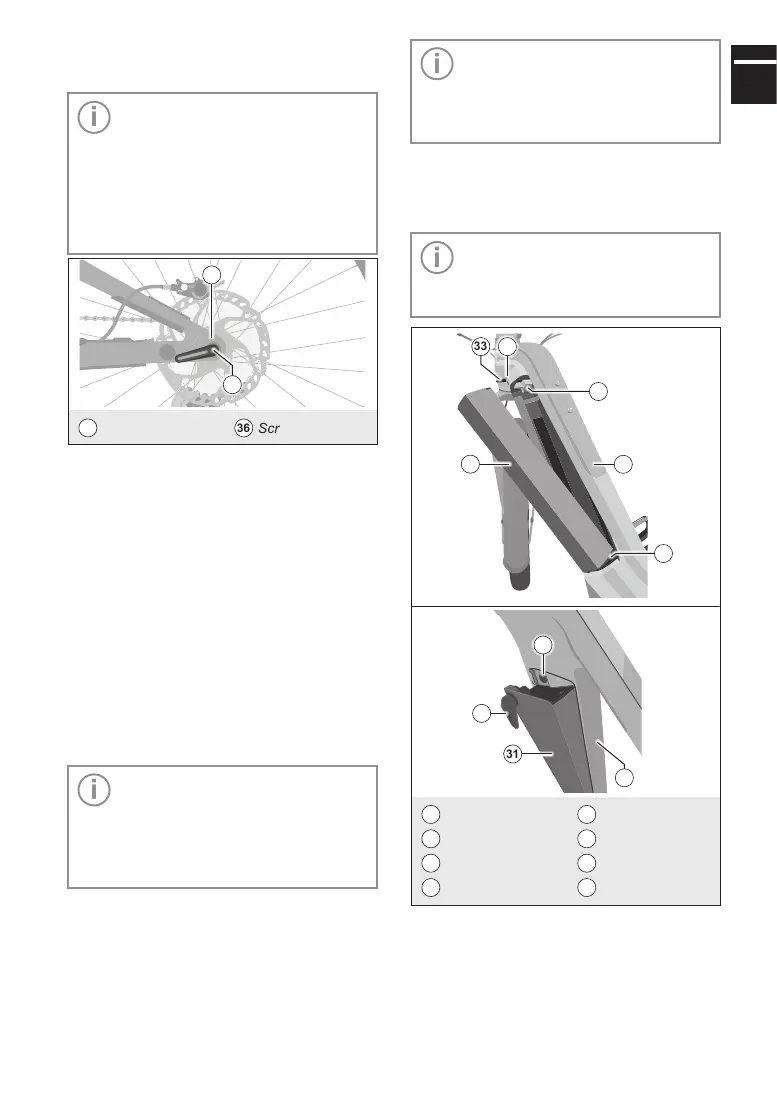
Important: Depending on the
model, lock the battery to the e-bike
with a battery lock (including a key)
or with a screw connection. The tool
for loosening or tightening the screw
connection is stored by magnetic
holder on the rear wheel axle when
not in use.
22
Rear hub
36
Screwdriver tool
36
22
Fig.11: Screwdriver tool for battery on rear wheel axle
Inserting the battery
1. Insert the battery into the lower holder on
the e-bike and then swing the upper part of
the battery into its holder until the battery
lock audibly engages in the upper holder.
2. Make sure that the battery is securely
seated in its holder.
3. Lock the battery to the e-bike by using the
key to lock the battery lock or the screw-
driver tool to tighten the screw connection.
Then remove the key or the screw-
driver tool.
Removing the battery
Important: Make sure you have set
the desired charging mode in the
Settings menu or change it before
removing the battery. You cannot
change the charging mode on the
removed battery during charging.
1. Switch off the electric drive system.
To do so, press the On/Off button on
the display.
2. Unlock the battery on the e-bike by open-
ing the battery lock with the key or loosen-
ing the screw connection with the screw-
driver tool.
Important: Depending on the
model, the battery must be released
from its lock in the holder before it
can be removed. To do so, press the
tab on the upper end of the battery.
3. Secure the battery with one hand to pre-
vent it from falling, release the lock if nec-
essary and remove the battery from its
holder on the e-bike to the side.
Important: To charge the battery,
follow the instructions in the manu-
facturer's manual for your electric
drive.
35
34
31
33 32
5
37
31
36
5
5
Down tube
34
Upper holder
31
Battery
35
Lower holder
32
Battery lock
36
Screwdriver tool
33
Key
37
Thread
Fig.12: Inserting/removing the battery from the side



 To Next Page