194
17.2 Notes on lowerable seat
posts
With a lowerable seat post, you can quickly
and flexibly lower and raise the saddle
height in difficult terrain, for example, in front
of high steps, using a lever on the handle-
bars.
WARNING!
Risk of accident and injury
Changing the seat post height while
cycling can lead to loss of control over
the seat post or the e-bike. Serious falls
and injuries can result.
• First practice using the lowerable
seat post in a suitable environment
and while cycling smoothly until you
have mastered its use.
• Do not ride your e-bike if the lower-
able seat post does not function
reliably, but first contact your FLYER
specialist dealer to have the prob-
lem rectified.
Important: Have your FLYER spe-
cialist dealer instruct you on how to
adjust and use the lowerable seat
post.
• To lower the saddle: Operate the lever
on the handlebars and load the saddle at
the same time.
• To bring the saddle back to the regular
height: Operate the lever on the handle-
bars again and relieve the saddle.
8
Handlebars
51
Control lever (lowerable seat post)
51
8
Fig.25: Control lever for the adjustable seat post
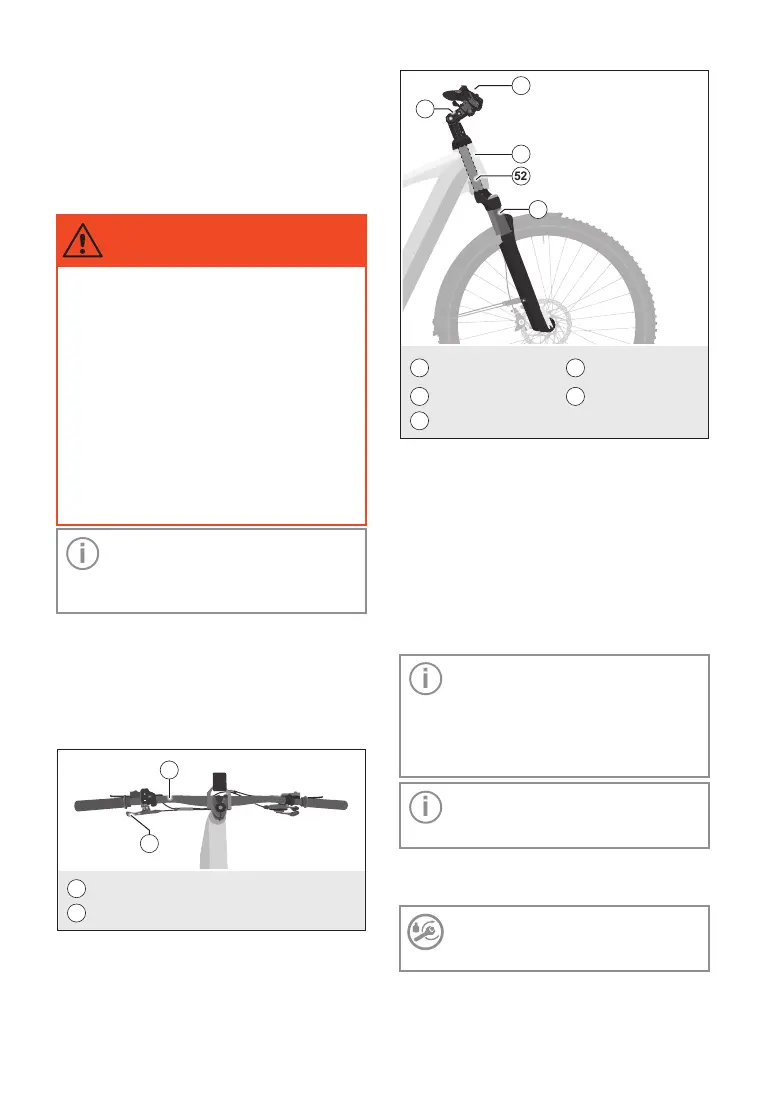
18 Handlebars
6
Head tube with
headset
9
Front fork
7
Stem
52
Fork tube
8
Handlebars
8
52
6
9
7
Fig.26: Handlebar components
18.1 Adjusting the
handlebars
To adjust the handlebar height, the stem
may need to be adjusted in height.
Adjustments of handlebars and stem are dif-
ferent depending on the model and require
expertise.
Important: Be sure to follow the
associated manufacturer's instruc-
tions for your stem. Have work on
the handlebars and stem carried out
exclusively by a FLYER specialist
dealer.
Important: The stem clamp can be
attached with a screw connection or
with a quick release.
Always tighten screw connections to the
correct torque.
Torque: See model-specific infor-
mation on your stem in the accom-
panying Technical Datadocument.



 To Next Page