90
18-5. Safety Area Markers
Various markers indicating the safety area, the center of the screen, and the aspect ratio can be
displayed on the desired output.
(1) Press the MENU button, then press the 7/SETUP button to display the SETUP top menu.
Turn F1 to select OUTPUT, then press F1 or the PAGE DOWN button to open the [SETUP-
OUTPUT] menu.
(2) Turn F1 to select MARKER, then press F1 or the PAGE DOWN button to open the
[SETUP-OUTPUT-MARKER] menu.
(3) Turn F1 to select a video output.
PGM (Program Out)
AUX1 and AUX2 (AUX1 Out and AUX2 Out)
C-Ch1 and C-Ch2 (Ch1 Out and Ch2 Out on the option slot C)
D-Ch1 and D-Ch2 (Ch1 Out and Ch2 Out on the option slot D)
(4) Turn F2 to set the Marker function to ON.
OUTPUT :SELECT :ENABLE :MARKER :SIDECUT: 1/2
MARKER : =AUX1 : =ON : =BOX : =OFF :
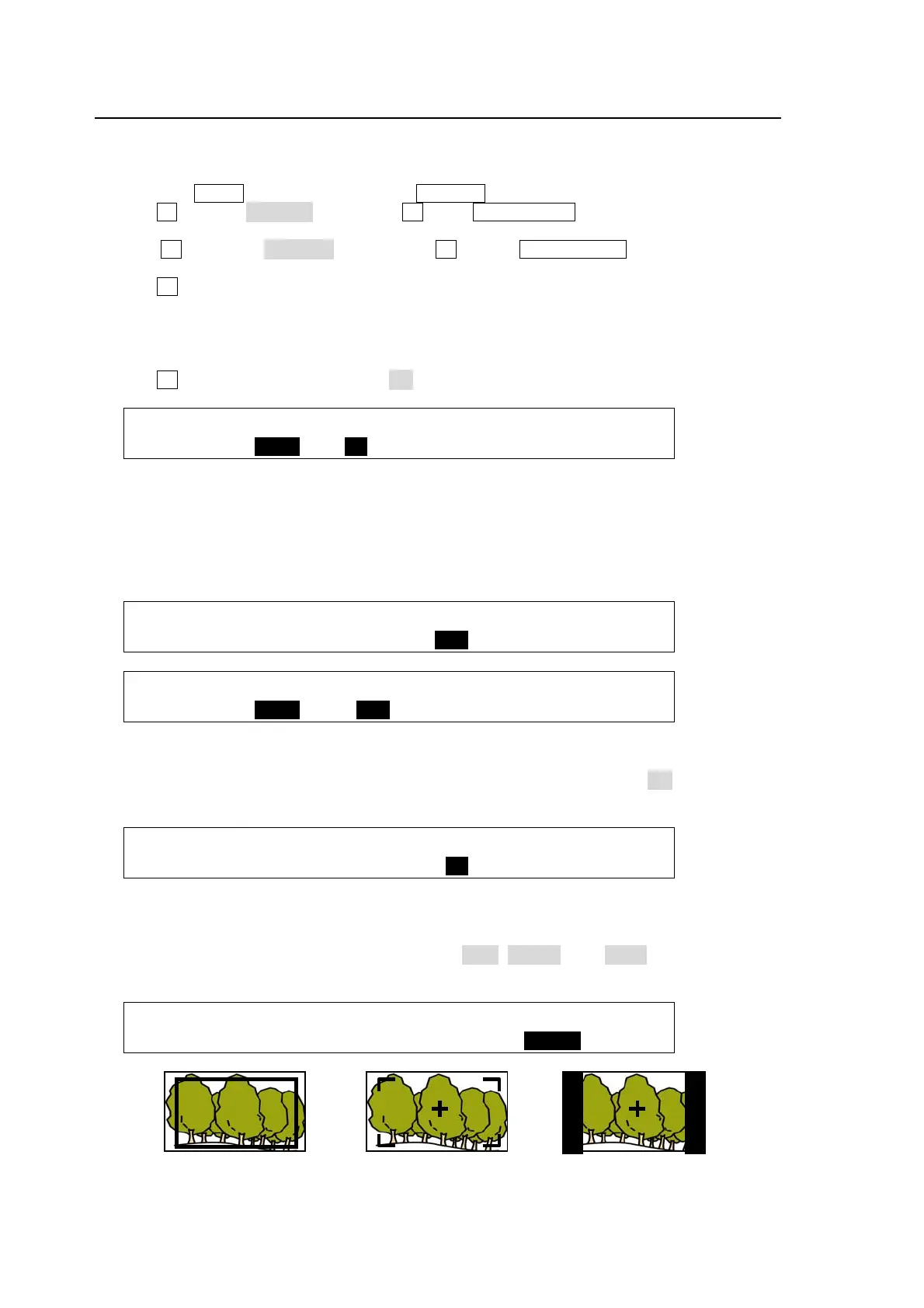
Safety Area Marker
To display the safety area marker in the selected output, first select the type of marker under the
MARKER item in the [SETUP-OUTPUT-MARKER] menu from BOX and HOOK. (See the
figures in the bottom of the page.) Then go to PAGE 2, select an aspect ratio and set the marker
size.
OUTPUT :SELECT :ENABLE :MARKER :SIDECUT: 1/2
MARKER : =AUX1 : =ON : =BOX : =OFF :
OUTPUT :ASPECT : SIZE :CENTER : : 2/2
MARKER : =16:9 : =85% : =ON : :
Center Marker
To display the center marker in the selected output, set the CENTER item to ON in the PAGE 2
of the [SETUP-OUTPUT-MARKER] menu. (See the figures in the bottom of the page.)
OUTPUT :ASPECT : SIZE :CENTER : : 2/2
MARKER : =16:9 : =85% : =ON : :
Side Cut Display
To display the Side Cut image converting the aspect ratio from 16:9 to 4:3, select the display
type under the SIDECUT item. Available types are LINE, BLACK ands HALF. (See the figure in
the bottom of the page.)
OUTPUT :SELECT :ENABLE :MARKER :SIDECUT: 1/2
MARKER : =AUX1 : =ON : =OFF : =BLACK :
MARKER: BOX
SPECT: 16:9
SIZE: 85%
MARKER: HOOK
SPECT: 16:9
SIZE: 85%
CENTER: ON
MARKER: OFF
SIDECUT: BLACK
CENTER: ON


 To Next Page