79
16. Event Memory
The switcher can save control panel setup statuses as data for recall when needed. This function is
called Event Memory. This Event Memory function enables quick recall of the same setting statuses.
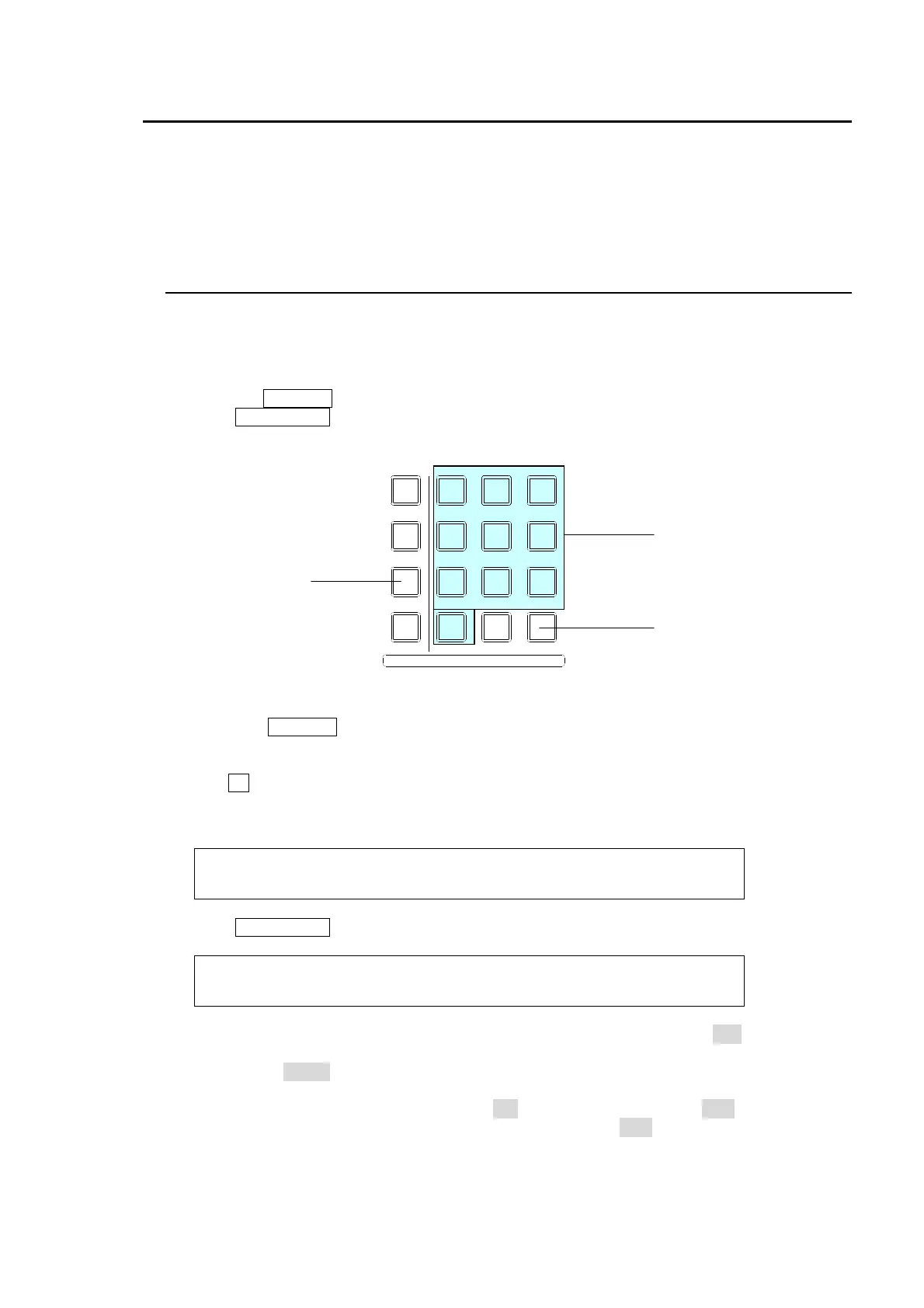
The keypad is used to save and recall events.
Saved event memories can be saved and recalled from USB flash memories. For details, see
section
17 “File Operations.”
16-1. Storing Events
Event memory can store the setting status of the control panel. Up to 100 events (10 memory
pages, with10 events per page) can be stored in memory. The PGM/PST and KEYER signal
selection data can also be saved to the memory.
To Store Event (in the minimum way):
(1) Press the ±/EVENT button at the top right-hand side of the menu display.
(2) Press ENT/STORE on the Keypad.
(3) Press a number button (0-9) on the Keypad to store the event.
Storing Events (in the detailed way):
(1) Press the ±/EVENT button at the top right-hand side of the menu display. The [EVENT
MEMORY] menu is displayed and the Keypad switches to EVENT mode.
(2) Turn F1 to select an event page in the [EVENT MEMORY] menu. PAGE 0 has Event 0-9
(event memories), PAGE 1 has Event 10-19, and so on. The last page, PAGE 9 has Event
90-99.
EVENT : PAGE :DIRECT :PAGECLR:LAST : 1/1
MEMORY : =0 : =OFF : =OFF : :
(3) Press ENT/STORE on the Keypad. The [EVENT STORE] menu will then be displayed.
EVENT :SELECT :XPT :DATA : : 1/1
STORE : =ALL : =ON : =ON : :
(4) Data saved to the event can be selected under the SELECT item. If set to ALL, all data set for
BKGD, KEYER, DSK PinP1 and PinP2 are selected. You can also select specific bus data,
for exmaple, BKGD.
(5) Normally set the XPT and DATA items to ON. If the XPT item is set to OFF, the bus signal
selection is not saved to the event. If the DATA item is set to OFF, the setting data for the bus
such as transition type and transition rate (including the bus signal selection) is not saved to
the event.
MENU/DIRECT PATT/EVENT/KEY PAD
7/SET UP
4/WIPE
1
8/STILL
5/P in P
2/KEYER
9/FILE
6/MATT
3/DSK
MENU
DIRECT PATT
±/EVENT
CLR/TRANS RATE 0 /RECALL
. (DOT)
ENT/STORE
±/EVENT button
0 to 9
ENT/STORE button



 To Next Page