38
9. Transition Operations
The following transition-related operations are possible.
BLACK transition
Background CUT, MIX, Pattern transitions
DSK CUT, MIX and SLIDE IN/OUT and SCALER.
KEYER CUT, MIX, SLIDE IN/OUT, SCALER and Pattern transitions
Transitions setup by next transition bus selection (BKGD and KEYER)
Transitions using the AUTO button or the fader lever
On-Air indicators for KEYER, DSK and PinP1/2.
More than 150 types of various preset patterns.
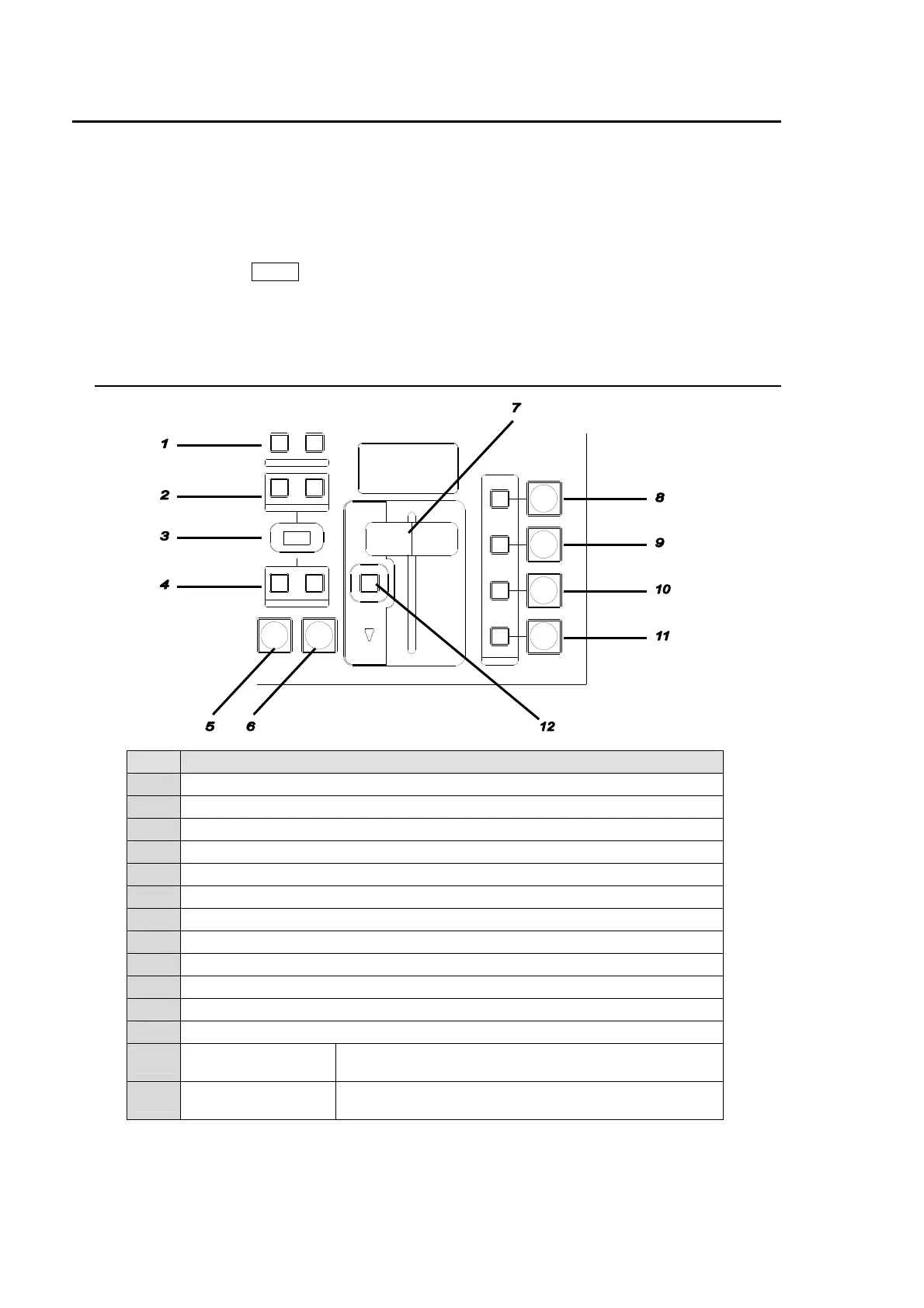
9-1. Transition Block Description
No. Description
1 For transition direction setting for WIPE.
2 For selecting next transition bus.
3 For transition rate and type display use.
4 For selecting transition type
5 The AUTO transition button for BKGD and KEYER
6 The CUT transition button for BKGD and KEYER
7 The fader lever for BKGD and KEYER
8 The Auto/User transition buttons for KEYER and ON AIR indicator.
9 The Auto/User transition buttons for PinP1 and ON AIR indicator.
10 The Auto/User transition buttons for PinP2 and ON AIR indicator.
11 The Auto/User transition buttons for DSK and ON AIR indicator.
12 For setting fader limit ON/OFF.
-
BLACK TRANS
button
For BLACK transition use. (Located on the right next to
MENU/DIRECT PATT/EVENT/KEYPAD)
-
TRANS PREVIEW
button
For previewing transitions.
(Located on the left next to BUS SELECT)
Transition Block
AUTO CUT
DSK
KEYER
P IN P
1
2
P IN P
NOR/REVREV
BKGD
WIPEMIX
KEYER
FADER LIMIT
ON AIR
DIRECTION
NEXT TRANSITION
PATTERN/ RATE
TRANSITION TYPE



 To Next Page