31
7. Video Outputs
7-1. How to Select Aux signals
The AUX1 to AUX3 output signals can be selected from all bus sources (IN01-12, Still1-2, Matte
and etc.), program, preview, clean and key out signals. There are two procedures to select
signals for auxiliary outputs: via bus buttons or from menu selection. If you want to select a
signal easily and quickly, select the signal in the KEY/AUX bus. If you want to select a signal not
assigned to bus buttons, select it in the menu.
7-1-1. Selecting Video via Bus Buttons
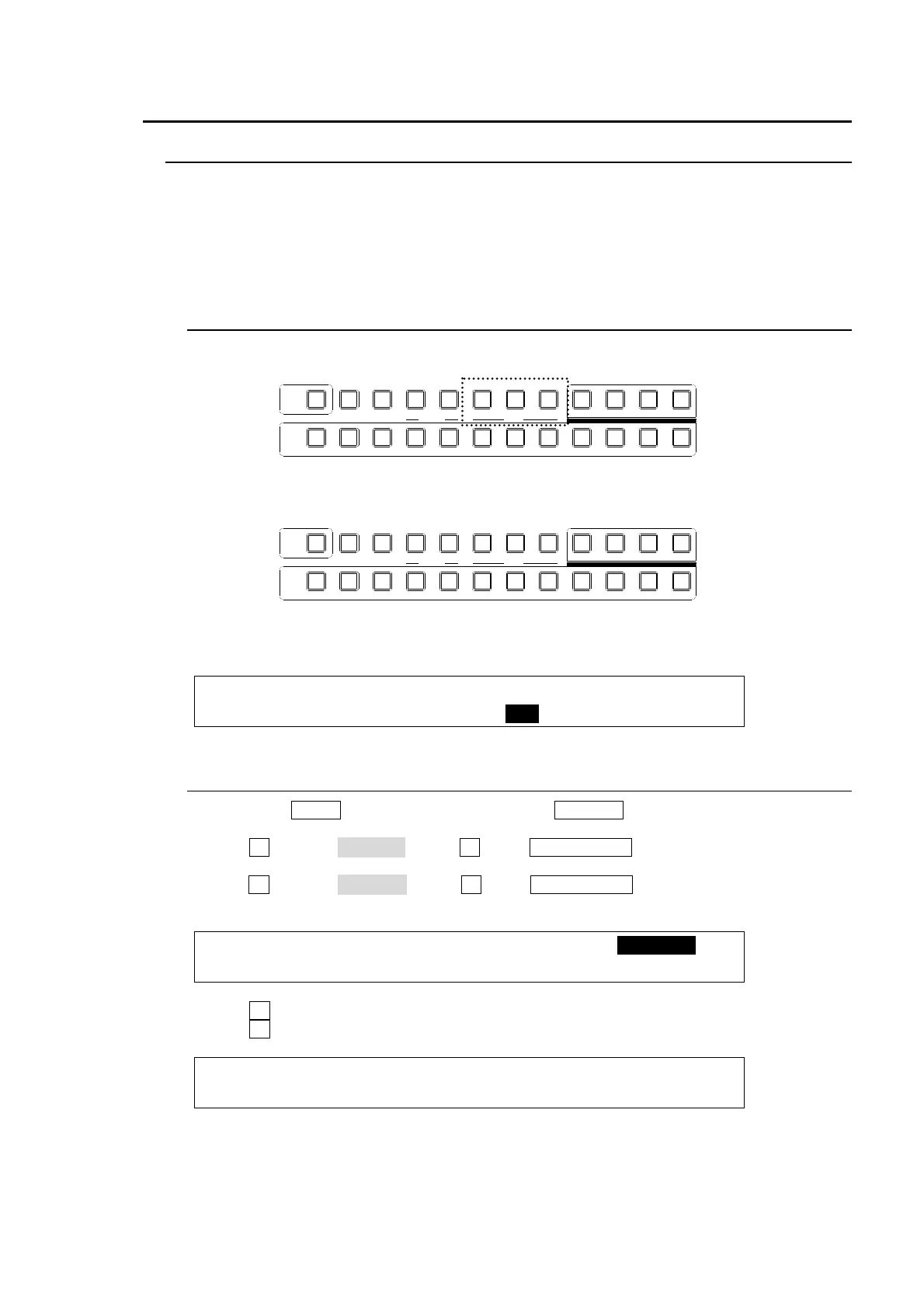
(1) Press a button, one of AUX1 to AUX3 shown by dashed lines below.
(2) Press a button in the KEY/AUX bus section to select a signal for the selected AUX output.
AUX signal selection via bus buttons can be disabled if AUX CTRL is set to OFF in the
[SETUP - OUTPUT - AUX XPT] menu to prevent any operational mistakes.
OUTPUT :SELECT : XPT : CTRL : ANCI : 1/2
AUX XPT : =AUX1 : =BLACK: =OFF : =OFF :
7-1-2. Selecting Video from Menu Selection
(1) Press the MENU button and then press the 7/SETUP button to display the SETUP
menu’s top page.
(2) Turn F1 to select OUTPUT. Press F1 or the PAGE DOWN button to display the [SETUP-
OUTPUT] menu.
(3) Turn F1 to select AUX XPT. Press F1 or the PAGE DOWN button to display the [SETUP-
OUTPUT-AUX XPT] menu.
SETUP :>MARKER >CLN/PREV>ANCI >AUX XPT
OUTPUT :>MV >OPTION
(4) Turn F1 to select an AUX bus.
(5) Turn F2 to select a video signal.
OUTPUT :SELECT : XPT : CTRL : ANCI : 1/2
AUX XPT : =AUX1 : =BLACK: =ON : =OFF :
AUXP IN P
KEYER DSK
12123
PGM CLEANPREV MV
234567891011121
KEY/AUX
TRANS PREV
AUXP IN P
KEYER DSK
12123
PGM CLEANPREV MV
234567891011121
KEY/AUX
TRANS PREV



 To Next Page