28
IMPORTANT
The Resize function is automatically enabled when SD signals are input to the
switcher in HD mode, and FORMAT in the [SYSTEM-INPUT- SIGNAL] menu is set to
SDSDI. ((Please make sure the Resize function stays disabled if HDSDI is set for
FORMAT.)
6-4. Frame Synchronizer
A video frame synchronizer is provided for every input (this includes optional inputs). It is used to
synchronize asynchronous signals. Users can select whether frame synchronizing is applied to
input signals or not (for each of them) as shown in the procedure below.
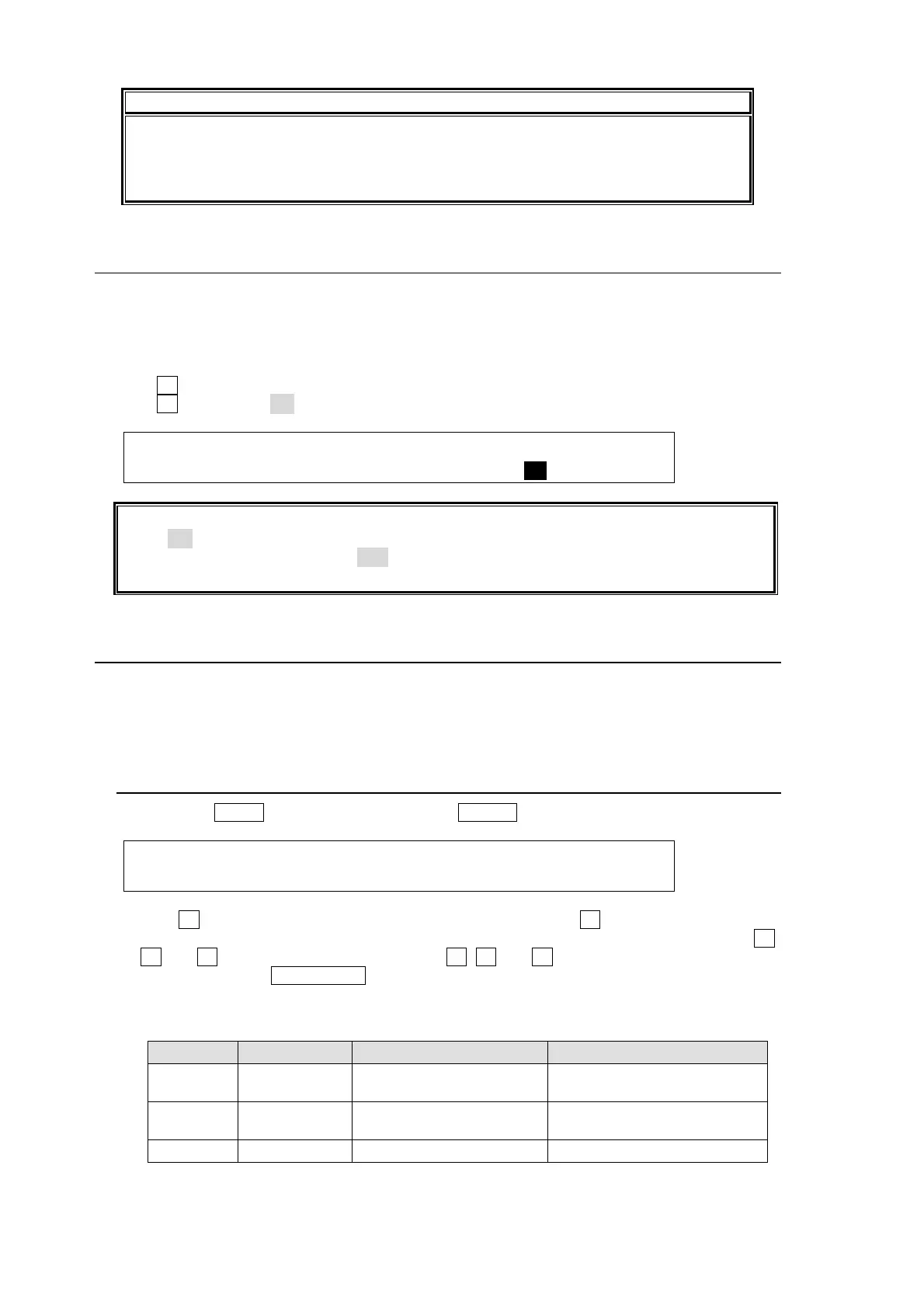
(1) Display the [SETUP - INPUT - SIGNAL] menu.
(2) Turn F1 to select an input signal for use.
(3) Turn F4 to set FS to ON and activate the frame synchronizer.
INPUT :SELECT :FORMAT :RESIZE : FS : 1/2
SIGNAL : =IN02 : =AUTO : =16:9 : =ON :
Ancillary data in input video cannot be passed through if FS (input frame synchronizer) is
set to ON or RESIZE is enabled. To pass ancillary data, input the video synchronized with
the genlock signal and set FS to OFF. Be sure to that ancillary data in SD inputs cannot be
used when the switcher operates in HD mode.
6-5. Bus Matte
One matte signal can be assigned to the PGM/PST and KEY/AUX bus buttons. The matte
signals can be assigned to any bus button (Default assignment: Button 12). Refer to section
6-2.
"How to Assign Sources to Bus buttons" for the matte assignment.
6-5-1. Setting Up the Matte Color
(1) Press the MENU button and then press the 6/MATT button to display the MATT menu.
MATT : BUS MATT COLOR :RECALL : 1/1
COLOR1 :S=50.0 L=80.2 H=125.5: >GREEN:
(2) Turn F4 to select a color from 8 standard colors. Then press F4 to apply the setting.
If you want to adjust the selected color or set the color by entering its HSL values, turn F1,
F2 and F3 to adjust these values or press F1, F2 and F3, enter a value from the Keypad
and then press ENT/STORE (from the keypad). Users can also set these three
parameters via the JOYSTICK block. (See section 4-2-4. "Changing Settings or Values by
Using the Joystick.")
Parameter Setting Range Description Joystick operation
S 0.0 to 100.0 Adjusts color saturation.
Moves Joystick horizontally
(X -axis)
L 0.0 to 100.0 Adjusts color luminance.
Moves Joystick vertically
(Y -axis)
H 0.0 to 359.5 Adjusts color hue. Turn the SIZE control



 To Next Page