15
4. Menu Operations
4-1. How to Access Menus
4-1-1. Menu Access Buttons
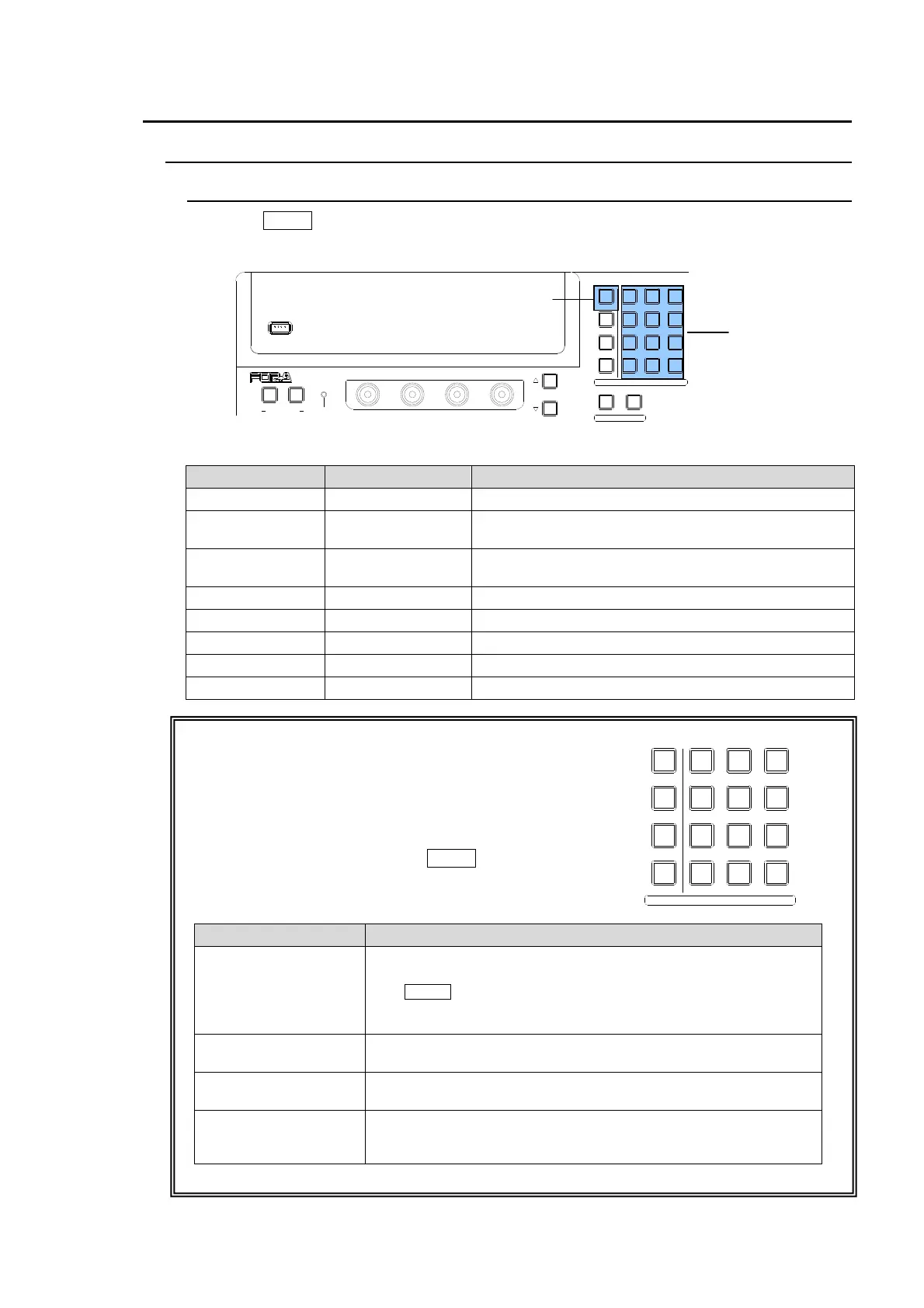
Press the MENU button below, which changes the buttons in the Keypad block to the menu
buttons, and then press the buttons on the Keypad to access menus.
KEYPAD Block
Button Accessed menu Menu Description
FILE FILE TOP Accesses menu for file operations using a USB
STILL
STILL
STORE(1/2~2/2)
Accesses menu for still store operation.
SET UP SETUP MENU
Accesses menu for setup of system, panel, video
input, video output, external interface.
MATT MATT COLOR Accesses menu for matte color
P in P PinP TOP Accesses menu for PinP 1 and PinP 2 setup.
WIPE WIPE Accesses menu for WIPE pattern modification.
DSK DSK SETUP Accesses menu for DSK setup and DSK effects.
KEYER KEYER SETUP Accesses menu for KEYER setup and KEYER effects.
MENU/ DIRECT PATT/ EVENT/ KEY PAD Block
The MENU/ DIRECT PATT/ EVENT/ KEY PAD block to the
right of the menu display has four modes: Menu Access,
Pattern Selection, Event Control and Transition Rate. The
current operational mode is displayed at the upper right of
the menu display. To use the buttons in the Keypad as the
Menu Access buttons, press the MENU button at the upper
right of the block.
Mode Selection Buttons
Button Function
MENU
This button changes the Keypad to menu access buttons.
Pressing on a button in the Keypad displays the related menu.
The MENU button blinks if a parameter has changed and it
requires rebooting. In this case, reboot the switcher. (See
section 19-1. "Rebooting System.")
DIRECT PATTERN
This button changes the Keypad to direct pattern selection
buttons.
±/EVENT
This button changes the Keypad to event memory control
buttons.
CLR/TRANS RATE
This button displays the TRANS menu. The transition rate can be
changed by entering the number and then pressing ENT/STORE
on the Keypad.
USB MEMORY
NOR/REVREV
F4
F3F2
F1
PAGE
12
MENU/DIRECT PATT/EVENT/KEY PAD
ALARMUSER BUTTON
DIRECTION
7/SET UP
4/WIPE
1
8/STILL
5/P in P
2/KEYER
9/FILE
6/MATT
3/DSK
MENU
DIRECT PATT
±/EVENT
CLR/TRANS RATE 0 /RECALL
. (DOT)
ENT/STORE
Keypad Block
MENU button
MENU/DIRECT PATT/EVENT/KEY PAD
7/SET UP
4/WIPE
1
8/STILL
5/P in P
2/KEYER
9/FILE
6/MATT
3/DSK
MENU
DIRECT PATT
±/EVENT
CLR/TRANS RATE 0 /RECALL
. (DOT)
ENT/STORE



 To Next Page