4
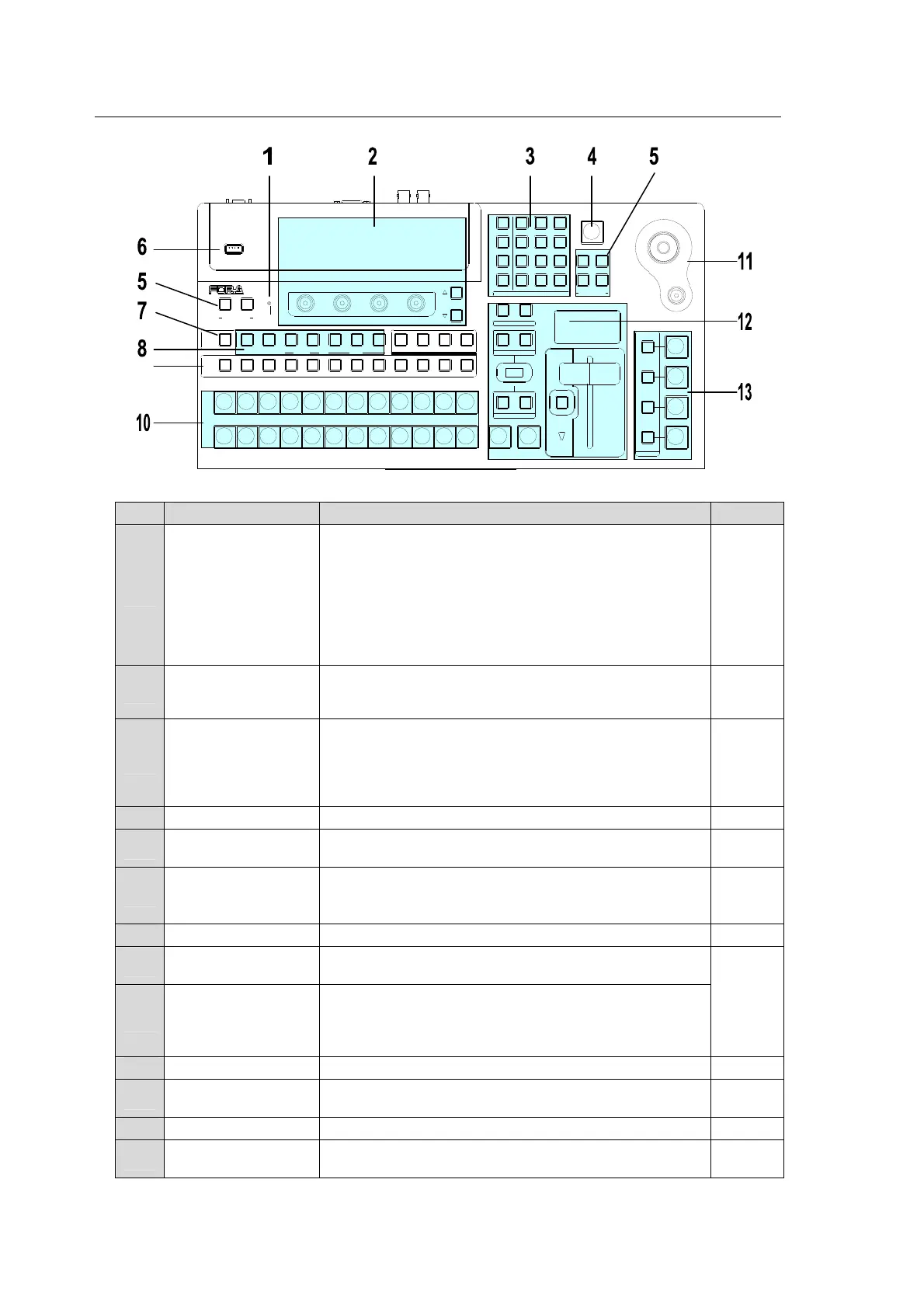
2-3. HVS-30OU (Operation Unit)
Control Panel
No. Name Description Refer to
1 ALARM indicator
Indicates the alarm status in the main unit.
-Fan alarm is indicated for HVS-300HS.
-Power and fan alarm is indicated for HVS-300RPS.
The indicator blinks red when an alarm occurs. In such
a case, power off the system and consult your FOR-A
supplier. The indicator is normally unlit.
This indicator works the same as the ALARM indicator
located on the front panel of the main unit.
2 Menu Control Block
The menu control block is composed of the menu
display, menu control push-buttons (F1 to F4) and page
up/down buttons.
4
3
MENU
DIRECT PATT
EVENT
KEYPAD
Four mode buttons at the left side change the keypad
mode to the right.
In these modes, the Keypad is used for menu access,
numeric input, transition pattern selection, event
control.
4-1-1
4-2-3
9-9-2
16
4 BLACK TRANS Used to perform black transition. 9-3
5 USER BUTTON
User assignable buttons. Menu shortcuts or functions
can be assigned to these buttons.
5
6 USB MEMORY
Used to connect a USB flash memory for image file
import and export or system setting backup.
(USB1.1, Type-A)
18
7 TRANS PREV Used to preview next transition. 7-2-1
8 BUS SELECT Block
Used to select a bus. Then select a video in the
KEY/AUX bus (No 9) .
7-1-1
11
14-1-1
15-1
9 KEY/AUX Bus
Used to select a video signal for the bus selected at the
BUS SELECT block (No.8).
The video signal can be selected from KEY/AUX bus
buttons, PGM, PREV, CLEAN and MV.
10 PGM/PST Bus Used to select video signal for the background. 8
11 Joystick Block
Used to set position, size or color in the specific menu
parameters.
4-2-4
12 Transition Block Used to perform transitions for background and keyer. 9
13
KEYER/DSK/PINP
Transition Block
Used to perform transitions for KEYER, DSK and
PINP1/2.
15-2
USB MEMORY
AUTO CUT
DSK
KEYER
P IN P
1
2
P IN P
(PUSH to DEF)
43
65
SIZE
NOR/REVREV
BKGD
WIPEMIX
F4
F3F2
F1
PAGE
USER BUTTON
12
AUXP IN P
KEYER DSK
12123
PGM CLEANPREV MV
234567891011121
PGM
PST
121110987654
POSIT ION
123
KEYER
MENU/D IRECT PAT T/EVENT/KE Y PAD
KEY/AUX
FADER LIMIT
ALARM
ON AIR
USER BUT TON
TRANS PR EV
DIRECTION
NEXT TRANSIT ION
PATTERN/RATE
TRANSITION TYPE
HVS-300HS
DIGITAL VIDEO SWITCHER
7/SET UP
4/WIPE
1
8/STILL
5/P in P
2/KEYER
9/FILE
6/MATT
3/DSK
BLACK
TRANS
MENU
DIRECT PATT
±/EVEN T
CLR/TRANS RATE 0 /RECALL
. (DOT)
ENT/STOR E



 To Next Page