35
(1) Open the [SETUP – OUTPUT-OPTION] menu.
(2) Turn F1 to select an output channel. C-Ch1 and C-Ch2 is for Slot C and D-Ch1 and D-Ch2 is
for Slot D.
(3) Turn F1 to select an image to be output from PGM, PREV, CLN, AUX1-AUX3 and MV.
OUTPUT :SELECT :OUTPUT :FORMAT :ASPECT : 1/2
OPTION : =C-Ch1: =PGM : =SXGA : =4:3 :
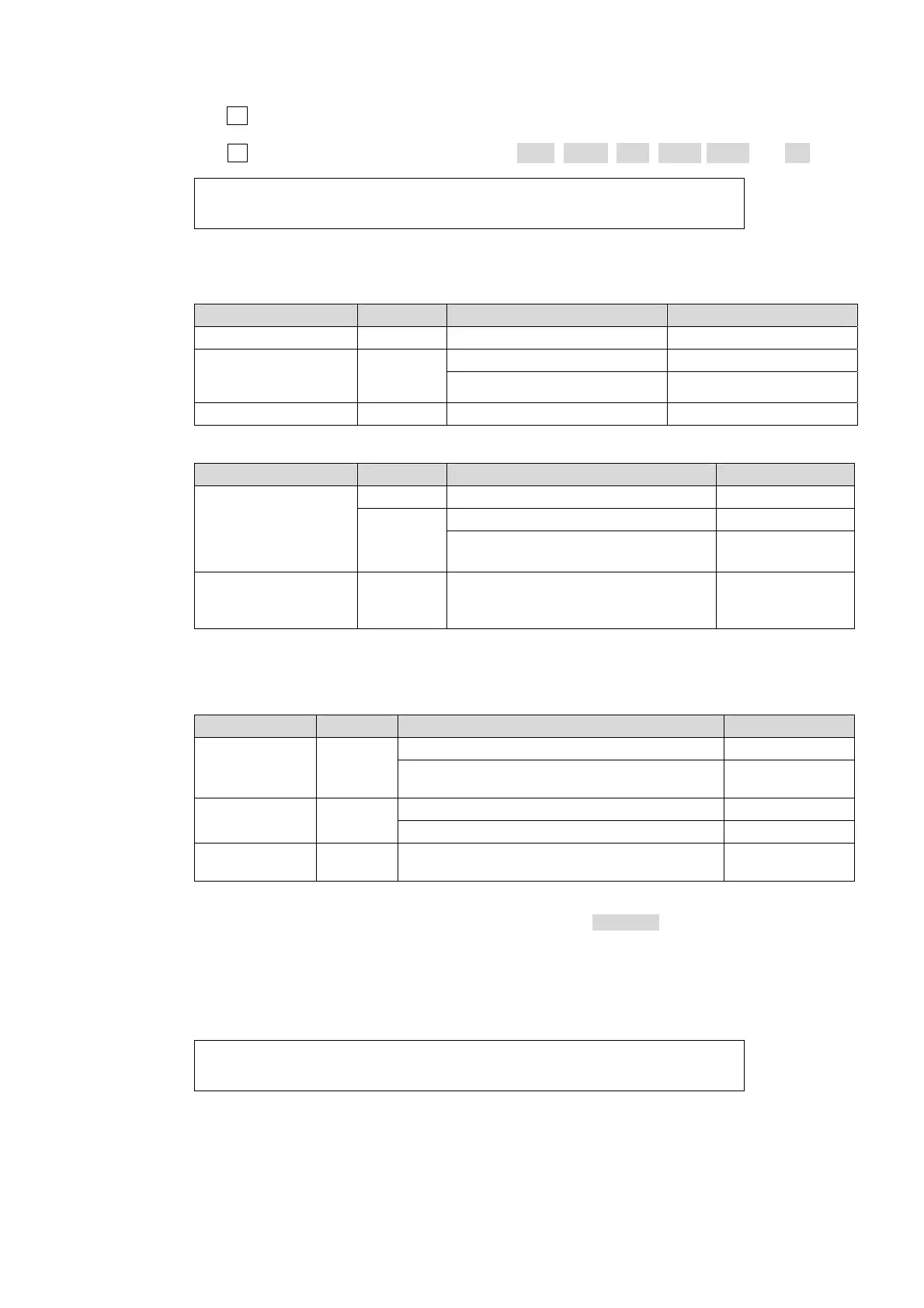
(4) Select the signal format and aspect ratio. Available selections are shown in the tables below.
If HVS-30HSDO is installed:
System format Channel FORMAT setting ASPECT setting
HD Ch1 HDSDI (Fixed) -----
1080i/59.94, 50,
1080PsF/29.97, 25
720p/59.94, 50
Ch2
HDSDI (Fixed) -----
SDSDI 4:3, SQUEEZE, LETTER
SD Ch1, Ch2 --- ---
If HVS-30HSAO is installed:
System format Channel FORMAT setting ASPECT setting
HD
Ch1 HDComponent -----
Ch2
HDComponent -----
SDComponent,
Composite *
4:3, SQUEEZE,
LETTER
SD
Ch1,
Ch2
Component *
(SMPTE or BetaCam level),
Composite *
-----
* You can choose whether to add or not to add 7.5% Setup to the output signals if the switcher is running
in 59.94Hz mode. If 7.5% Setup is added to a signal, the symbol "+" follows immediately after the name
of the signal.
If HVS-30PCO is installed:
System format Channel FORMAT setting ASPECT setting
1080i
Ch1,
Ch2
1280x1024 (SXGA), 1600x1200 (UXGA) 4:3, LETTER
1680x1050 (WSXGA), 1920x1200 (WUXGA),
1920x1080 (HDTV) *1
-----
720p
Ch1,
Ch2
1280x1024 (SXGA) 4:3, LETTER
1280x768 (WXGA) -----
SD
Ch1,
Ch2
800x600 (SVGA) 4:3, LETTER *2
*1 You can choose between 60Hz and 50Hz for output frequency for DVI-D(Ch1) if the switcher is running
in 50Hz mode (1080/50i, 720/50p or 625/50). See step (5) below. (Version 01-11 and later.)
*2 This setting is available only when ASPECT RATIO is set to SQUEEZE in the
[SETUP-SYSTEM-FORMAT] menu.
(5) Select the output frequency for HVS-30PCO between 60Hz and 50Hz in the [SETUP –
OUTPUT-OPTION] (2/2) menu. The setting can be made for each channel by turning menu
controls. The setting is available only when the switcher is running in 50Hz mode.
OUTPUT :HVS-30PCO V SCAN FREQUENCY : 2/2
OPTION :C1=60Hz C2=--- D1=60Hz D2=--- :



 To Next Page