Content Management Application (CMA)
DML-1200 w/Axon Embedded Graphic Engine 24/12/2010 _____________________________________________________________________________ 104
6.3.1 Viewing Server Identification Information
Selecting the
All Server
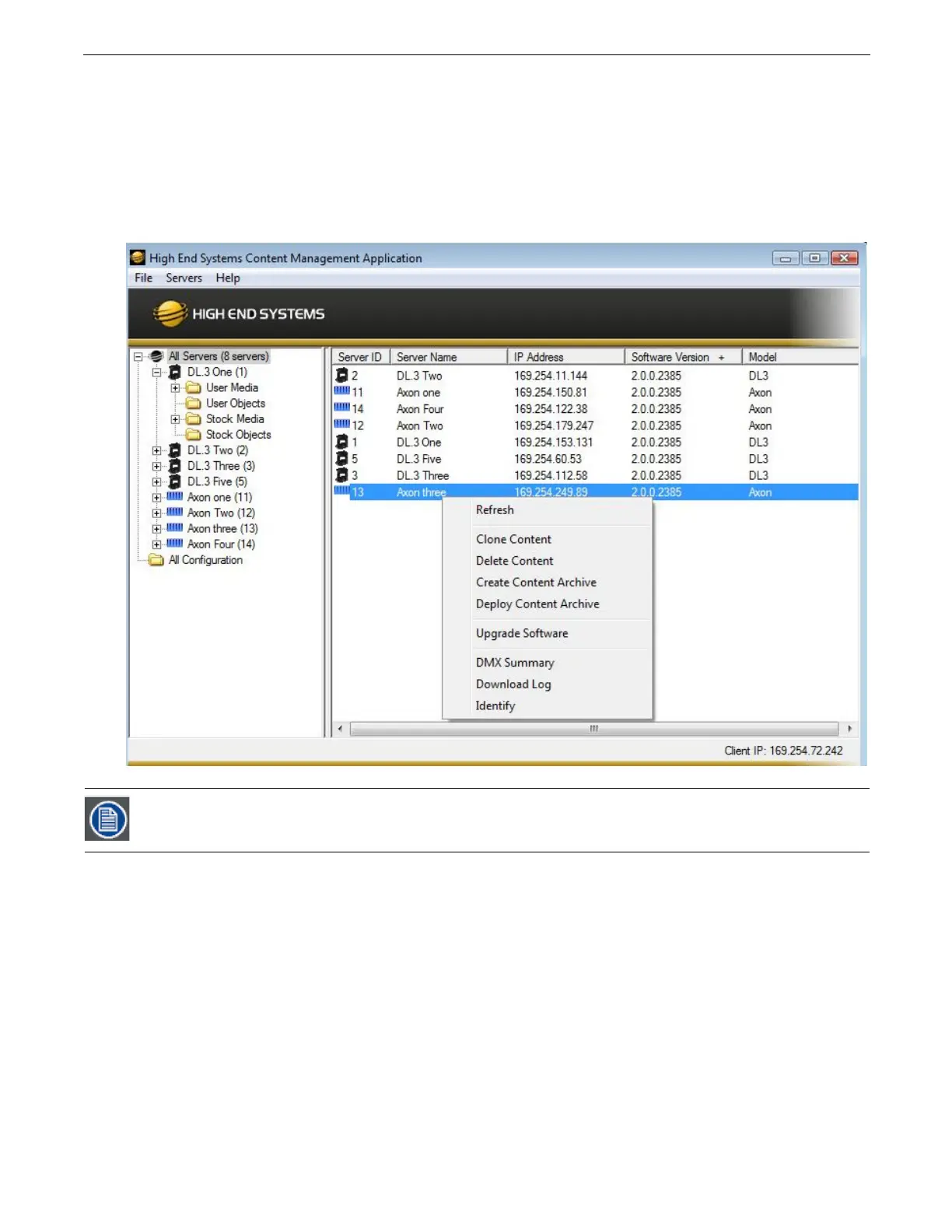
view displays all the Digital Light fixtures and Axon servers on the fixture network. In the following
example, six servers have been identified on the network. The right pane contains the following details in a table format.
•
Server ID
number defaults to 1, but can be configured in the CMA
•
Server Name
is a name you assign to a Digital Light fixture or Axon server
•
IP Address
is assigned to that unit by the router or Auto IP
•
Software Version
Number
•
Model
identifies the media server as a DML-1200 w/Axon, DL.3, DL.2 or Axon
In the
All Server
view, the drop down
Servers
menu or right clicking to select a server in the right pane gives you the these
options:
•
Refresh
the screen.
•
Clone Content
replicates the server’s user content to one or more other servers on the network,
(see page 110).
•
Delete Content
removes all the user content from the server.
•
Create Content Archive
lets you back up all the server’s user content to a compressed file,
(see page 110).
•
Deploy Content Archive
restores user content to the server from the backup,
(see page 110).
•
Upgrade Software
allows you to upgrade media server software. For more information on upgrade options, see
Upgrading
Software
on page 112.
•
DMX Summary
provides a web-based summary of a server’s content in a table format.
•
Download
Log
provides useful troubleshooting information to Customer Service if needed.
•
Identify
will cause a fixture to strobe, so you can find it in the rig.
Clicking in a column heading sorts the table according to the values in that column.



 To Next Page