Graphic Functions
DML-1200 w/Axon Embedded Graphic Engine 24/12/2010 _____________________________________________________________________________ 14
2.2 Rotation, Position, Scale
You can independently control each Graphic Object’s rotation direction and speed; along with its position and scale in X, Y, and Z
axis directions.The parameters described in this chapter are set for each Graphic Object you define. Parameters for composite
image rotation, position and global scale are described in
Global Functions
on page 32.
2.2.1 Rotating a 3-D Object
The
Rotation
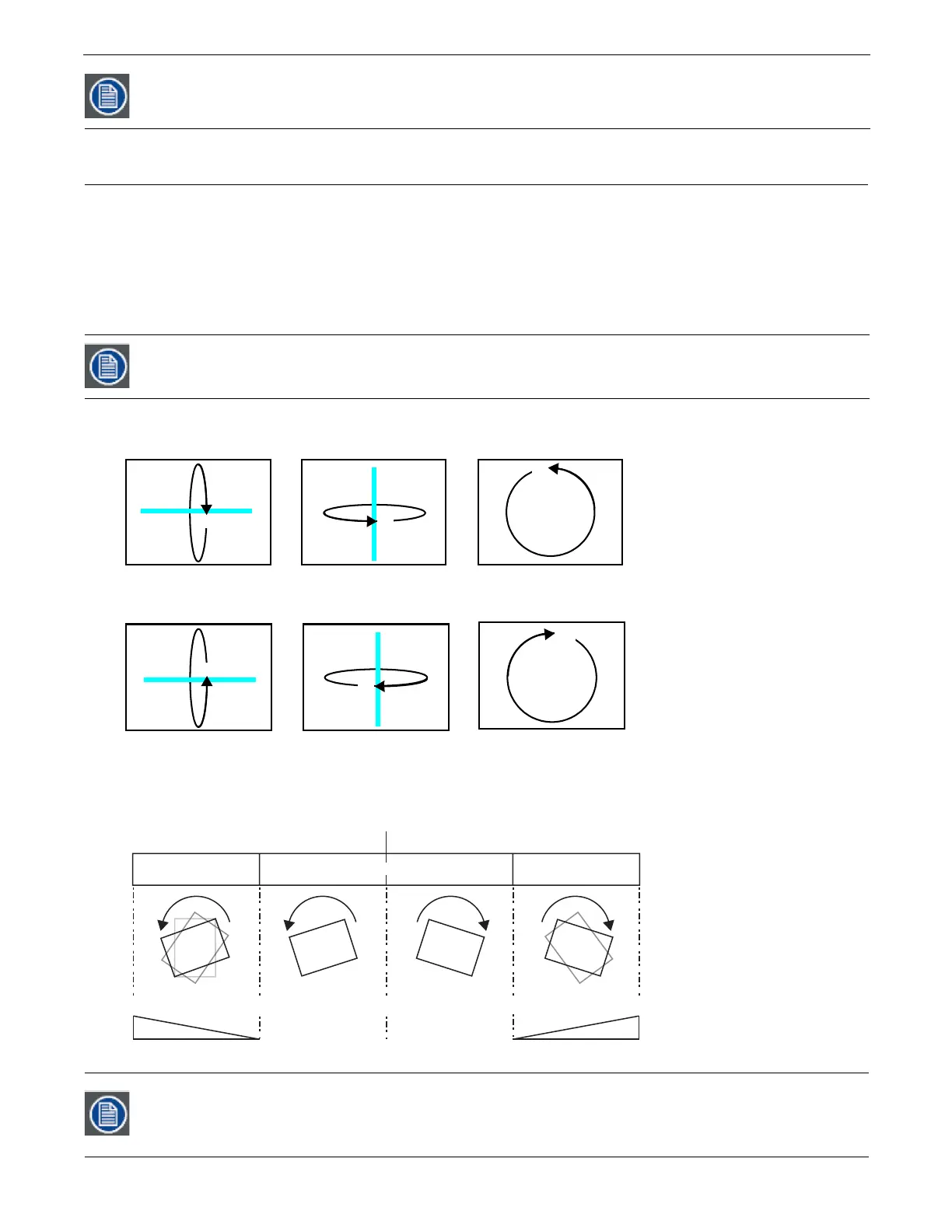
parameters for each object control 3-D object rotation with 16-bit precision. You can rotate a 3-D object up to 720° in
either a clockwise or counterclockwise direction around the X, Y and/or Z axis.
When you rotate an object, you are rotating it around the selected axis.
X Rotation
produces the effect of a top-to-bottom flip.
Y
Rotation
produces a left-to-right flip.
Z Rotation
causes a circular motion.
The Rotation parameters’ suggested default values are the midpoint of the 16-bit DMX value range, which is equal to no rotation.
Increasing the DMX value from the midpoint indexes the object in a clockwise direction. Reducing the DMX value below the
midpoint indexes the object in a counterclockwise direction.
When the DMX value for a rotation parameter is greater than the 720° limit in either direction, the object begins rotating
continuously. Additional adjustment to the DMX values increases the speed of continuous rotation.
DMX Values 1-127 utilize frame blending to provide a smooth playback motion at slow speeds
Remember that rotation changes could affect an object’s relationship to other objects.
Global and Graphic Effects Mode parameters contain a Prerotation Translation effect option. When a Global or
Graphic Effects Mode DMX value = 102, you can use the Effect Modifier parameters to locate the image in a virtual
three dimensional space. Applying the Rotation parameters then cause the image to orbit around the selected
axis from that location, see Prerotation Translation on page 86.
X Rotation
Rotates image
about the X axis
Y Rotation
Rotates image
about the Y axis
Z Rotation
Rotates image
about the Z axis
Continuous RotationContinuous Rotation
25% 50% 75%
Rotation Speed
0% 100%
Counter-clockwise Clockwise
Rotation Speed
0
o
720-0 0-720
oo
Indexed Rotation
Indexed Rotation



 To Next Page