Wireless LAN – WLAN
56
3.4
Configuration of WLAN parameters
BAT54-Rail/F..
Release
7.54
06/08
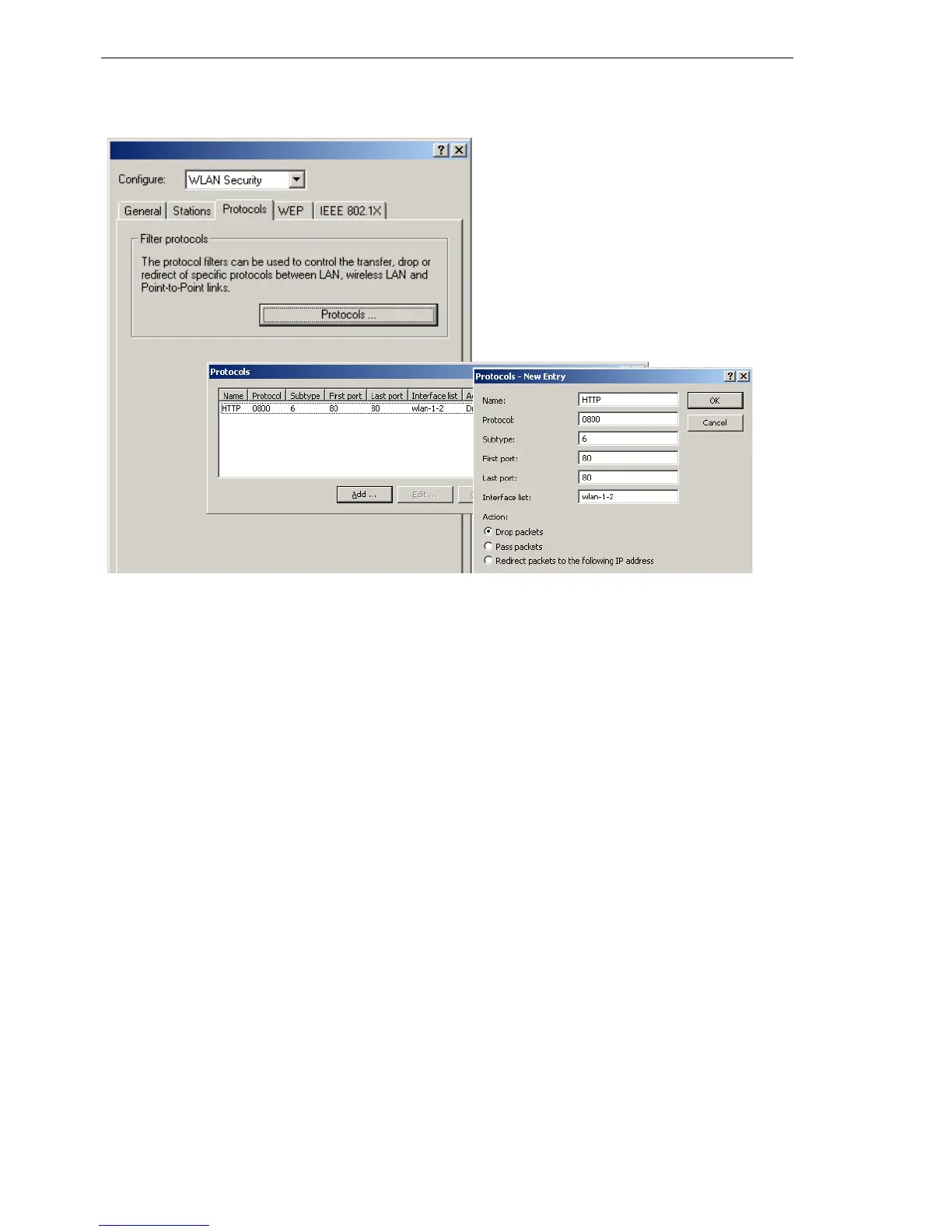
Make an entry in the protocol list for each protocol that requires special han-
dling. Enter the following values:
D A name of your choice for the filter entry
D Protocol number, e.g. '0800' for IP. If no protocol is entered, the filter will
be applied to all packets.
D Subprotocol, e.g. '6' for TCP. If no subprotocol is entered, the filter will be
applied to all packets of the entered protocol.
D Port start and port end, e.g. each '80' for HTTP. If no ports are entered,
then this filter will be applied to all ports of the appropriate protocol/sub-
protocol.
Note: Lists of the official protocol and port numbers are available in the Inter-
net under www.iana.org.
D Action for the data packets:
D Let through
D Reject
D Redirect (and state the target address)
D List of interfaces that the filters apply to
D Redirect address when the 'Redirect' action is selected



 To Next Page