Wireless LAN – WLAN
BAT54-Rail/F..
Release
7.54
06/08
3.4
Configuration of WLAN parameters
57
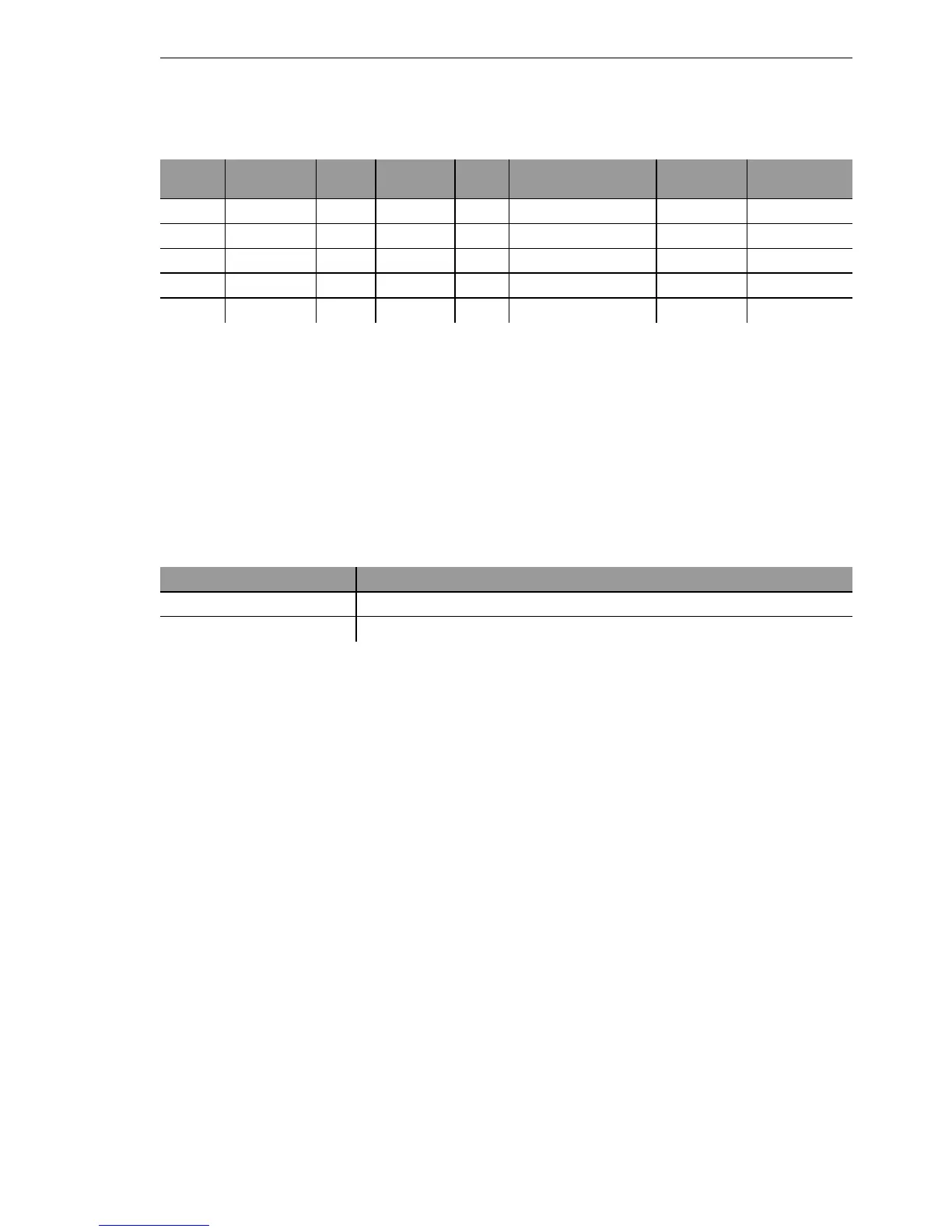
Example:
ARP, DHCP, ICMP will be let through, Telnet and HTTP will be redirected to
192.168.11.5, all other packets will be rejected.
Note: As soon as an entry is made in the protocol filter, all packets not match-
ing the filter will be automatically rejected!
Configuration with WEBconfig or Telnet
Under WEBconfig or Telnet you will find the protocol filter under the following
paths:
U Encryption settings
Access points of the BAT range support the most up-to-date methods of en-
cryption and security for data that is transferred via WLAN.
D The IEEE standard 802.11i/WPA stands for the highest degree of security
that is currently available for WLAN connections. This standards uses a
new encryption procedure (AES-CCM) which, in combination with other
methods, achieves levels of security equalled only by VPN connections
until now. When using AES-capable hardware the transmissions are
much faster than with comparable VPN security.
D WEP is also supported to ensure compatibility with older hardware. WEP
(Wired Equivalent Privacy) is the encryption method originally incorporat-
ed in the 802.11 standard for the encryption of data in wireless transmis-
sion. This method uses keys of 40 (WEP64), 104 (WEP128) or 128 bits
(WEP152) in length. A number of security loopholes in WEP have come
to light over time, and so the latest 802.11i/WPA methods should be used
wherever possible.
Note: Further information about the 802.11i and WPA standards are avail-
able under ’Development of WLAN security’ → page 33.
Name Protocol Sub-
type
Start port End
port
Interface list Action Redirect IP
address
ARP 0806 0 0 0 WLAN-1-2 Let through 0.0.0.0
DHCP 0800 17 67 68 WLAN-1-2 Let through 0.0.0.0
TELNET 0800 6 23 23 WLAN-1-2 Redirect 192.168.11.5
ICMP 0800 1 0 0 WLAN-1-2 Let through 0.0.0.0
HTTP 0800 6 80 80 WLAN-1-2 Redirect 192.168.11.5
Configuration tool Menu/Table
WEBconfig Expert configuration
Setup LAN-Bridge Protocol table
Terminal/Telnet
cd /Setup/LAN-Bridge/Protocol-Table



 To Next Page