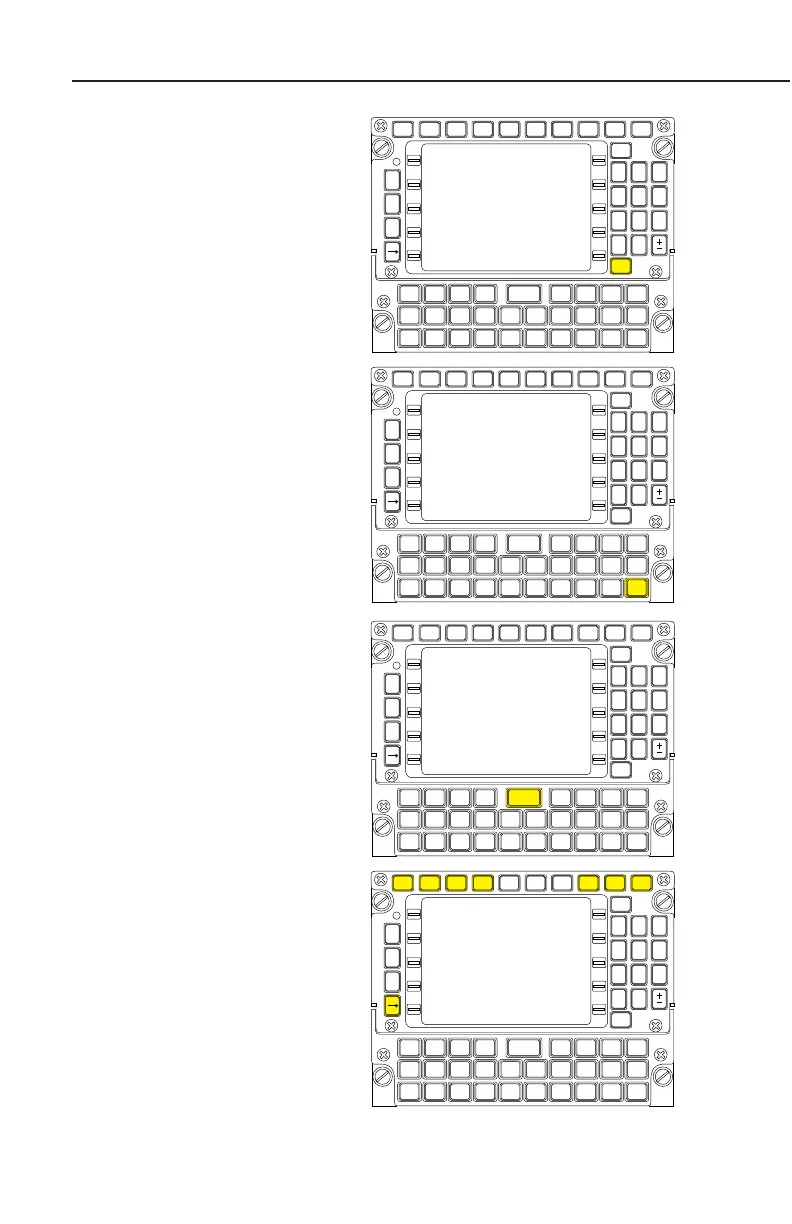
BACK KEY:
The BACK Key is used to
erase errors and page back-
ward when the cursor is not dis-
played. It can also be used to
change data in a field if the cur-
sor is present.
SPACE (SP) KEY:
The SP Key is used to enter a
space when entering a mes-
sage on an AFIS Page. This
key is not functional if AFIS is
not installed in the system.
ENTER KEY:
When the ENTER Key is
depressed, data is entered into
the computer memory.
DISPLAY SELECTOR KEYS:
NAV (Navigation), VNAV
(Vertical Navigation), AFIS
(Airborne Flight Information
System), FPL (Flight Plan),
PLAN (Planning), HDG
(Heading), TUNE (Radio
Tuning), and d (Direct) are
used to select the pages per-
taining to that particular section.
The first page of a section is dis-
played first when a Display
Selector Key is pressed. With
each subsequent press of the
Key, the next sequential page
will be displayed.
Description
1-6
GNS-XLS Flight Management System
Rev. 3
Sep/96
NAV
MSG
P
R
V
N
X
T
VNAV AFIS FPL ON BRT PLAN HDG TUNE
HOLD
BACK
ENTER
SP
1 2 3
4 5 6
7 8 9
# 0
A B
D
C D E F G H
I J K L
S T U V
M N O P
W X Y Z
Q R
*
NAV
MSG
P
R
V
N
X
T
VNAV AFIS FPL ON BRT PLAN HDG TUNE
HOLD
BACK
ENTER
SP
1 2 3
4 5 6
7 8 9
# 0
A B
D
C D E F G H
I J K L
S T U V
M N O P
W X Y Z
Q R
*
NAV
MSG
P
R
V
N
X
T
VNAV AFIS FPL ON BRT PLAN HDG TUNE
HOLD
BACK
ENTER
SP
1 2 3
4 5 6
7 8 9
# 0
A B
D
C D E F G H
I J K L
S T U V
M N O P
W X Y Z
Q R
*
NAV
MSG
P
R
V
N
X
T
VNAV AFIS FPL ON BRT PLAN HDG TUNE
HOLD
BACK
ENTER
SP
1 2 3
4 5 6
7 8 9
# 0
A B
D
C D E F G H
I J K L
S T U V
M N O P
W X Y Z
Q R
*



 To Next Page
 Loading...


