. . . . .
APPENDIX B
MAXPRO®NVRs - AXIS Camera/Encoders Discovery and Configuration (using ONVIF)
MAXPRO NVR 3.1 Operator’s Guide 247
Note: Restore operation resets all the parameters, except the IP and focus parameters,
to the original factory settings.
5. Add and discover the AXIS camera in MAXPRO NVR using the default user name root
and password pass.
Step 2: Discover and Configure the AXIS
Camera/Encoder in MAXPRO
® NVR
To discover and configure the AXIS Camera/Encoder in MAXPRO NVR
1. In MAXPRO NVR, click the Configurator tab. The System page displays by default.
2. Click the Camera tab to open the Camera page.
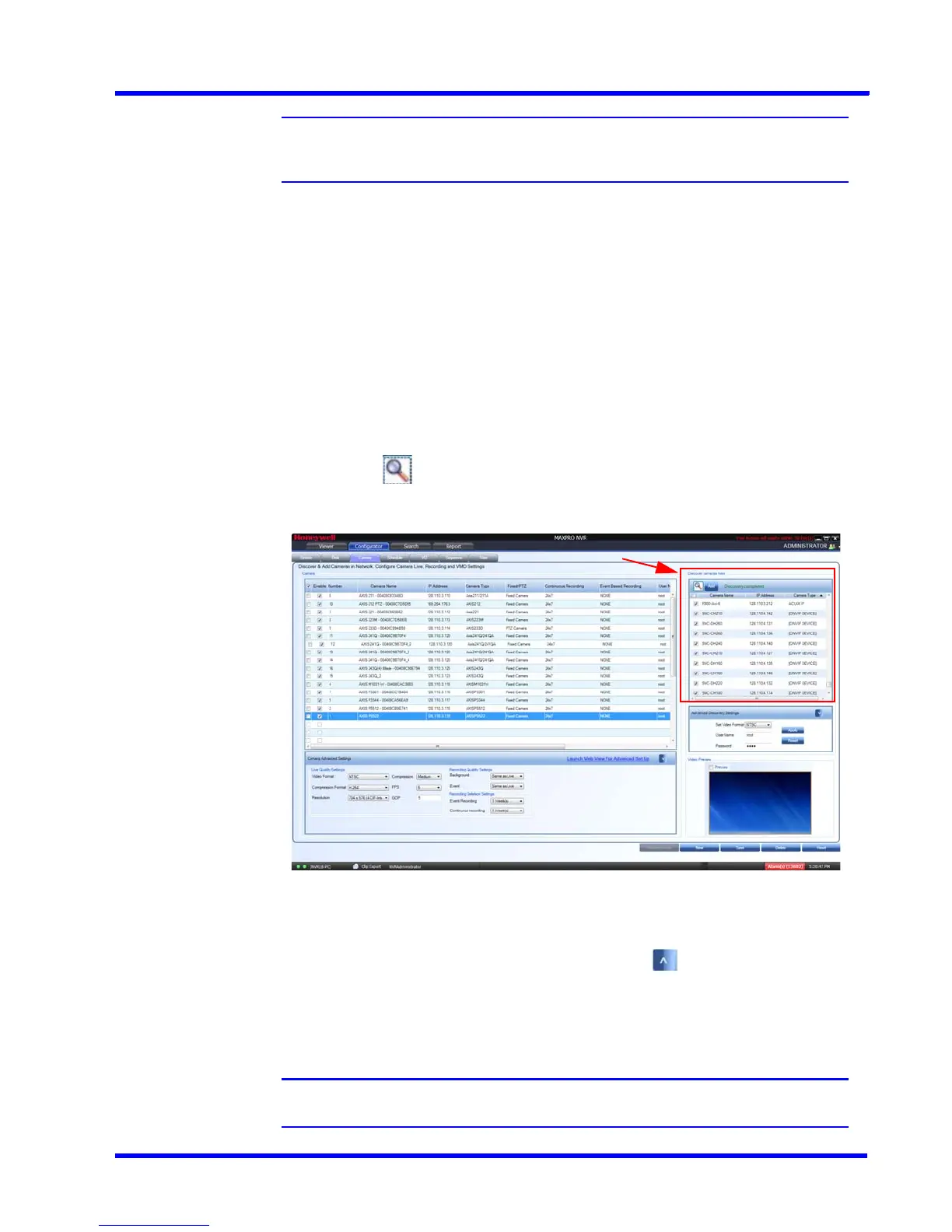
3. Under Discover cameras here
• Click to discover the cameras in the network. By default, the check boxes
corresponding to all the discovered cameras are selected as shown below.
4. After the discovery, to add the AXIS cameras, first clear the check boxes corresponding to
all other cameras other than AXIS cameras.
5. Select a AXIS camera that you want to add, and click to open the Advanced
Discovery Settings pane.
6. Type the User Name and Password of the third party AXIS camera as shown in the
following figure.
Note: The default user name is root and password is pass.











 To Next Page