128 User’s Manual INNOMAR Parametric Sub-Bottom Profilers / SESWIN
128 Innomar Technologie GmbH (2023-01)
A “InnomarFirmware.exe” for all models with new SESWIN version
For models with external PC, make sure the topside is connected to the same
Ethernet as your PC.
Start the “InnomarFirmware” app and follow the instruction given by the software.
B “NetworkFirmware.exe”: Models with external data acquisition PC (older SESWIN)
(“smart”, “compact”, “standard-rov”, “standard-usv”, “medium-usv”)
Make sure the topside unit is connected to the same Ethernet as your PC.
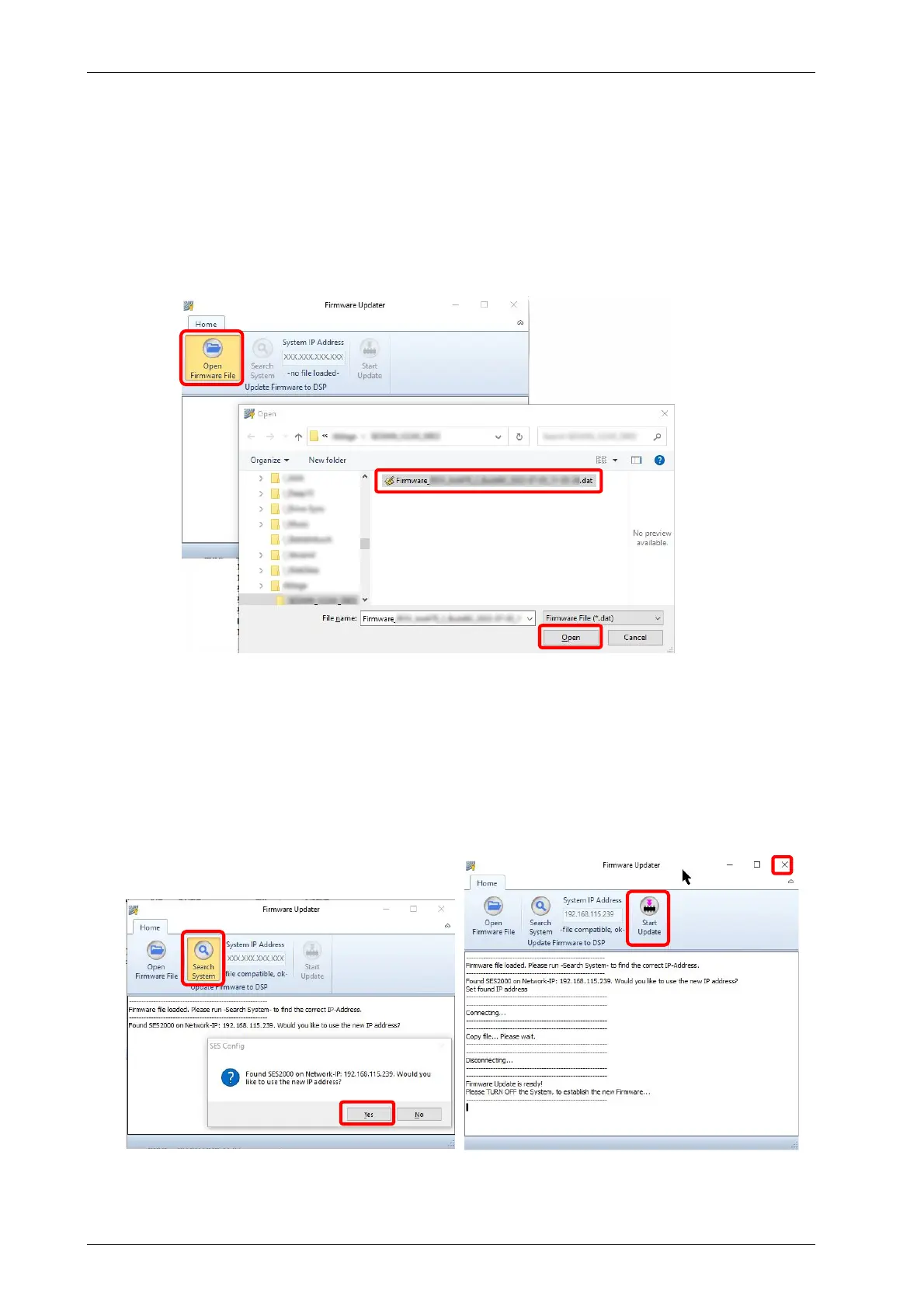
In the “Open Firmware File” dialogue (1), select the provided data file (2) and
press the “Open” button (3).
Press the “Search System” button to set the IP address of the topside unit (4) and
acknowledge the IP address found (5). If the system is not found, reboot the
topside unit.
Press the “Start Update” button (6). The update starts and the progress is shown
in the text area (7).
The update process may take a while, the software will show a message if the
firmware update is finished. Then you can close the updater software (8).
Reboot the topside unit (power off, wait for one minute, then power on).
1
2
3
4
5
6
7
8



 To Next Page