User’s Manual INNOMAR Parametric Sub-Bottom Profilers / SESWIN 129
Innomar Technologie GmbH (2023-01) 129
C “FirmwareCX.exe”: Models with internal data acquisition PC (older SESWIN)
(“light”, “standard”, “medium-100”, “medium-70”, “deep-xx”, “quattro”, “sixpack”)
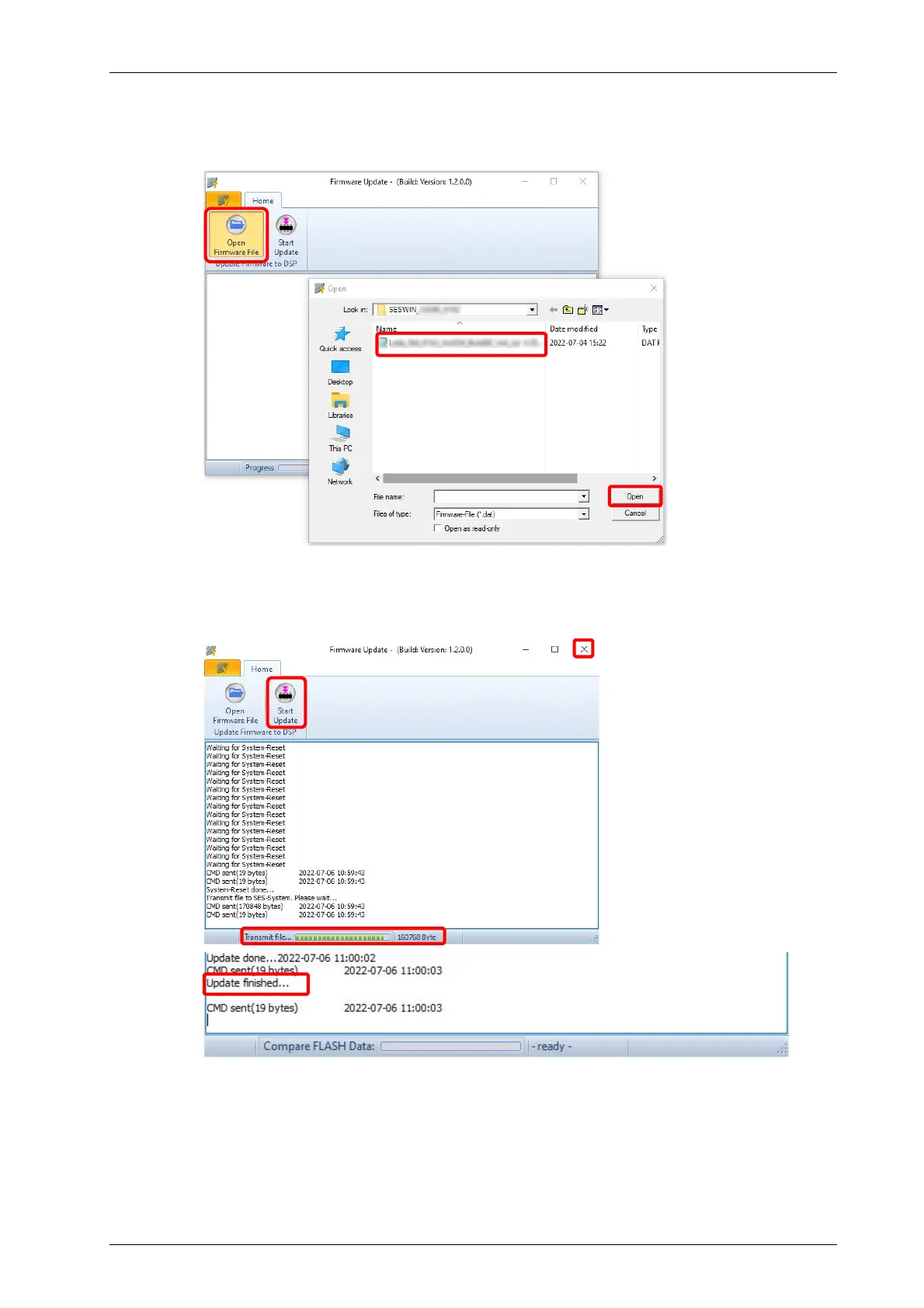
In the “Open Firmware File” dialogue (1), select the provided data file (2) and
press the “Open” button (3).
Press the “Start Update” button (4). The update starts and the progress is shown
in the status bar (5). The update process may take a while, the software will show
a message “Update finished” (6) if the firmware has been applied. Then you can
close the updater software (7)
6 Start SESWIN and reset your settings
As there may be new or changed features, some settings may be different from
the SESWIN version you were updating from. Please refer to the release notes.
1
2
3
4
5
6
7



 To Next Page