GAPS - User Guide
4.1.5 GENERAL RULES FOR USING COMMAND WINDOWS
You display and modify the configuration parameters via the command windows. At first,
these parameters are set to default values. You have to modify them to fit your needs:
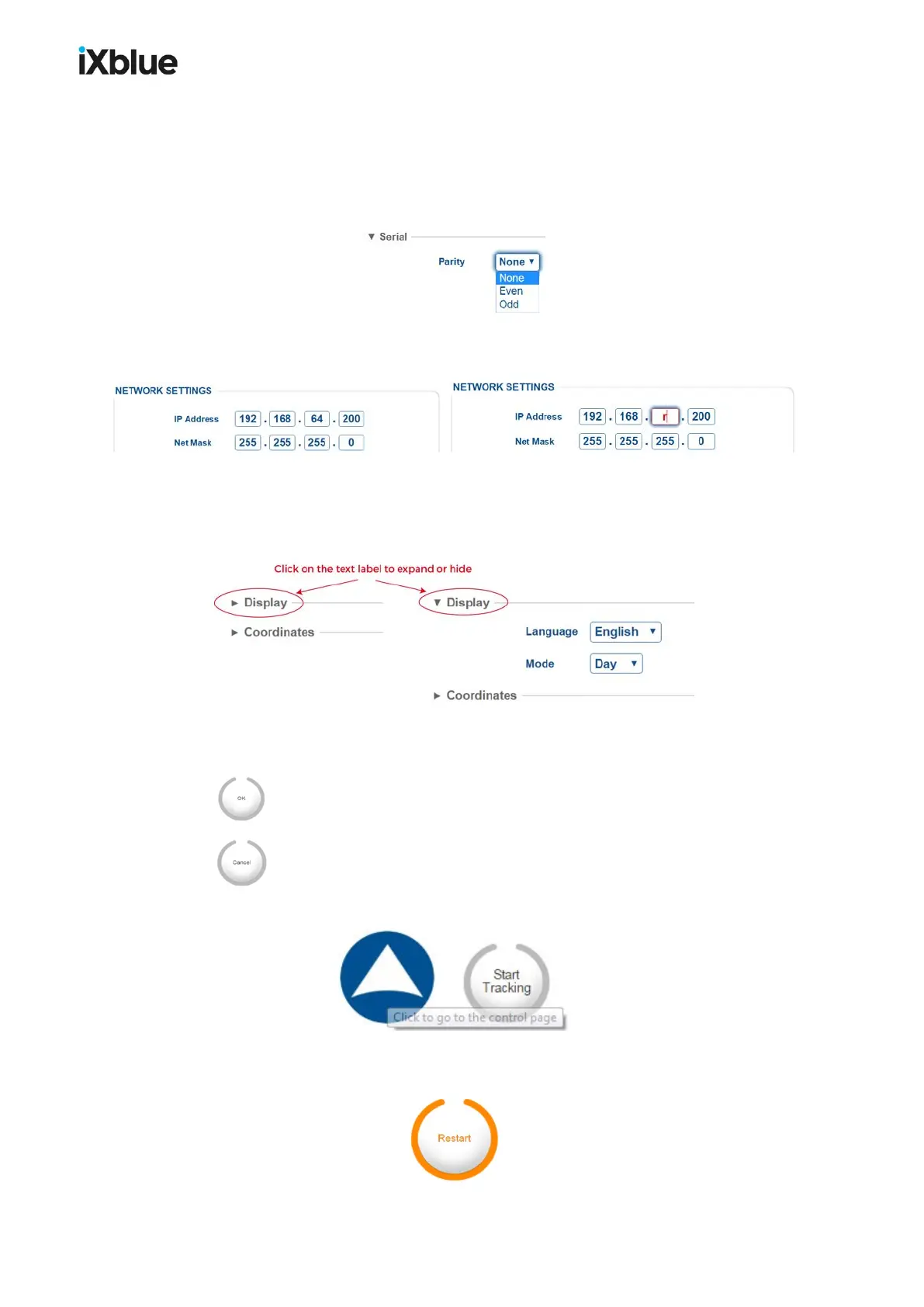
Scrolling list
By selecting it directly in the scrolling list:
You can also use the up / down arrows[↑] [↓] keys to scroll the list.
Text box
By typing it in the dedicated area:
You may also use the up / down arrows [↑] [↓] keys to change the numerical values. An
incorrect value is immediately indicated by red color:
Expanding
hidden area
In order to keep each web-based page as small as possible, only the main parameters are
default visible. You can expand the hidden area by clicking on its text label title:
OK / Cancel
buttons
Each command page contains the same buttons. The buttons appear as soon as a
modification or a selection has been made in the command page:
To validate the new configuration and store it in the electronic of the system.
To return to the previous entered values.
Tool Tips
Move your pointer above some parameters and logo to access its tool tip.
Other Button
On “mouse over” action, orange color may surround a button to indicate that the action
performed on the button has important consequences. Example: the system restarts.
MU-GAPS-AN-005-H - November 2019 51



 To Next Page