GAPS - User Guide
6.3 Real-Time Mode
This chapter describes how to visualize in DELPH RoadMap the real-time data being output
from equipment among the following devices: GAPS, POSIDONIA (USBL-BOX), RAMSES,
INS or GPS. The different steps are:
● Defining equipment in DELPH RoadMap, see section 6.3.1
● Configuring connection parameters, see section 6.3.2
● Configuring logging parameters, see section 6.3.3
● Connecting DELPH RoadMap to the equipment, see section 6.3.4
6.3.1 DEFINING AN EQUIPMENT
You may define one or several equipment devices to match your system configuration.
1. Select the Navigation > Add equipment… menu or in the Project view panel, right click on
Navigation and select Add equipment… in the menu that opens.
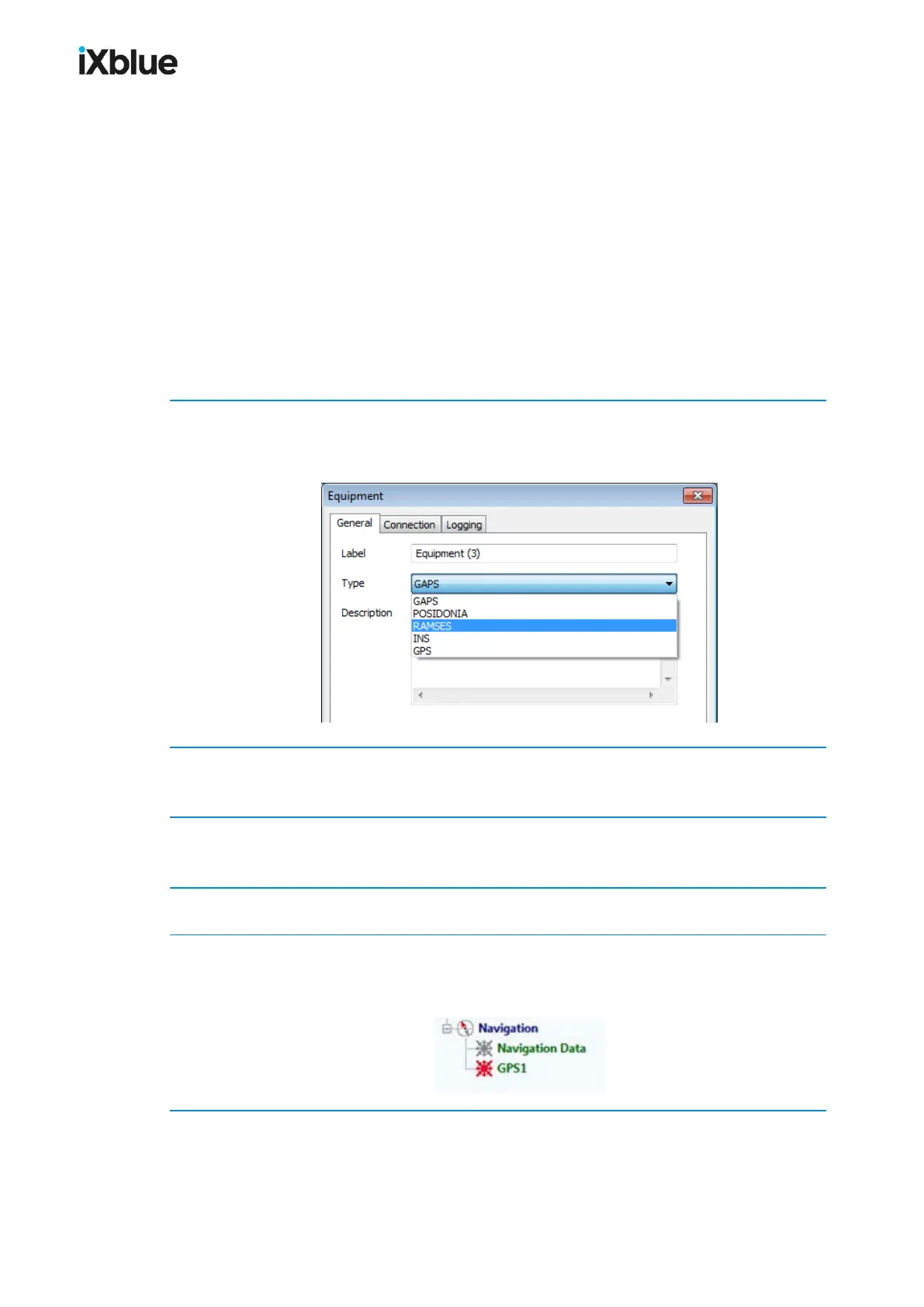
The Equipment window opens. The General tab is by default opened.
2. Choose a Label for the equipment.
The Label is used by default as a prefix of the name of the files that are logged.
3. Select the Type of equipment in the scrolling list.
The type of equipment defines a default connection protocol.
4. You may enter a text Description of your piece of equipment.
5. Click on OK.
The chosen equipment is defined. An item with the Label as name and with a red icon is
added under the Navigation in the Project view.
MU-GAPS-AN-005-H - November 2019 97



 To Next Page