GAPS - User Guide
7.3.2 INPUT CONFIGURATION IN THE SUBSEA INSWEB-BASED USER INTERFACE
The distance between the subsea INSand the GAPS transponder installed on the ROV along
the three axis of the INS reference frame must be known so the INS can correct the positions
provided by GAPS. The following values must be filled in:
● LV1 signed distance from the center of the INS to GAPS on axis 1.
● LV2 signed distance from the center of the INS to GAPS on axis 2.
● LV3 signed distance from the center of the INS to GAPS on axis 3.
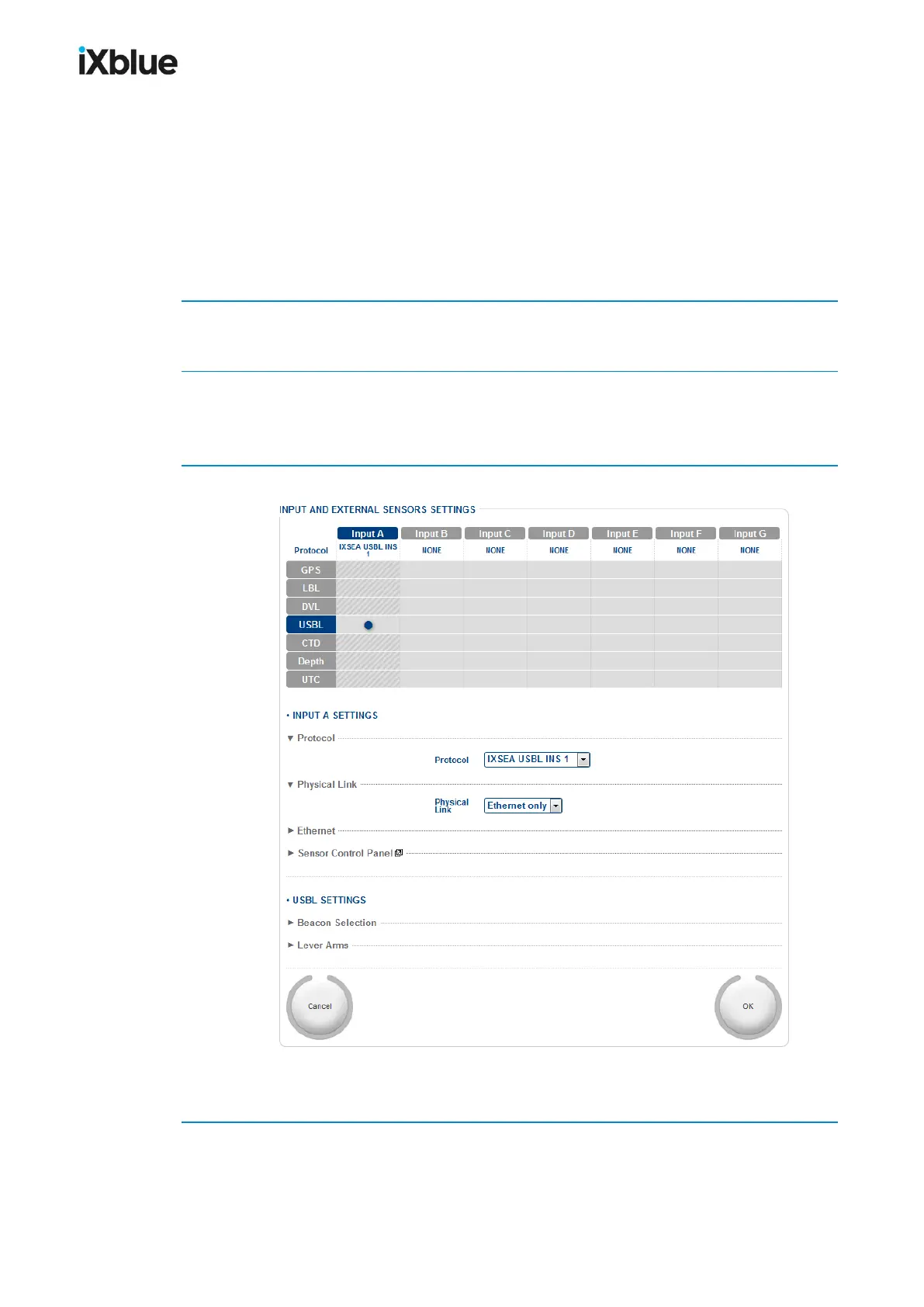
1. In the INS Web-based User Interface, select INSTALLATION > INPUTS.
The INPUT AND EXTERNAL SENSORS SETTINGS opens.
2. Select a port among the ports A to E and click in the table, in the column of the selected port
and in the USBL line.
The selected table cell is highlighted.
3. Select IXSEA USBL INS 1 or POSIDONIA 6000 in the Protocol list.
The protocol appears now in the first line of the table. All the other cells of the selected port
column are grayed because only USBL data will enter this port.
4. Select Ethernet_only or Serial_only in the Physical Link.
Once the physical link selected, the corresponding parameters appear below.
132 MU-GAPS-AN-005-H - November 2019



 To Next Page