GAPS - User Guide
6.3.2 CONFIGURING THE CONNECTION
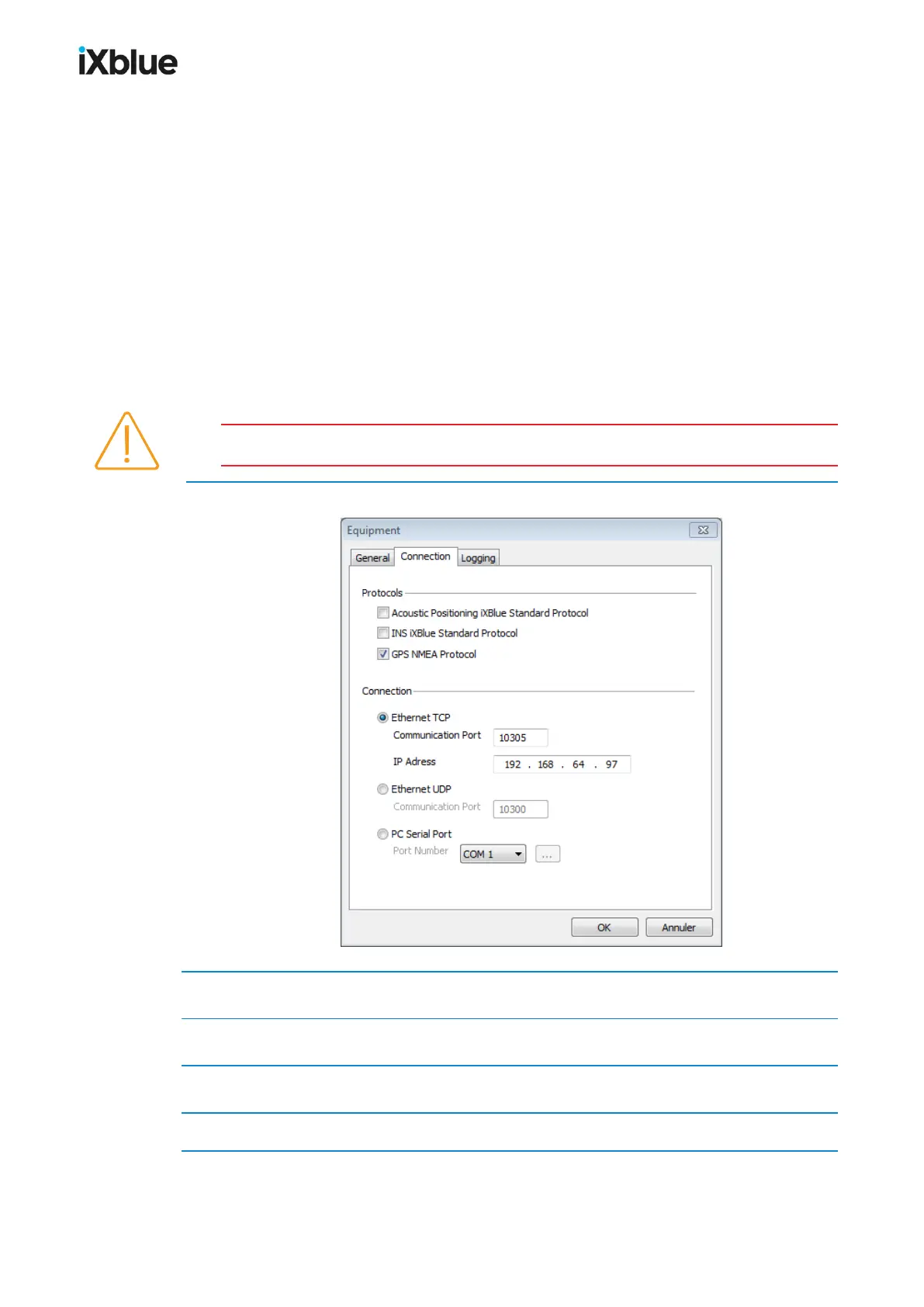
The equipment has been created in section 6.3.1. The connection between the equipment and
DELPH RoadMap is configured both in the dedicated user interface of the device and in
DELPH RoadMap. Please refer to the chapter describing the configuration of the output data
flow in the appropriate device user guide. The configuration of DELPH RoadMap is described
below.
The following ASCII protocols may be received on the same connection when they are
present in the device data output:
● Acoustic Positioning iXblue Standard (GAPSStandard, DATAStandard, RAMSES
Standard, etc.)
● INS iXblue Standard (PHINSStandard)
● GPS NMEA (GPGGA, GPGLL, GPRMC, etc.)
Only ASCII protocols are decoded.
1. Select the Connection tab.
2. Select one or several Protocols to receive from the equipment if relevant.
3. Select the Connection between Ethernet TCP, UDP and PC Serial Port.
4. If you selected Ethernet TCP, enter a Communication Port and the IP address.
5. If you selected Ethernet UDP, only enter the Communication Port.
98 MU-GAPS-AN-005-H - November 2019



 To Next Page