NET Series
Software Operation
Page 104 Firmware Ver. 1.00.42/Software Ver. 1.0.2.6 LEIGHTRONIX, INC.
2010-07-09
FIELD DESCRIPTION
Time Scheduled “On-Air“ time of the event.
Event Start
Command
Choose from the following commands: “Play,” “Stop,” “Cue/Play,”
“Pause,” and “Record.” It will almost always be “Cue/Play.”
Title:Chapter,
Setup,
Preroll, and
Length
Fixed in the device and library properties. Reset time is unused.
Event End
Command
Choose from the following commands: “Play,” “Stop,” “Cue/Play,”
“Pause,” and “Record.” It will usually be “Stop.“
Fallback input
field
Enter the input to be taken to the output at the end of the event.
ADDING/EDITING SWITCH EVENTS
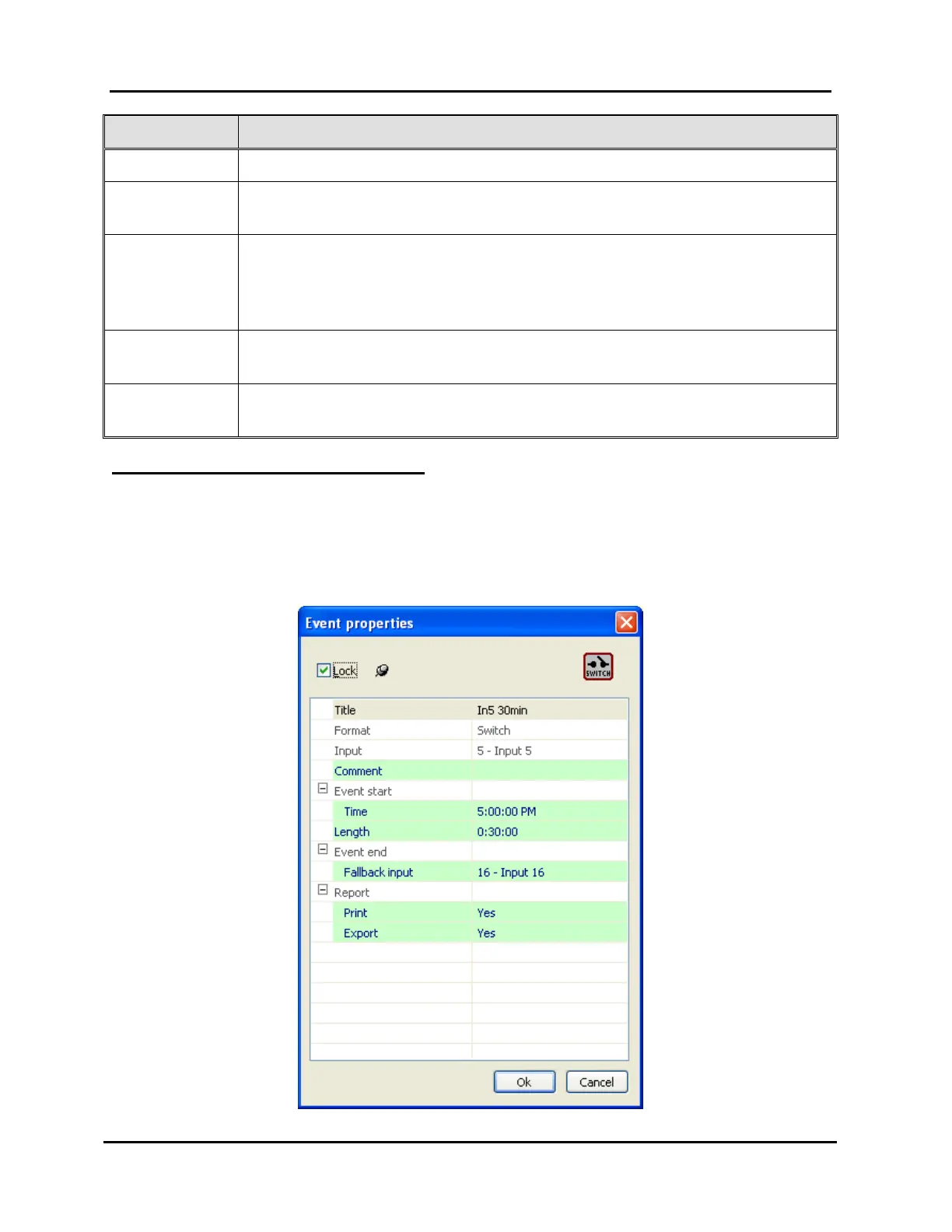
Adding or editing events from the Switch tab opens the box shown in Illustration 69,
Switch Event Properties Window. Click “OK” to submit the event or “Cancel” to abort
the add/edit. Refer to Table 21, Editable Switch Event Fields, for a description of the
editable event information fields for switches.
Illustration 69, Switch Event Properties Window



 To Next Page