NET Series
Software Installation and Configuration
Page 76 Firmware Ver. 1.00.42/Software Ver. 1.0.2.6 LEIGHTRONIX, INC.
2010-07-09
CREATING LIBRARY RESOURCES
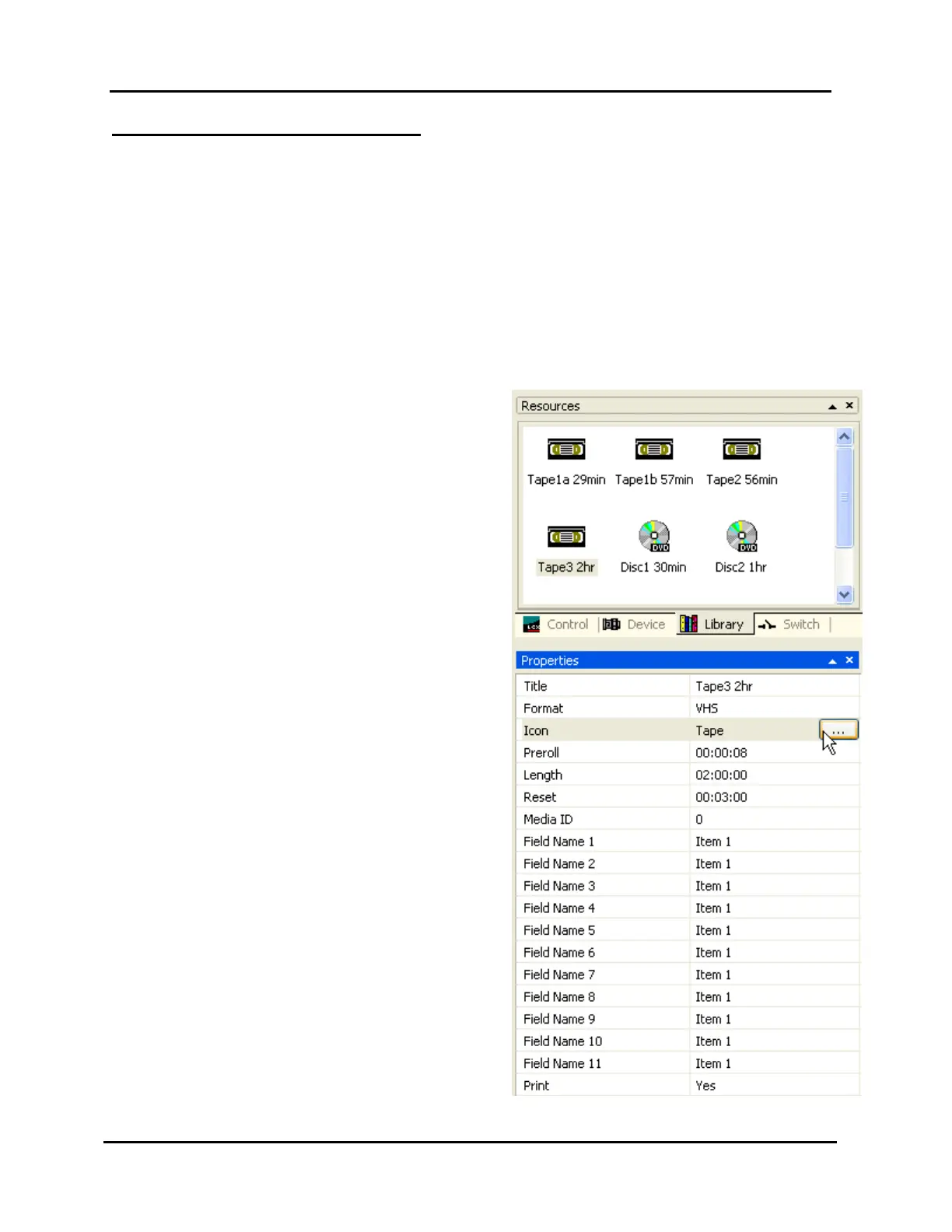
Use the “Library” tab in the “Resources” window to create a library of your tapes and
discs (refer to Illustration 48, Library Properties Window).
1. Click on the “Library” tab of the Resources window.
2. Right-click in the “Library” window and select “New” in the context menu (or click in
the “Resources” window and press the “Insert” key) to insert a new undefined
library item in the window.
3. When a library item is selected in the “Resources” window, its properties are listed
and can be entered in the “Properties” window. Complete the following library
property fields:
“Name”: enter a unique and
descriptive name, up to 31 characters.
“Format”: choose a medium. Choices
are:
¾”
8mm
Beta SP
DVD
GPI
HI-8mm
S-VHS
VHS
DVply for NET-164 and NET-EC
The DVply format displays the
“Title:Chapter” field, which lets you
enter the program location on a
DVply disc.
“Preroll”: enter a length of time to
indicate the amount of unwanted video
(black, etc.) at the start of a program
that you do not want playing on air.
NOTE: This field appears after any
non-GPI is selected in the
“Format” field.
“Length”: enter the on-air length of the
program medium
Illustration 48, Library Properties Window



 To Next Page