NET Series
Software Operation
LEIGHTRONIX, INC. Firmware Ver. 1.00.42/Software Ver. 1.0.2.6 Page 87
2010-07-09
Receive the current Controller image from the default Controller.
An image received from the default Controller contains the Controller type,
playlist, and the control, device, library, and switch properties last sent to the
Controller.
1. Select “Receive” in the “File” menu or
icon on the main toolbar to open a
dialog box confirming that you want to receive the image from the default
Controller (see Illustration 58, Receive Image Dialog Box).
Illustration 58, Receive Image Dialog Box
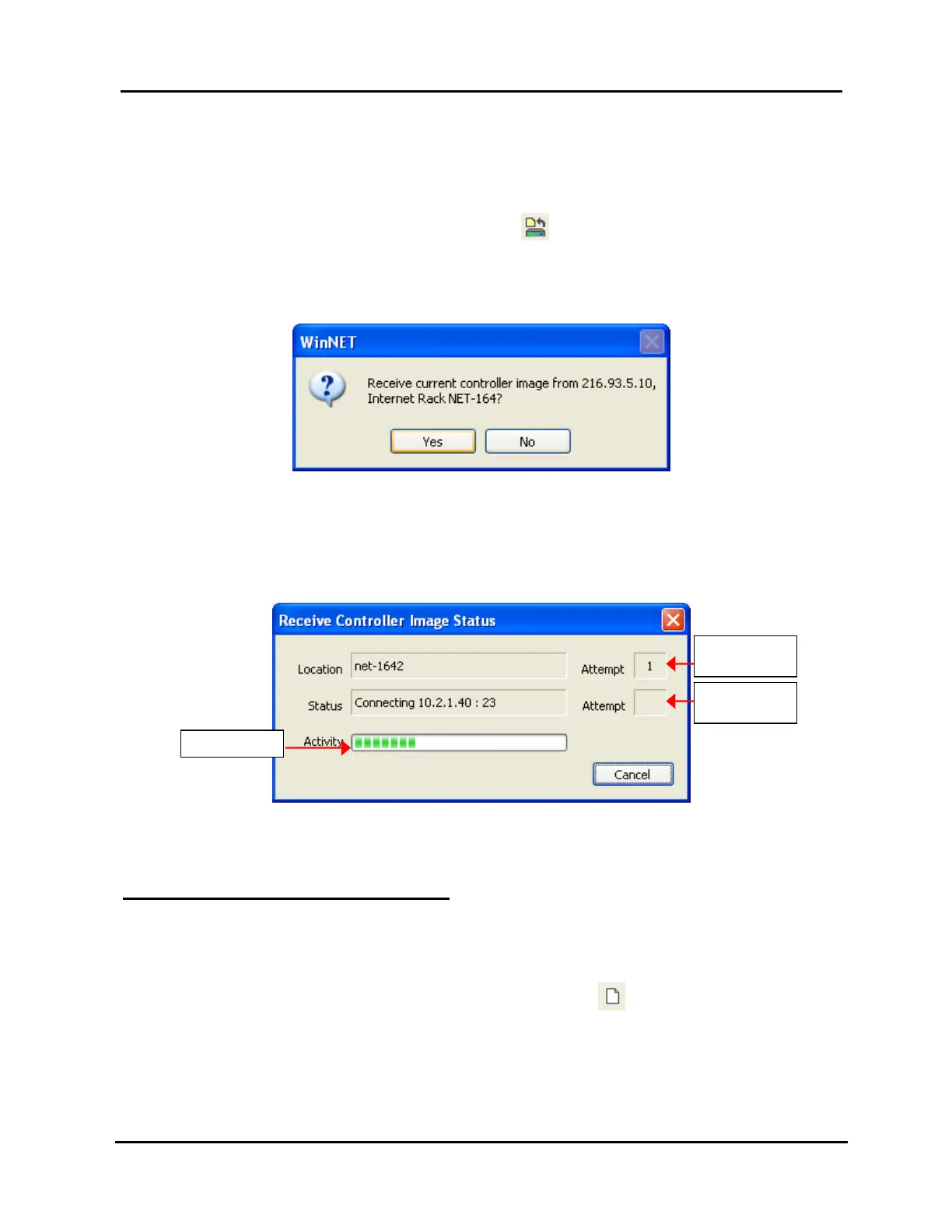
2. Click “Yes” to open the status box shown in Illustration 59, Image Status
Window. To interrupt the send, click the “Cancel” button. If the send
appears to be stalled, cancel it and check your default location IP address
and your network connections.
Illustration 59, Image Status Window
A “Receive Completed” message appears when the image has been received.
WinNET will now contain the remote data in an unnamed image.
UNLOADING CONTROLLER IMAGES
If an image is loaded into WinNET, only one Controller will be visible in the “Control”
tab of the “Resources” window and channel tabs will be shown along the left side of
the playlist window.
To unload an image, click “New” in the “File” menu or the
icon on the main toolbar.
Progress Bar
Connection
Attempts
Receiver
Attempts



 To Next Page