NET Series
Software Installation and Configuration
LEIGHTRONIX, INC. Firmware Ver. 1.00.42/Software Ver. 1.0.2.6 Page 49
2010-07-09
EDITING/DELETING CONTROLLER LOCATIONS
1. To configure Controller locations, click “Locations” under the “Tools” menu (see
Illustration 21, “Controller Locations” Window) and perform the following:
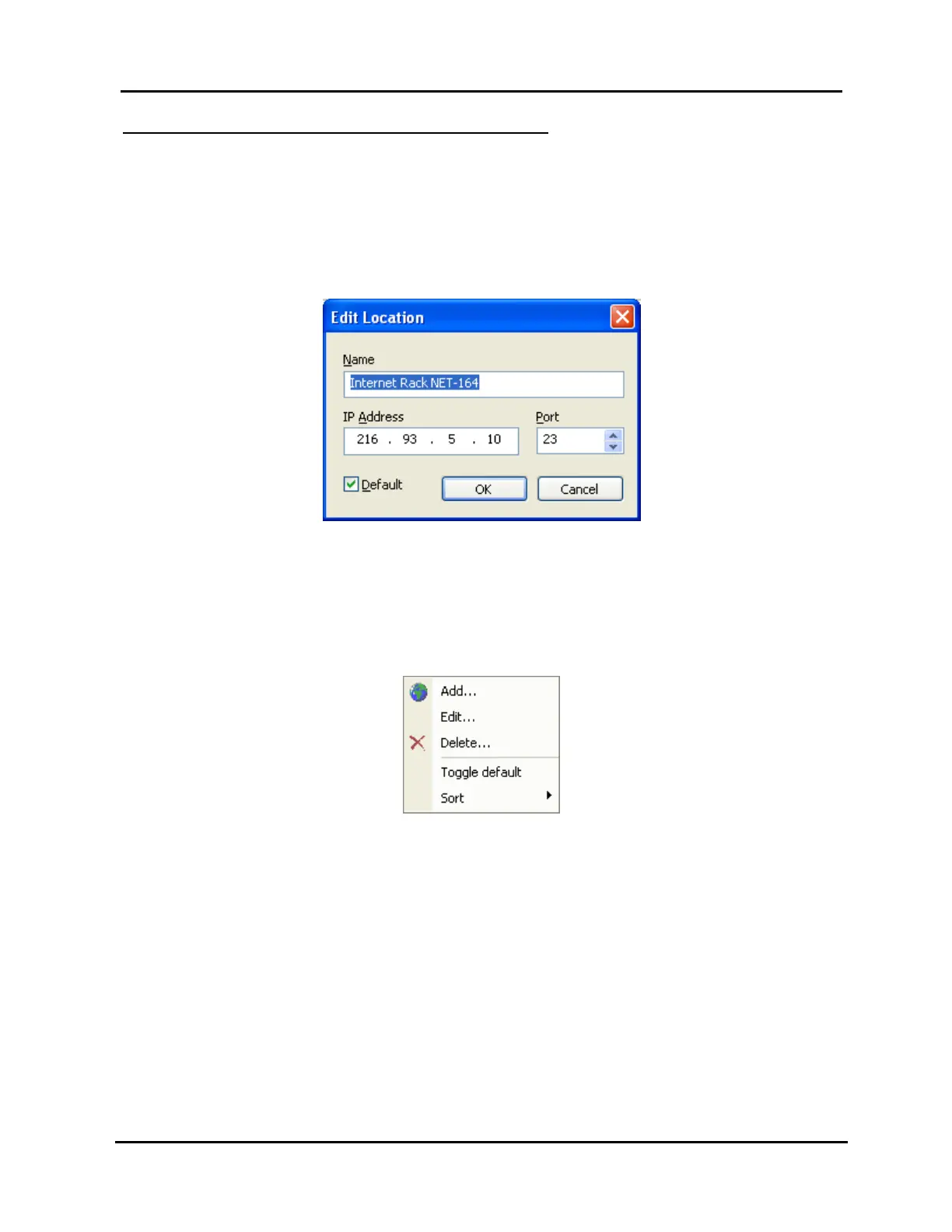
Clicking the “Edit” button opens the data entry box shown in Illustration 24,
which allows you to change the Controller’s IP address, name, port, and default
status.
Illustration 24, “Edit Location” Window
Clicking “Delete” prompts you for confirmation, then deletes the Controller.
Right clicking on the Controller opens the context menu shown in Illustration
25, Controller Location Menu. From here you can add, edit, delete, set (or
un-set) default status, or sort the list of Controllers based on name or IP
address.
Illustration 25, Controller Location Menu
2. Click “OK” at the bottom of the “Controller Locations” window to save your changes
to the database, or click “Cancel” to discard your changes.



 To Next Page