NET Series
Software Installation and Configuration
LEIGHTRONIX, INC. Firmware Ver. 1.00.42/Software Ver. 1.0.2.6 Page 67
2010-07-09
CONFIGURING CONTROLLER PROPERTIES
When the “Control” tab of the “Resources” window is selected, the Controller type is
shown in the window. (If all three Controllers are visible, no image is loaded. Refer to
“Loading Controller Images,” on page 84, for instructions on loading an image.) View
and enter the Controller properties in the “Properties” window. The properties for each
of the three NET Series Controller models are as follows:
MINI-T-NET
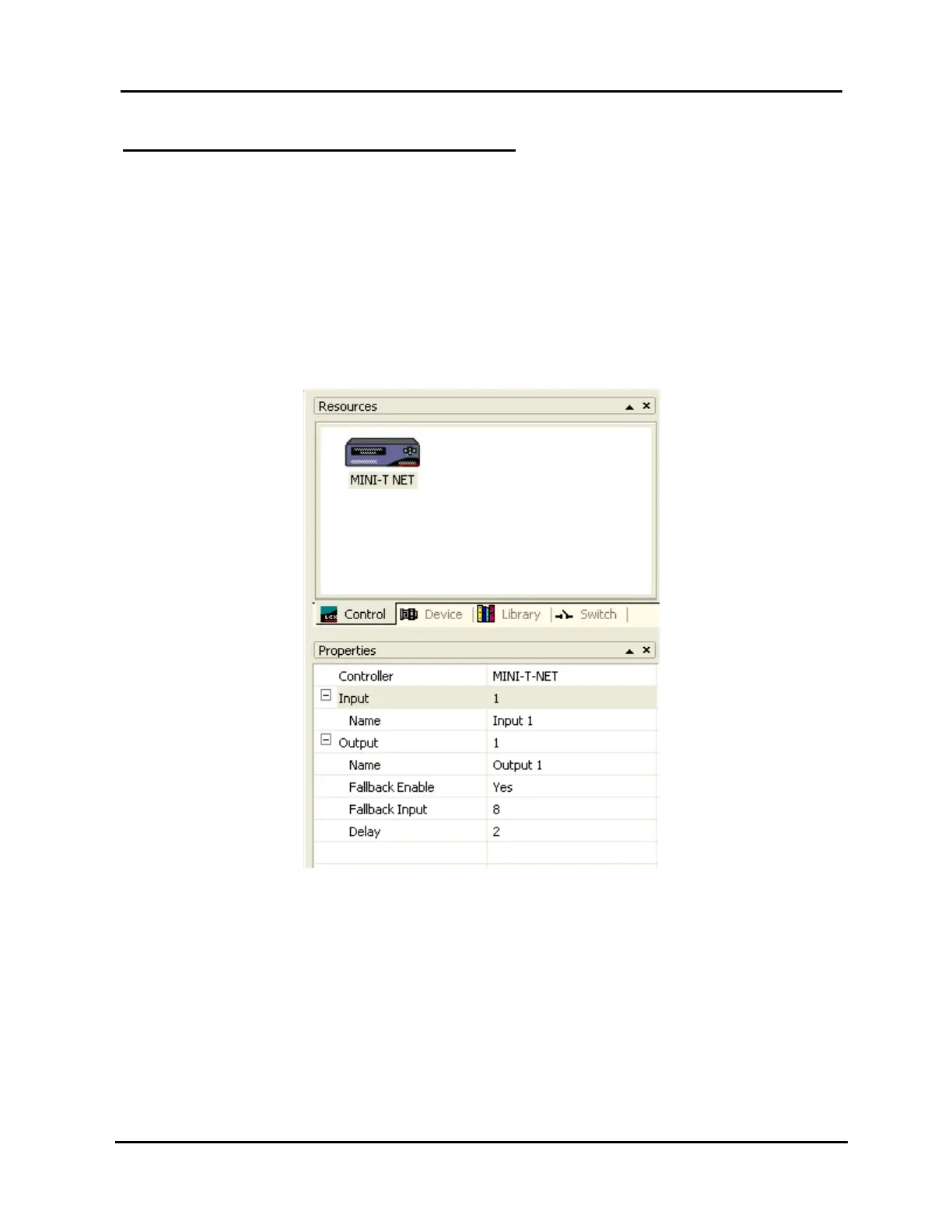
The MINI-T-NET’s control properties may be set as follows (refer to Illustration
43, MINI-T-NET Control Property Settings):
Illustration 43, MINI-T-NET Control Property Settings
Input aliases
1. In the “Input” field, select an input (1 – 8 may be chosen).
2. Type the selected input’s alias in the “Name” field (up to 31 characters).
Output alias: only “1” is available in the “Output” field. Type the alias for
output 1 in the “Name” field (up to 31 characters).
Loss-of-video fallback setting
NOTE: The fallback setting may also be set from the Controller’s front
panel.



 To Next Page