NET Series
Software Operation
Page 112 Firmware Ver. 1.00.42/Software Ver. 1.0.2.6 LEIGHTRONIX, INC.
2010-07-09
USING CONTROL PANEL TO PERFORM IMMEDIATE DEVICE AND
SWITCH ACTIONS
Use the control panel to control devices and perform switching actions without
scheduling as follows:
NOTE: An image must be loaded to enable the control panel window.
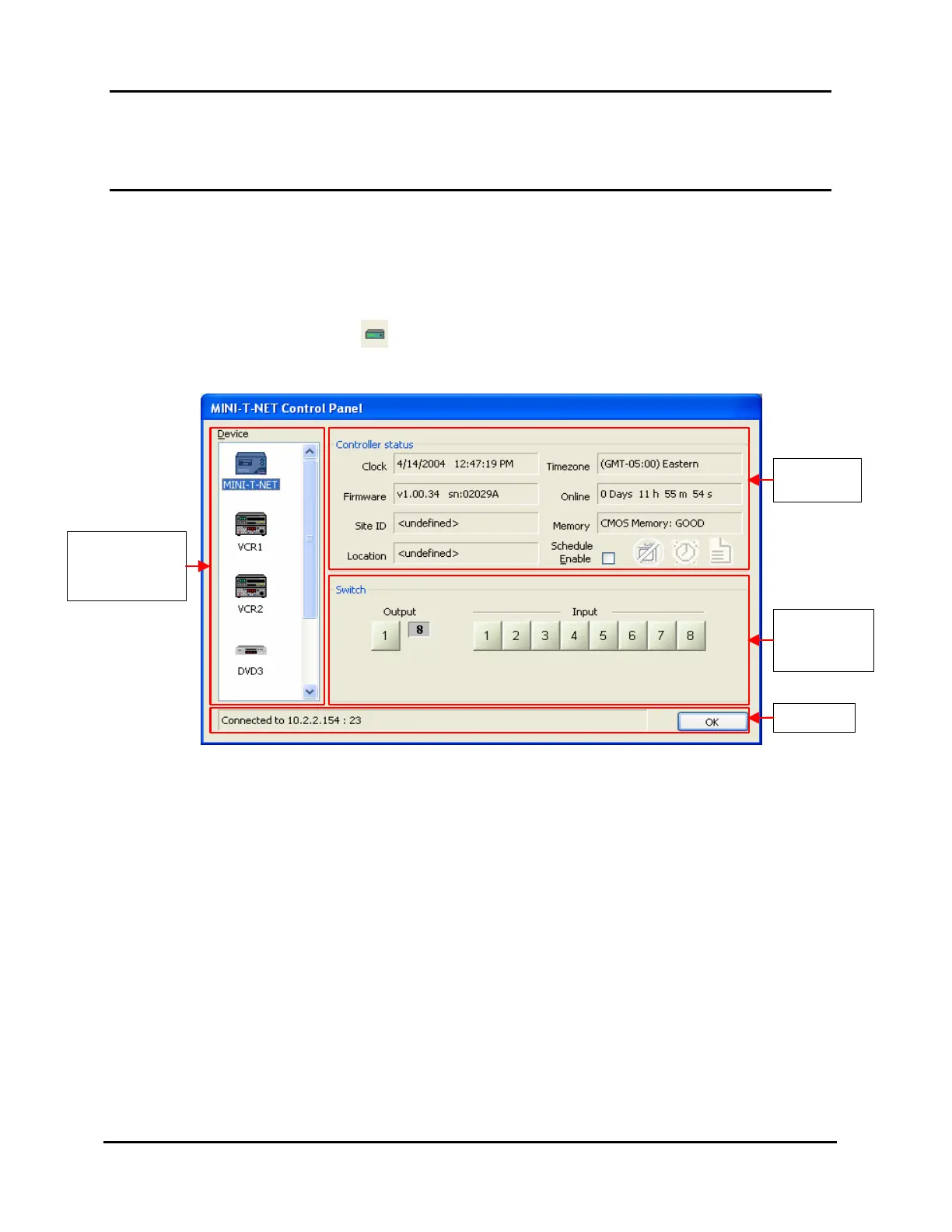
1. Open the control panel window (see Illustration 76) by clicking “Control Panel”
under the “Tools” menu or icon on main toolbar.
Illustration 76, Control Panel Window
The Control Panel will attempt to connect to the default Controller. If it succeeds,
the status bar at the bottom says “Connected.” If it fails, it says “Connecting.”
Check the IP address and network connections. WinNET uses the properties and
devices of the loaded Controller image as an integral part of the control panel. For
this reason, it is important that the loaded Controller image match the default
Controller.
Event Controller
and Devices for
the Loaded Image
Status/
Control Area
Switcher
Control and
Status Area
Status Bar



 To Next Page