NET Series
Software Installation and Configuration
LEIGHTRONIX, INC. Firmware Ver. 1.00.42/Software Ver. 1.0.2.6 Page 47
2010-07-09
CONFIGURING WINNET
ADDING CONTROLLER(S) TO LOCATIONS DATABASE
Create an IP address listing of your NET Series Controllers as follows:
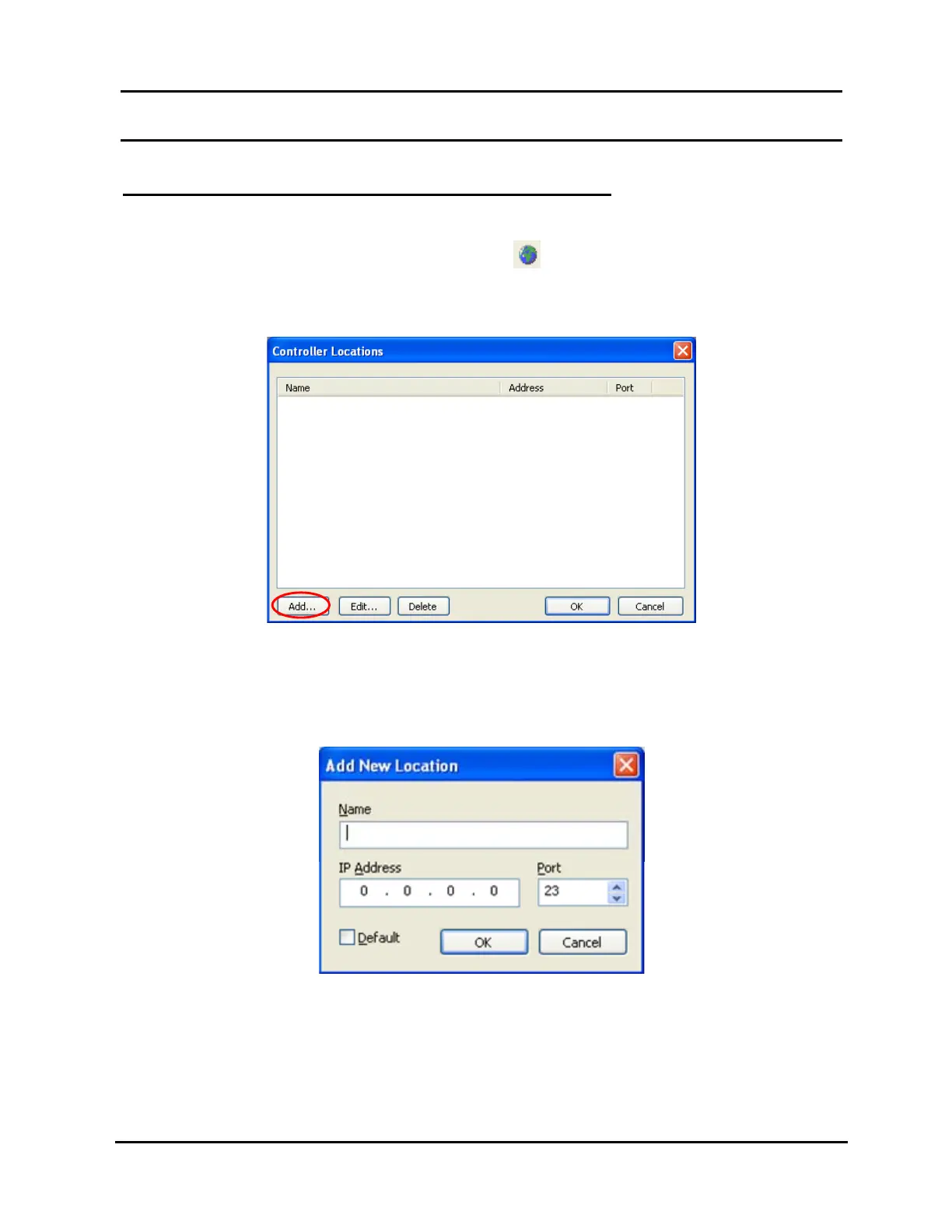
1. Click “Locations” in the “Tools” menu or the
icon on the main toolbar to open
the “Controller Locations” window shown in Illustration 21.
Illustration 21, “Controller Locations” Window
2. Click “Add” on the “Controller Locations” window (see Illustration 21, “Controller
Locations” Window) to open the “Add New Location” window shown in Illustration
22. Complete the following fields:
Illustration 22, “Add New Location” Window
“Name”: type a name for your Controller.
“IP Address”: enter the IP Address displayed on the Controller’s front panel.
This address can be viewed from the front panel by pressing the up or down
arrows until the IP Address is shown.



 To Next Page