NET Series
Software Operation
LEIGHTRONIX, INC. Firmware Ver. 1.00.42/Software Ver. 1.0.2.6 Page 117
2010-07-09
PERFORMING FORCED SWITCHES AND VIEWING SWITCHER STATUS
MINI-T-NET
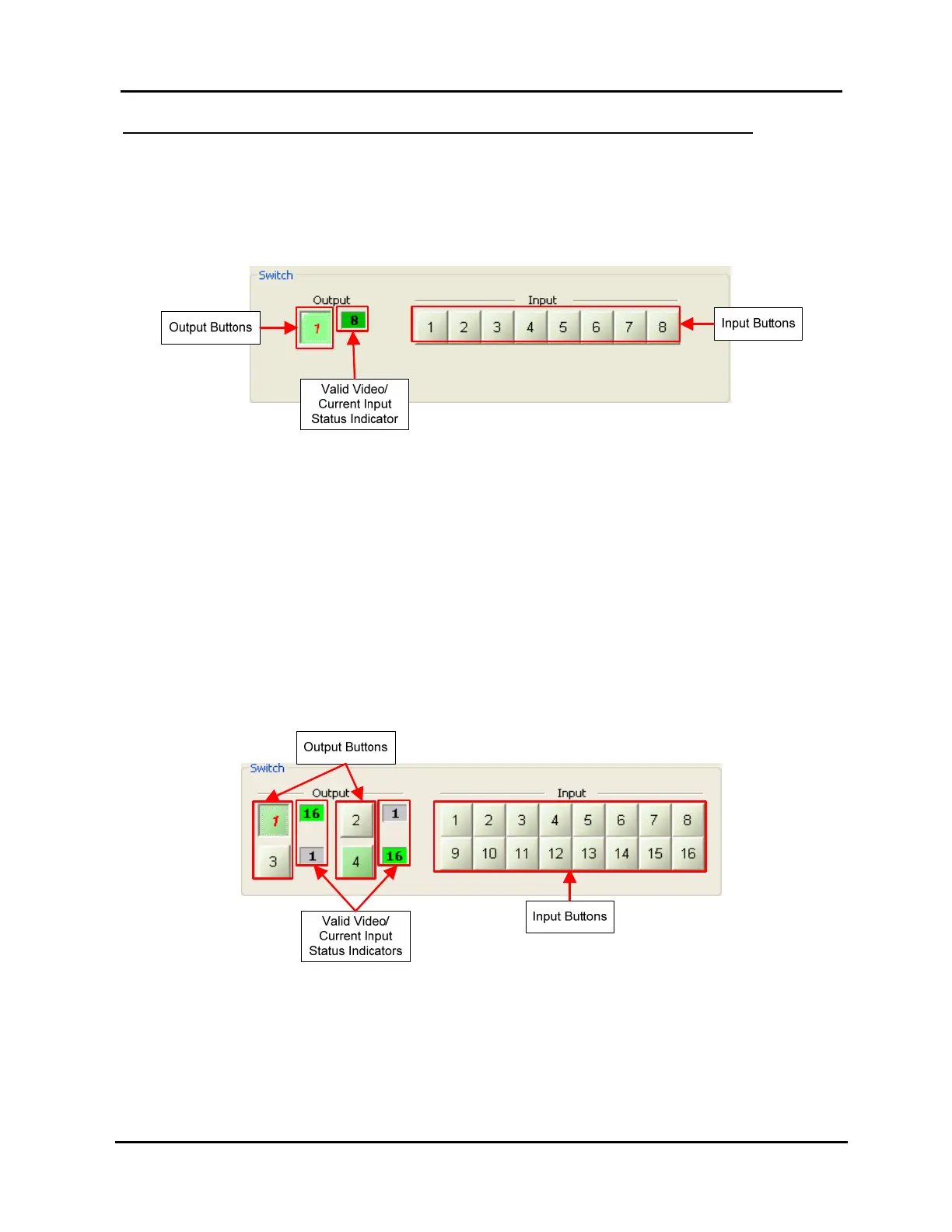
When the Controller is a MINI-T-NET, the lower right switcher section appears in
the control panel window as shown in Illustration 83.
Illustration 83, MINI-T-NET Forced Switch Control
To take a switch:
1. Click the output button to select it (as shown in Illustration 83, the number
turns red). The output button toggles each time you click it.
2. Click the desired input button.
To the right of the output button is a box showing the current input and valid video
status. Green means valid video present, while gray indicates no valid video.
NET-164
For a NET-164, the lower right switcher section appears in the control panel
window as shown in Illustration 84.
Illustration 84, NET-164 Forced Switch Control
To take a switch:
1. Click the output button(s) to select the desired output(s) (as shown in
Illustration 84, the output 1 number turns red). The output buttons toggle
each time you click them.
2. Click the desired input button to take that input to the selected output(s).



 To Next Page