NET Series
Software Installation and Configuration
Page 40 Firmware Ver. 1.00.42/Software Ver. 1.0.2.6 LEIGHTRONIX, INC.
2010-07-09
3. From the WinNET software HTML page, click on the “WinNET Software” link. A
new window will open, prompting you to run the “WinNET v* Installer.EXE” file.
4. Choose “YES” to continue installing the software.
5. Setup will then prompt you for a program folder. The default is “Leightronix, Inc.,”
but you may change it to anything you desire.
6. Once you have chosen a file path, setup installs the software and creates icons. It
will prompt you again when it is finished.
7. Click “Finish” to close the installer and return to Windows.
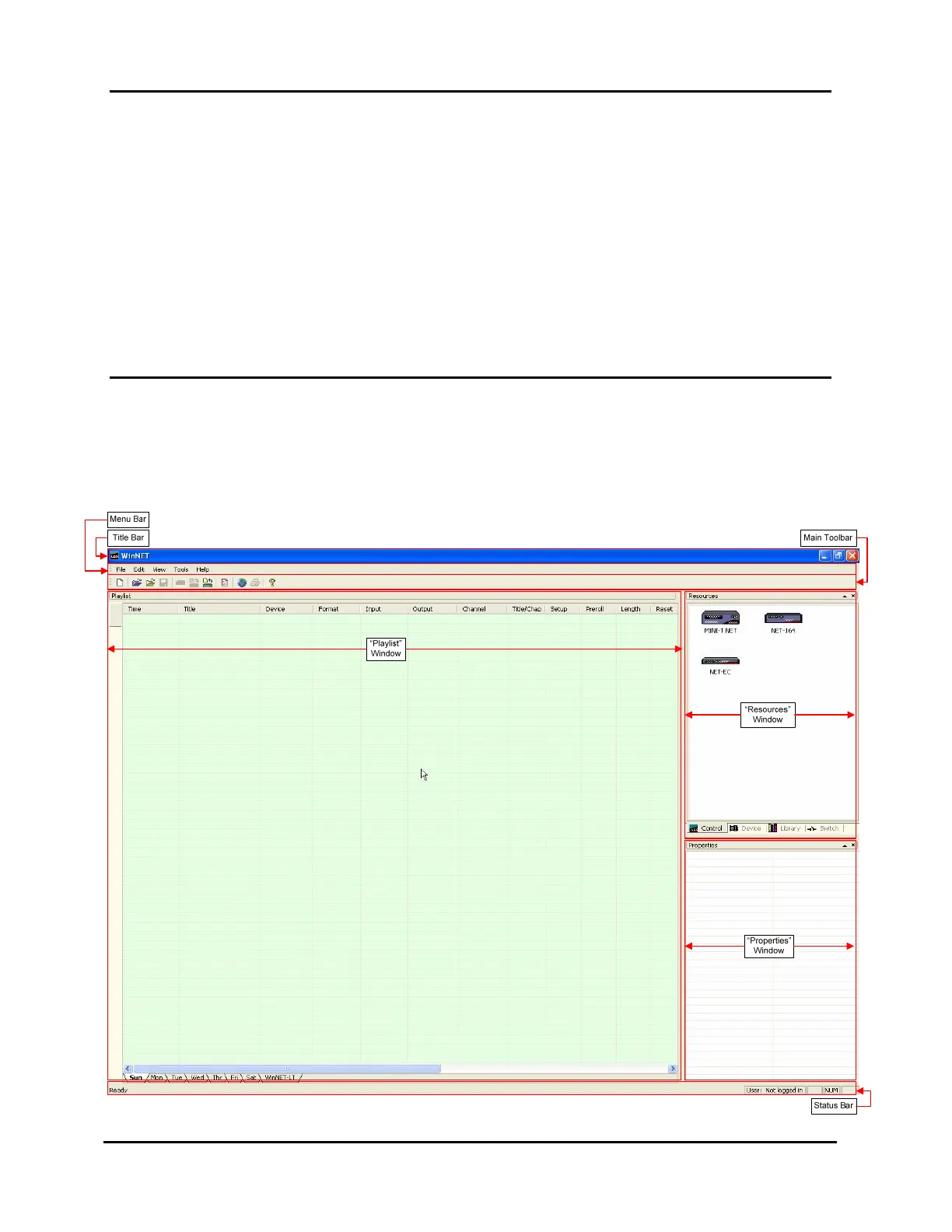
ABOUT THE MAIN WINDOW COMPONENTS
Icons to run the WinNET software are installed on the Windows desktop and in the
“Start Menu\Programs\Leightronix, Inc.” folder. Choosing either of these icons opens
the WinNET main window shown in Illustration 15.
Illustration 15, WinNET Main Window



 To Next Page