NET Series
Software Operation
Page 116 Firmware Ver. 1.00.42/Software Ver. 1.0.2.6 LEIGHTRONIX, INC.
2010-07-09
Device status: the left side of the section displays the name, format, and
device number given to the device in the loaded image. The “Device”
number is the PRO-BUS address set via switches on the PRO-BUS
interface.
Control options: on the right side of the section are buttons for closing the
contacts of the indicated colored pairs of wires.
DVply Device
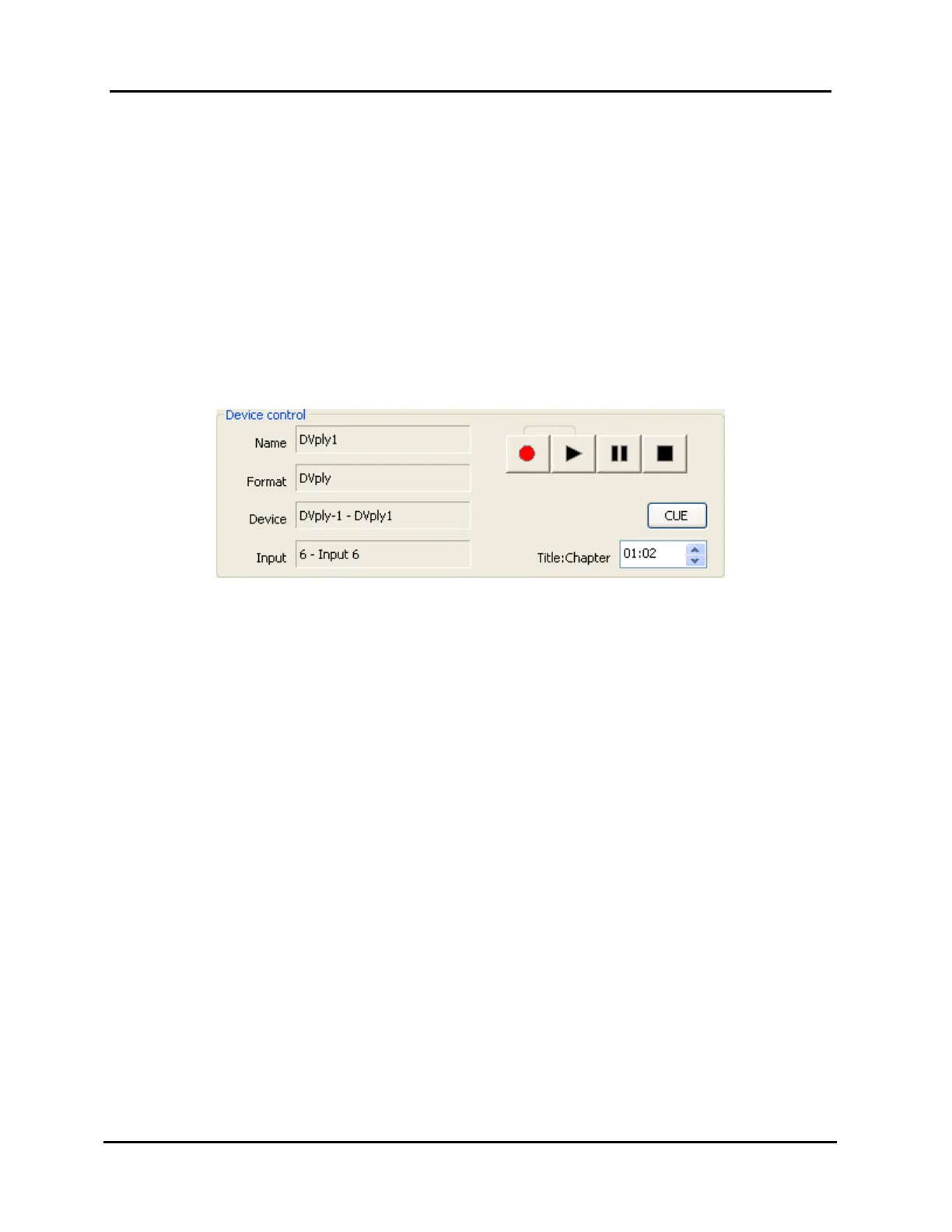
When a DVply device is selected in the control panel window’s “Device” list
(NET-164 and NET-EC only), the “Device control” section shown in Illustration
82, Control Panel DVply Device, is displayed.
Illustration 82, Control Panel DVply Device
Device status: the left side of the section displays the name, format, device
number, and input number given to the device in the loaded image.
“Device” is the DVply port on the back of the Controller.
Control options: on the right side of the section (from left to right) are the
record, play, pause, stop, and cue buttons for controlling the DVply device.
1. To play, pause, or stop, click the corresponding button.
2. To record, click the record button and then click the play button.
3. To cue, enter the desired title and chapter in the “Title:Chapter” field and
then click the “CUE” button.



 To Next Page