NET Series
Controller Installation and Configuration
Page 18 Firmware Ver. 1.00.42/Software Ver. 1.0.2.6 LEIGHTRONIX, INC.
2010-07-09
MINI-T-NET INSTALLATION OVERVIEW
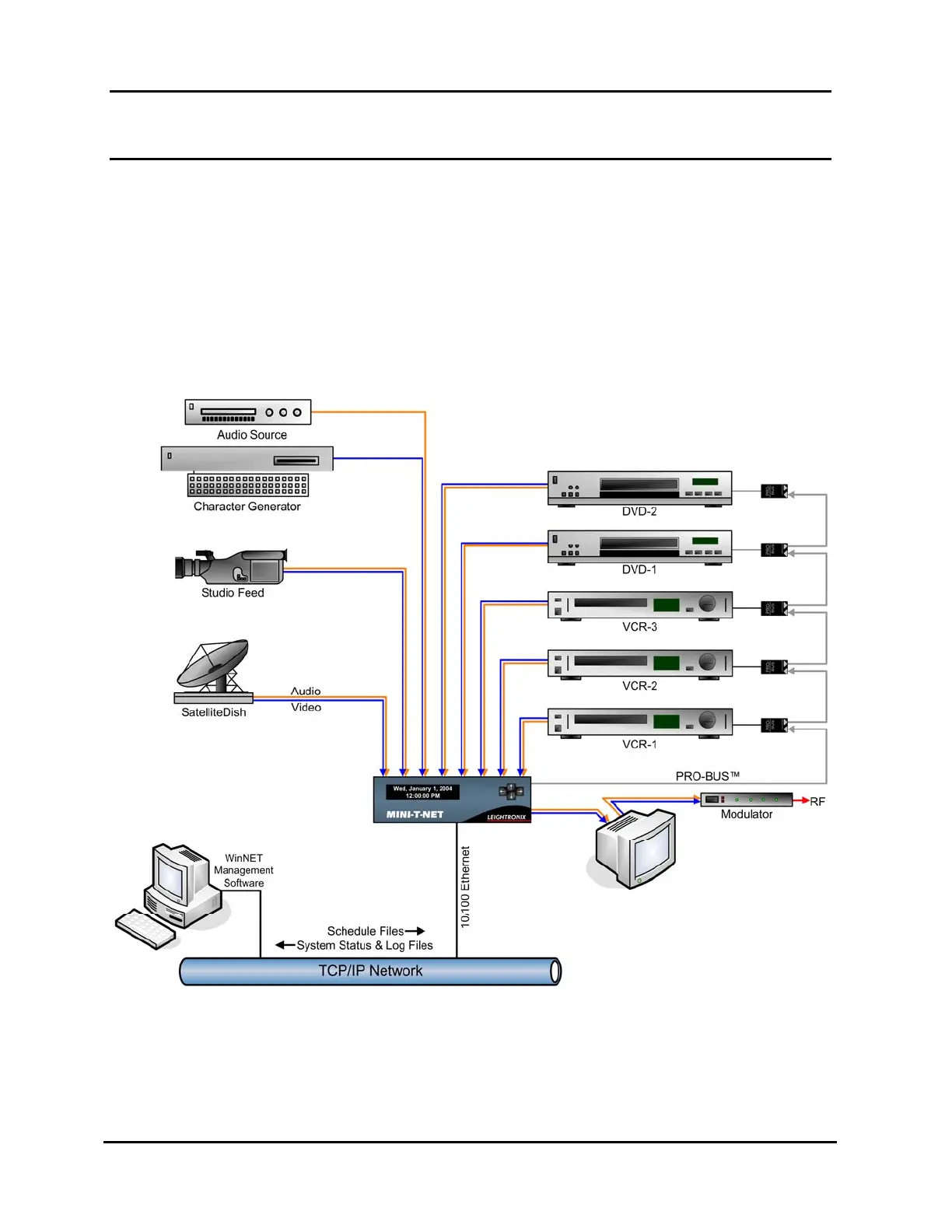
Illustration 7 shows a sample connection scenario for the MINI-T-NET. Video and
audio sources (VCRs, DVD players, satellite or studio feeds, character generator, etc.)
are connected to the 8 inputs, while the MINI-T-NET output is connected to the desired
destination, such as a modulator. VCRs and DVD players are controlled through the
use of LEIGHTRONIX PRO-BUS interfaces, sold separately for many brands and
models of professional video equipment. PRO-BUS interfaces loop together for easy
setup and are available with infrared, mini-jack, and multi-pin connectors. PC
configuration and control is done over a 10/100 Base-T Ethernet connection.
Illustration 7, MINI-T-NET Typical Playback System Diagram



 To Next Page