NET Series
Troubleshooting
Page 134 Firmware Ver. 1.00.42/Software Ver. 1.0.2.6 LEIGHTRONIX, INC.
2010-07-09
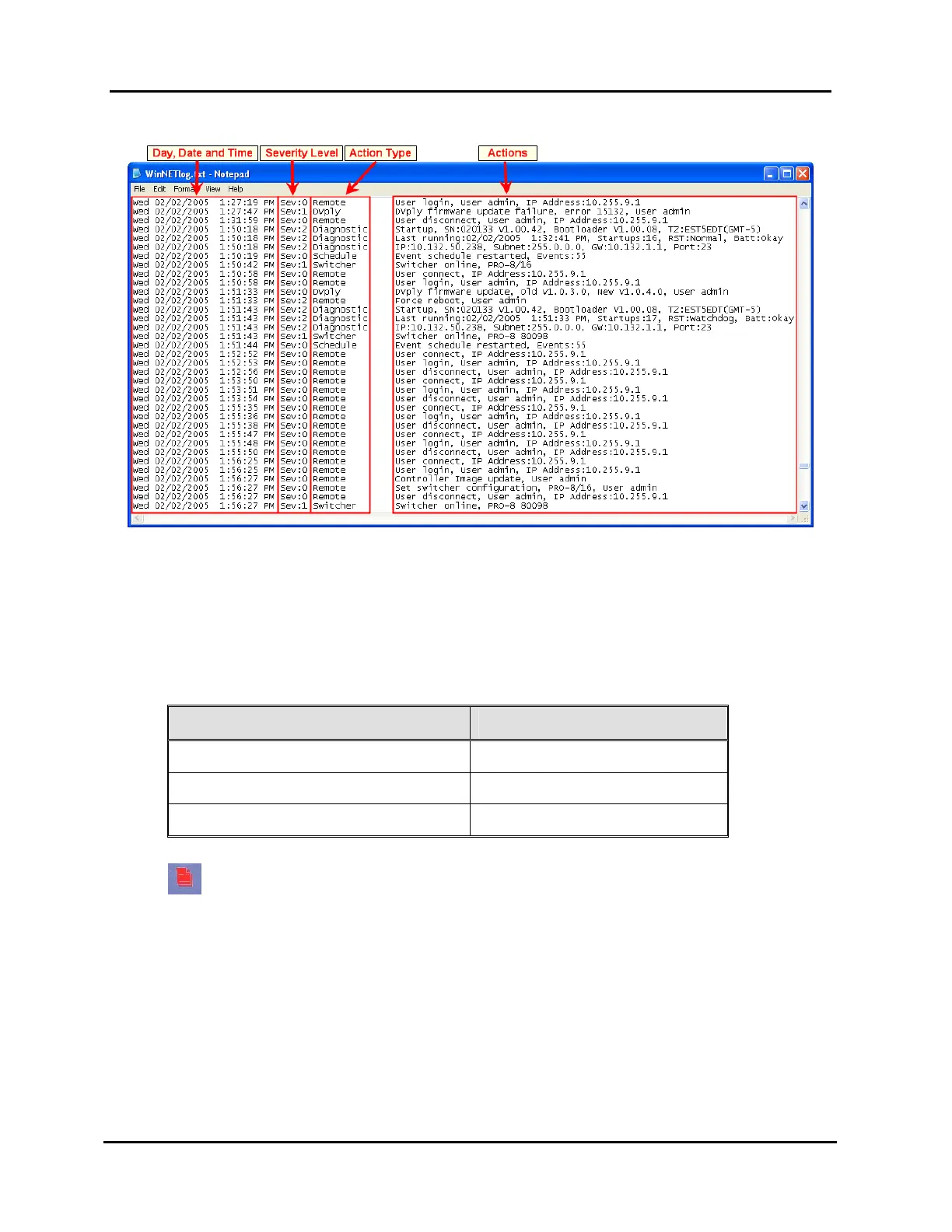
Illustration 2, WinNET Log File Components
Day, Date, and Time
Each action is “stamped” with a day, date, and time. The most recent actions
are listed at the bottom of the file. This is very useful when you know
approximately what time the unexpected action occurred.
Severity
Severity level indicates the severity of the action entered as follows:
ACTION SEVERITY LEVEL
Normal Operation 0
Cautionary Actions 1
Critical Events or Errors 2
A severity level 1 or 2 entry requests your attention by turning on the Log LED
on the front panel of the NET Series Controller. Downloading the file will
turn off the indicator.
Action Types and Descriptions
Actions describe what has been performed or noticed by a NET Series
Controller. The following is a list of the action types and corresponding
descriptions:
Diagnostic: Controller generated actions
Front Panel: actions performed based on commands given by the user
through the front panel of the NET Series Controller



 To Next Page