117
C
ONFIGURING SOFTKEYS BLF/LIST KEY
Softkeys
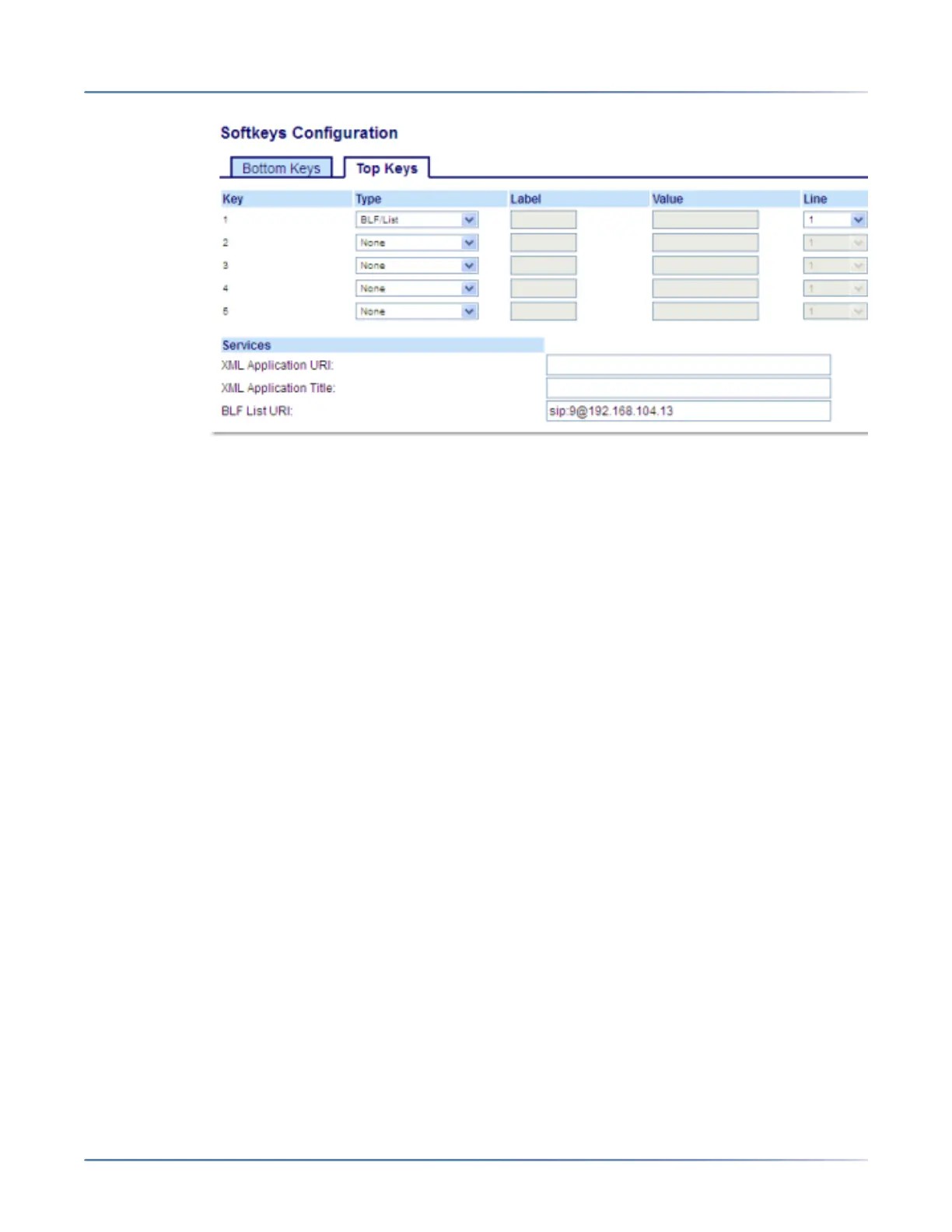
2. Select from Key 1 through Key 48 on the Top keys.
3. In the Type field, select BLF/List.
4. In the Line field, select a line number that is actively registered to the appropriate SIP proxy you are
using. Valid values are:
– global
– 1through24
NOTE: The Label and Valuefield are not required. The BLF/List name is configured in the BLF
List URIfield instead.
5. In the state fields, check (enable) or uncheck (disable) the states you want to apply to this softkey.
6. In the BLF List URI field, enter the name of the BLF list defined on the Busy Lamp field page for a
particular user. For example, sip:9@192.168.104.13.
NOTE: Contact your System Administrator for the BLF List URI.
Expansion Module Keys
7. Select from Key 1 through Key 84(M695).
8. In the Line field, select a line for which to apply this key. Valid values are:
– global
– 1through 24
NOTE: TheValue field is not required. The BLF/List name is configured in the BLF List URIfield
instead.
9. In the BLF List URI field, enter the name of the BLF list defined on the Busy Lamp field page for your
particular user. For example, sip:9@192.168.104.13.
NOTE: Contact your System Administrator for the BLF List URI.
10. ClickSave Settings.



 To Next Page