Spitfire – Maintenance Manual
111
AP-74096, Rev. 1.0, 09/06/05
4.7.6. Replacing the P_EDGE sensor assembly
Notes :
¾ Remove following covers before replacing the P_EDGE sensor Assembly.
Side cover R: refer to "Removing side cover R"
Side cover L: refer to "Removing side cover L"
Front cover: refer to "Removing the front cover"
Y rail cover: refer to "Removing the Y rail cover"
Head cover: refer to "Removing the head cover"
Step 1 : Remove the P_EDGE sensor assembly connector from the CR board assembly.
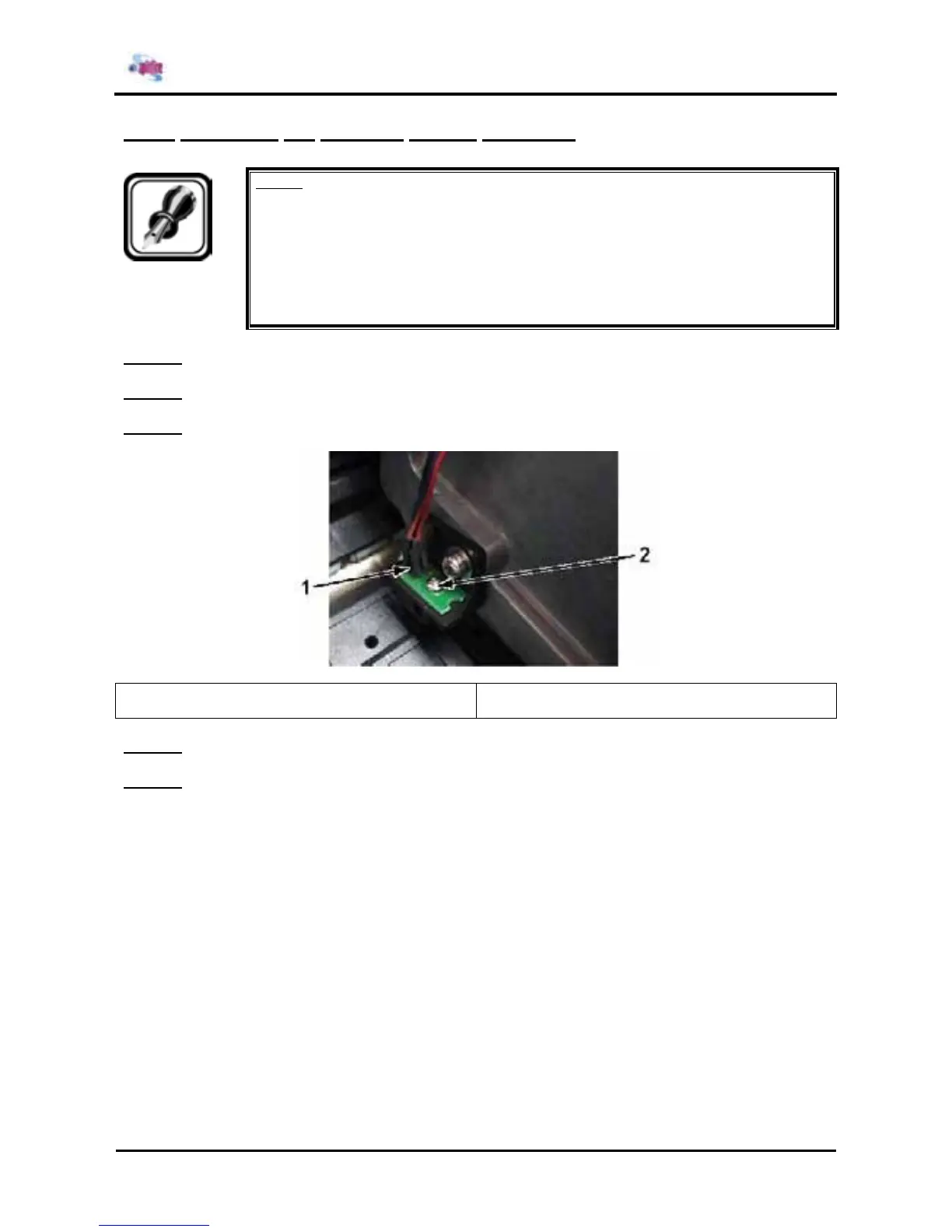
Step 2 : Remove the screw fixing the P_EDGE sensor assembly.
Step 3 : Replace the P_EDGE sensor assembly.
1 = P_EDGE sensor assembly 2 = Screw (M2x12) fixing the P_EDGE sensor
assembly
Step 4 : Reinstall all parts in the opposite order of the removal procedure.
Step 5 : Perform media sensor sensitivity adjustment according to "Media sensor sensitivity adjustment".















 To Next Page