Spitfire – Maintenance Manual
174
AP-74096, Rev. 1.0, 09/06/05
5.5.13. Feed Pitch Check Menu
In this menu, you can check the media feed amount for one band by reviewing a sample printing. There is
no adjustment item.
To check the feed pitch, follow the steps below.
Step 1 : Set media as necessary.
Step 2 : Select "Adj:SendPitch".
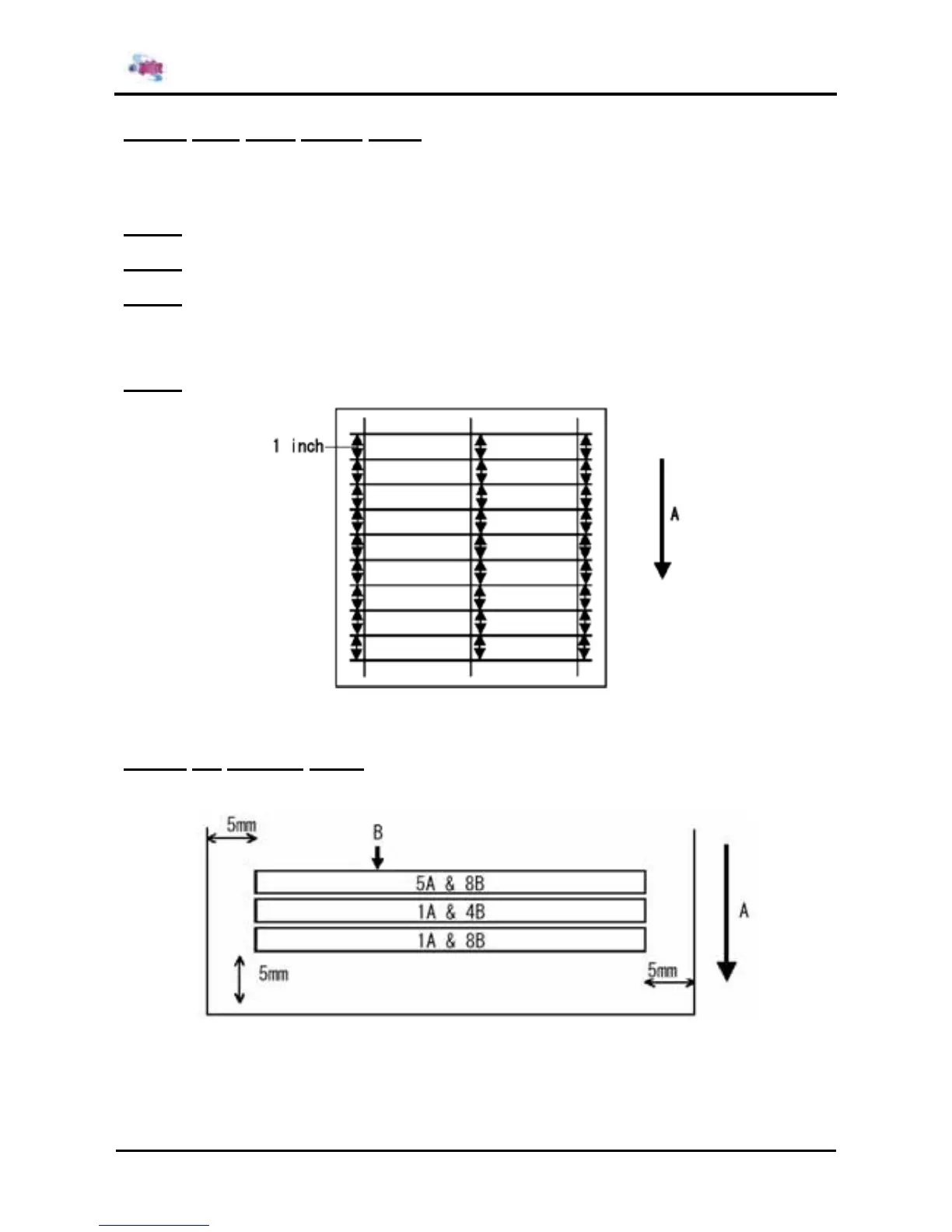
Step 3 : Select "Pattern 1" or "Pattern 2" to print feed pitch check patterns.
¾ "Pattern 1": Drawn with 1 inch (2.54 cm) intervals
¾ "Pattern 2": Draw a repetitive pattern with 1/4 inch (0.635 cm) intervals every 4 lines and
0.63 cm intervals between each of the 4 lines.
Step 4 : Confirm that it is drawn at 1 inch intervals as shown in the following drawing.
A = Media feed direction
5.5.14. Fill printing menu
A fill printing pattern is printed by both ends of the head.
A: Media feed direction
B: 100% print
65-inch specifications are pattern printed in the sequence 1A&4B, 1A&4B, 1A&4B, while 90-inch
specifications are printed in the sequence 1A&8B, 1A&4B, 5A&8B.















 To Next Page