Spitfire – Maintenance Manual
168
AP-74096, Rev. 1.0, 09/06/05
5.5.8. Top & bottom adjustment menu
Sets printing margins.
Make adjustments following the steps below.
Step 1 : Set media as necessary.
Step 2 : After the media has been set, pattern printing with band feed compensation and media cutting
are performed. The following is the description of the printing method.
¾ Black, one path, one-way
Step 3 : Measure the following adjustment items for the results of the printing of the top & bottom
adjustment pattern.
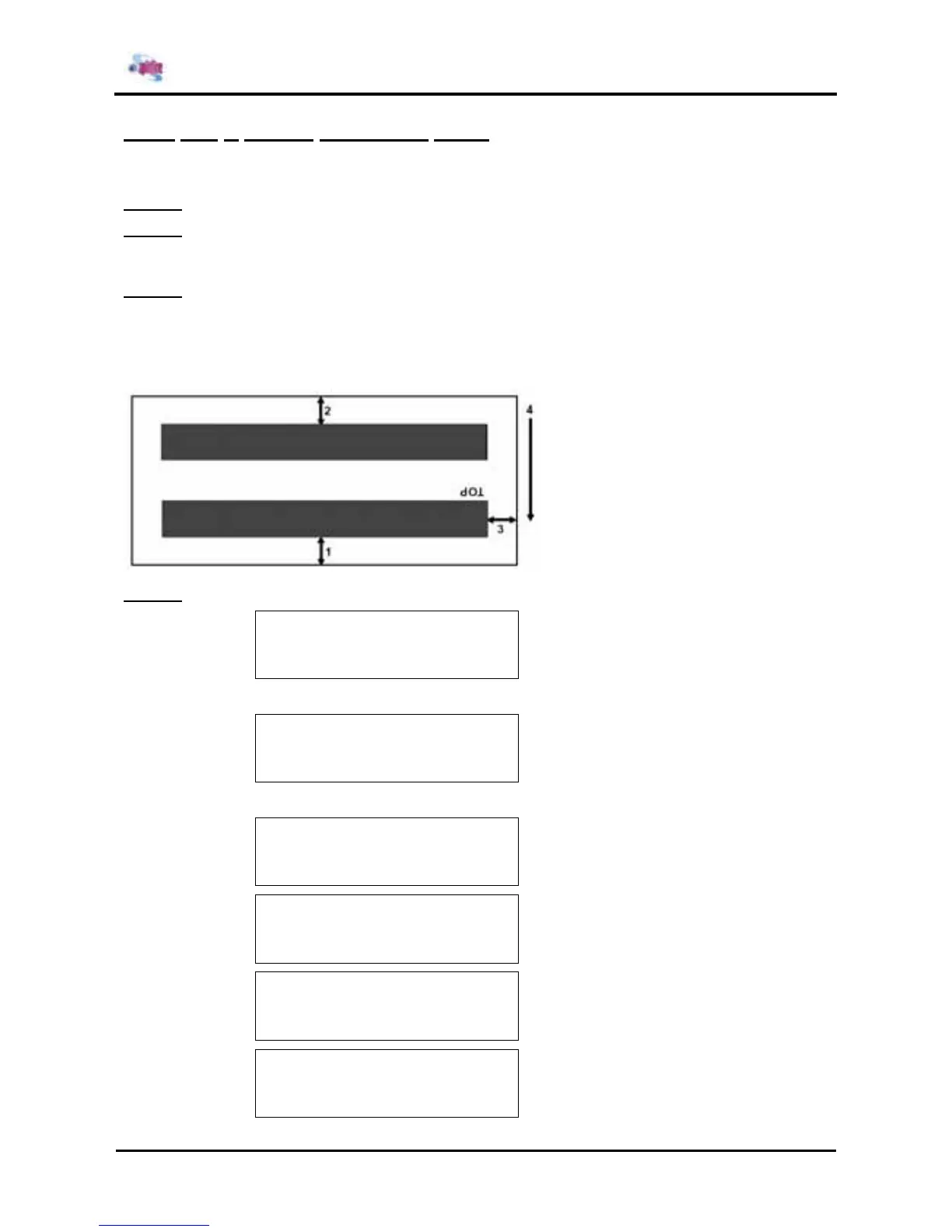
Measurements are carried out at the center of the media. The adjustment items are as follows.
¾ Top distance
¾ Bottom distance
¾ Side margin
1: Top distance
2: Bottom distance
3: Side margin
4: Media feed direction
Step 4 : Input each measurement as a parameter.
* Top&Bottom *
Set Paper If media is not set
↓ Set media
* Top&Bottom *
Paper Initial
↓ End Media Initialization
* Top&Bottom *
Adjustment Print Display during adjustment printing
* Top&Bottom *
Top Length 0 – 40.0 +
5.0 mm -
* Top&Bottom *
Top Length 0 – 40.0 +
5.0 mm -
* Top&Bottom *
Side 0 – 20.0 +
5.0 mm -















 To Next Page