Spitfire – Maintenance Manual
231
AP-74096, Rev. 1.0, 09/06/05
7.11. COVER SENSOR ADJUSTMENT
This section explains the procedure for adjusting the cover sensor.
When replacing the cover sensor assembly or removing/installing the front cover, use this procedure to
adjust the cover sensor.
Step 1 : Start the self-diagnostic function.
Notes :
¾ Refer to “Self-Diagnosis Function ".
Step 2 : Select "Check:Test" on the self-diagnostic menu.
Step 3 : In the inspection menu, select "Check : Check".
Step 4 : Select "Sensor:Etc." on the sensor menu.
Step 5 : Open and close the front cover assembly and make sure the dimension between the media guide
and the front cover end is 21 mm, and the display in the operation panel is switched as follows.
Front cover Operation panel display
Open Sensor: open
Closed Sensor: closed
Notes :
¾ Use a block gauge to measure the height of the front cover when opening it.
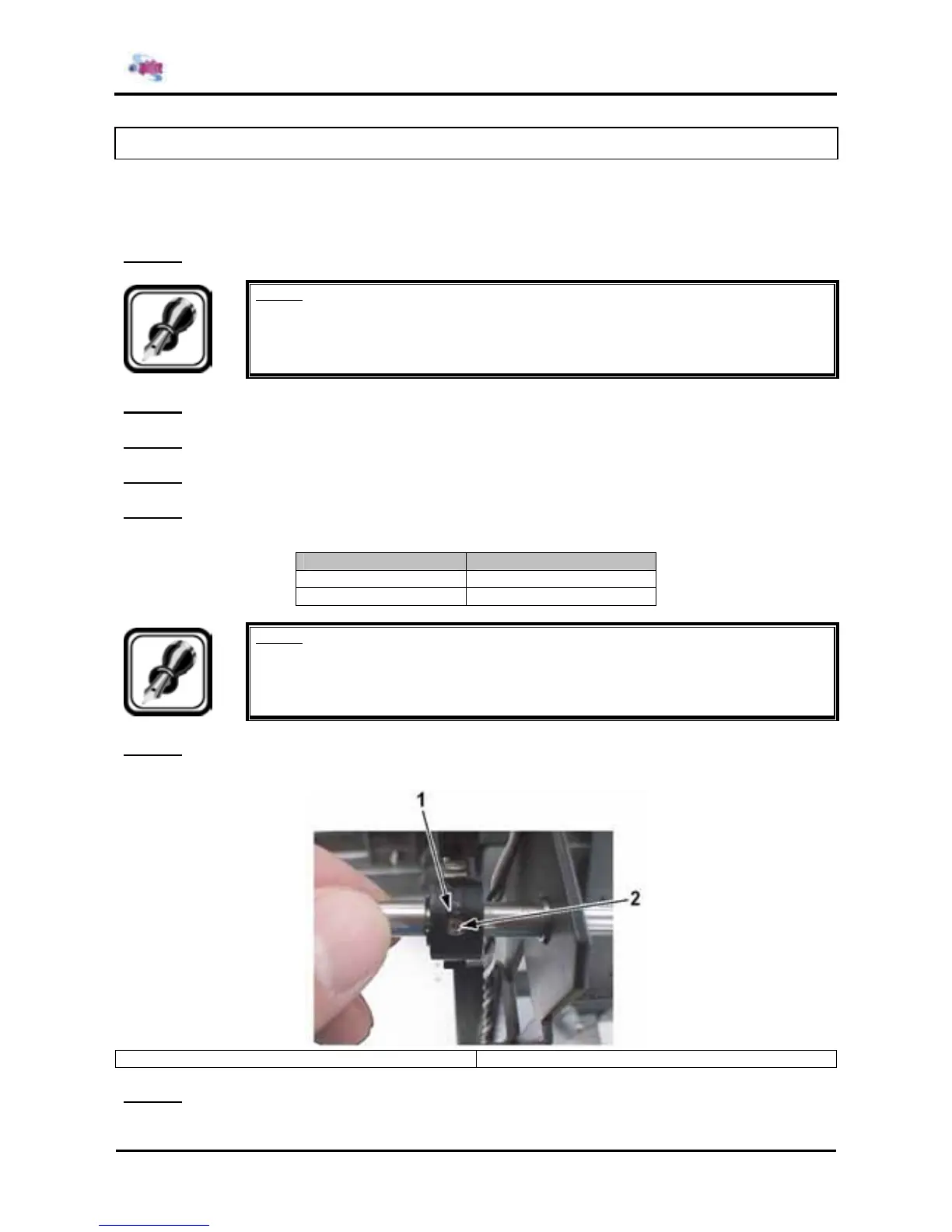
Step 6 : If the opening height of the front cover and the information displayed on the operation panel are
different, adjust the installation position of the sensor cam.
1 = Sensor cam 2 = Set screw
Step 7 : Use step 5 to check the display on the operation panel once more.















 To Next Page