Newtec Proprietary
Confidentiality: Unrestricted
R3.2_v1.0
182/387
Feature Descriptions
MDM9000 Satellite Modem
16.4.1 How to Monitor the Outgoing PRBS Bit Rate
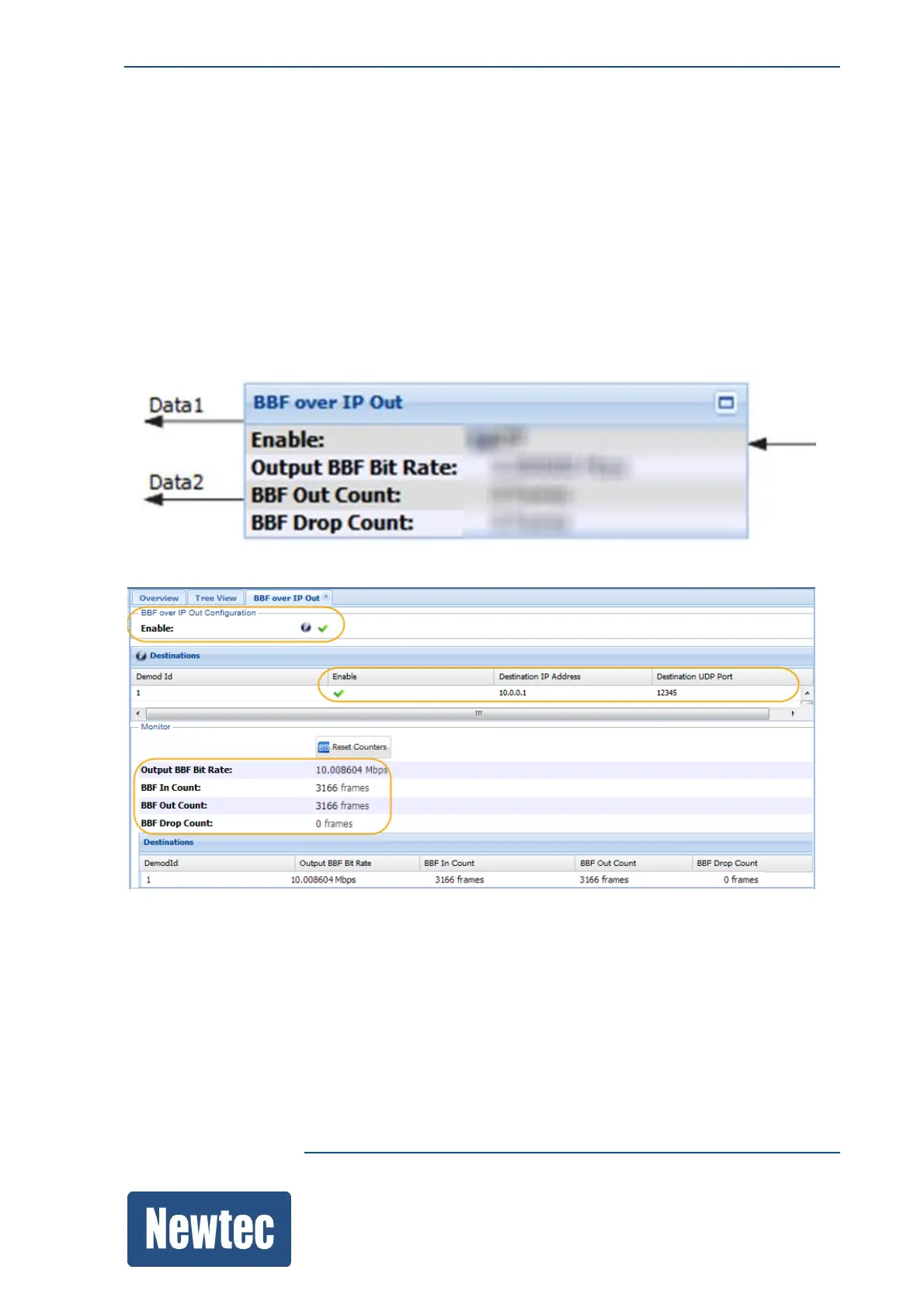
The PRBS bit rate can be measured in the BBF over IP Output functional block.
Note, the decapsulation block does not show a rate because no data is decapsulated.
The PRBS data is dumped by the decapsulator because there is no suitable destination.
Proceed as follows to create a suitable destination:
» Disable GSE decapsulation. (Do this because BBF over IP Out can not work in parallel with the
GSE Decapsulation.)
» In the overview tab, click on the top right icon to open the BBF over IP Out functional block.
» Enable the BBF over IP Output block.
» Enable the Destination.
» Enter the Destination IP Address.
Note: Make sure that the IP Address is within the data network that is configured in the Data
Interface menu.
» Now you should see the measured PRBS Bit Rate in the Output BBF Bit Rate monitoring value.



 To Next Page