Newtec Proprietary
Confidentiality: Unrestricted
R3.2_v1.0
342/387
Appendix - Classification Expressions
MDM9000 Satellite Modem
19.2.3 Expression: ip4 dst 10.10.10.0/24
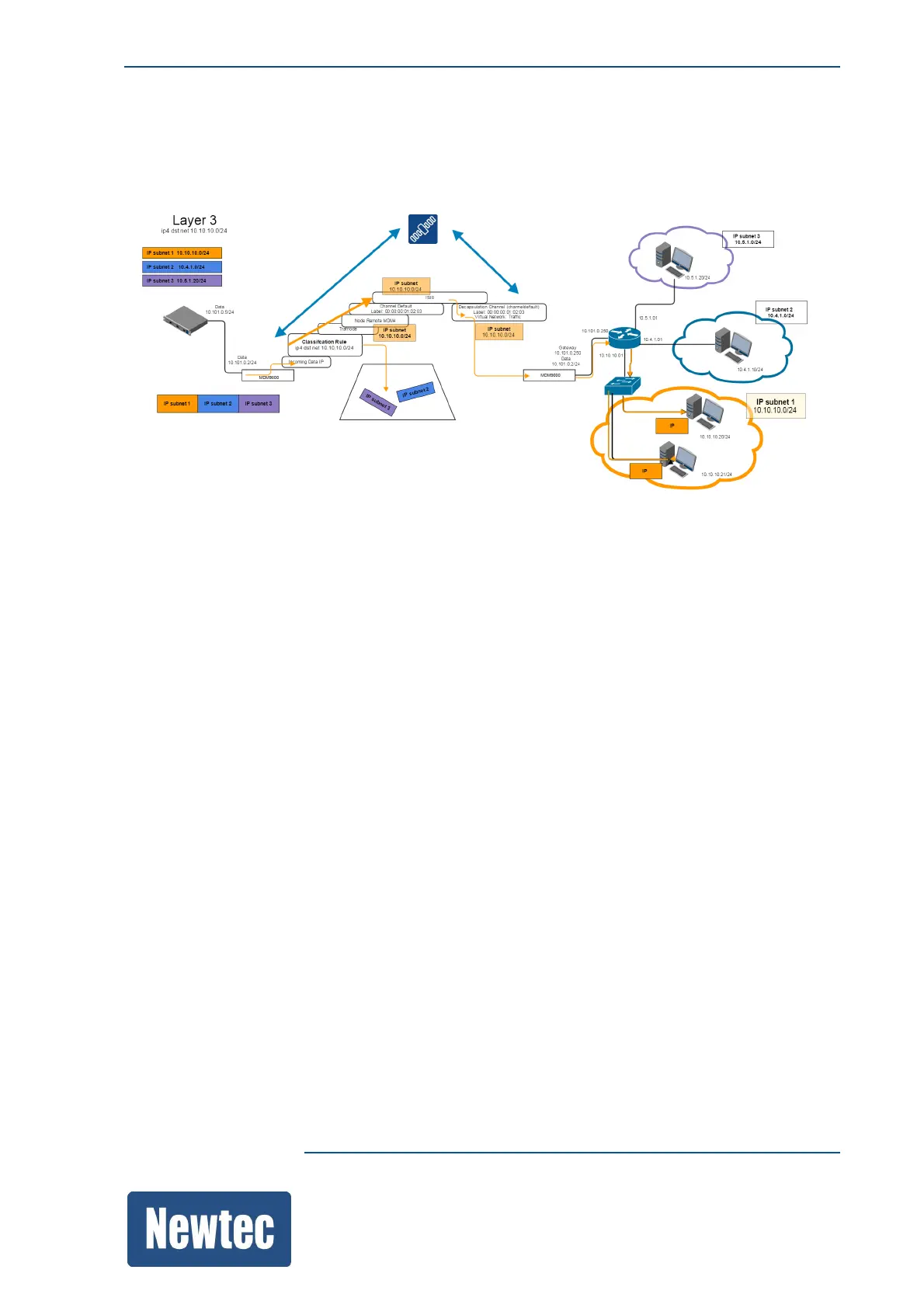
The following picture shows the L3 expression "ip4 dst net 10.10.10.0/24".
Use this expression to capture a certain IP (sub)net.
The previous figure shows that IP traffic, that belongs to specified destination subnet, is forwarded
towards the remote site.
All other traffic is dropped.
The following steps are taken:
Transmit
1. IP traffic is entering the MDM9000.
2. The traffic is inserted into the encapsulator.
3. The IP traffic is filtered according to the classification rule.
In this case "ip4 dst net 10.10.10.0/24", packets complying to this rule are further processed by
the shaping tree (Trafnode and Node Remote MDM4).
IP packets with an other destination subnet are dropped.
4. The shaped traffic is inserted into a channel (Channel Default).
5. A label can be assigned to the shaped traffic.
6. The shaped traffic is linked to a specific Input Stream Identifier (ISI8)
7. The shaped traffic is modulated and transmitted.



 To Next Page