4: Repair Internal Assemblies — Front Chassis
146
Speaker Assembly
Preparation
1 Remove the Printer Assembly. See “Printer Assembly” on page 85.
2 Open and separate the case. See “Opening the Case” on page 87.
3 Remove the Rear Chassis. See “Front Chassis and Case Access” on page 134.
4 Remove the Front Chassis. See “Front Chassis Removal and Replacement” on page 142.
Removal and Replacement
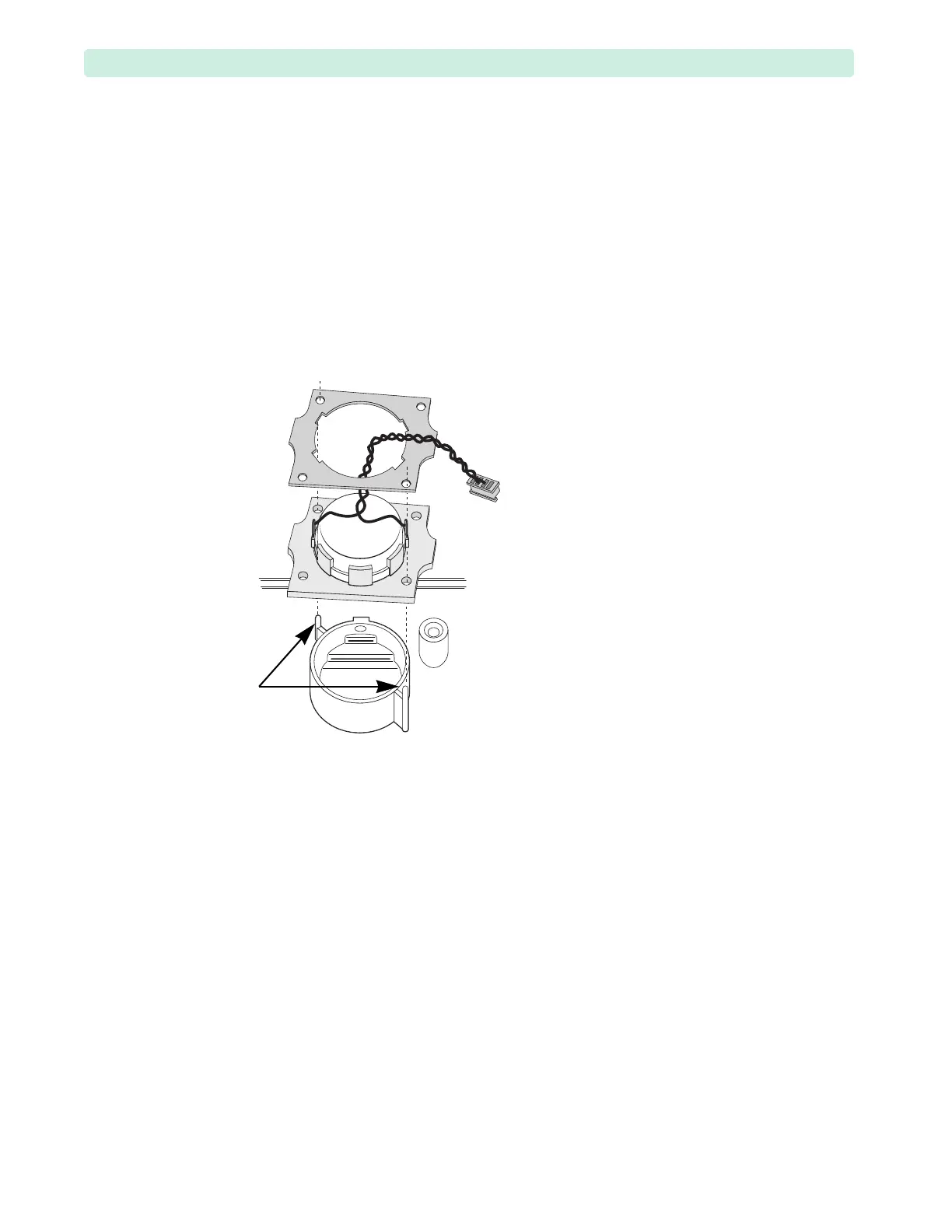
1 Lift the Speaker Assembly off the plastic pegs, see Figure 98.
2 Install the Speaker Assembly on the plastic pegs.
3 Install the foam pad on the plastic pegs with tabs positioned sideways, see Figure 98.
4 Replace the Front Chassis. See “Front Chassis Removal and Replacement” on page 142.
5 Replace the Rear Chassis. See “Front Chassis and Case Access” on page 134.
6 Close the case. See “Closing the Case” on page 151.
To Complete the Replacement:
Run Performance Verification and Safety testing as described in the “Performance Verification”
chapter.
Figure 98 Speaker Assembly








 To Next Page