User’s Manual of IGS-10020MT
4.9.11.1 QoS Control Entry Configuration
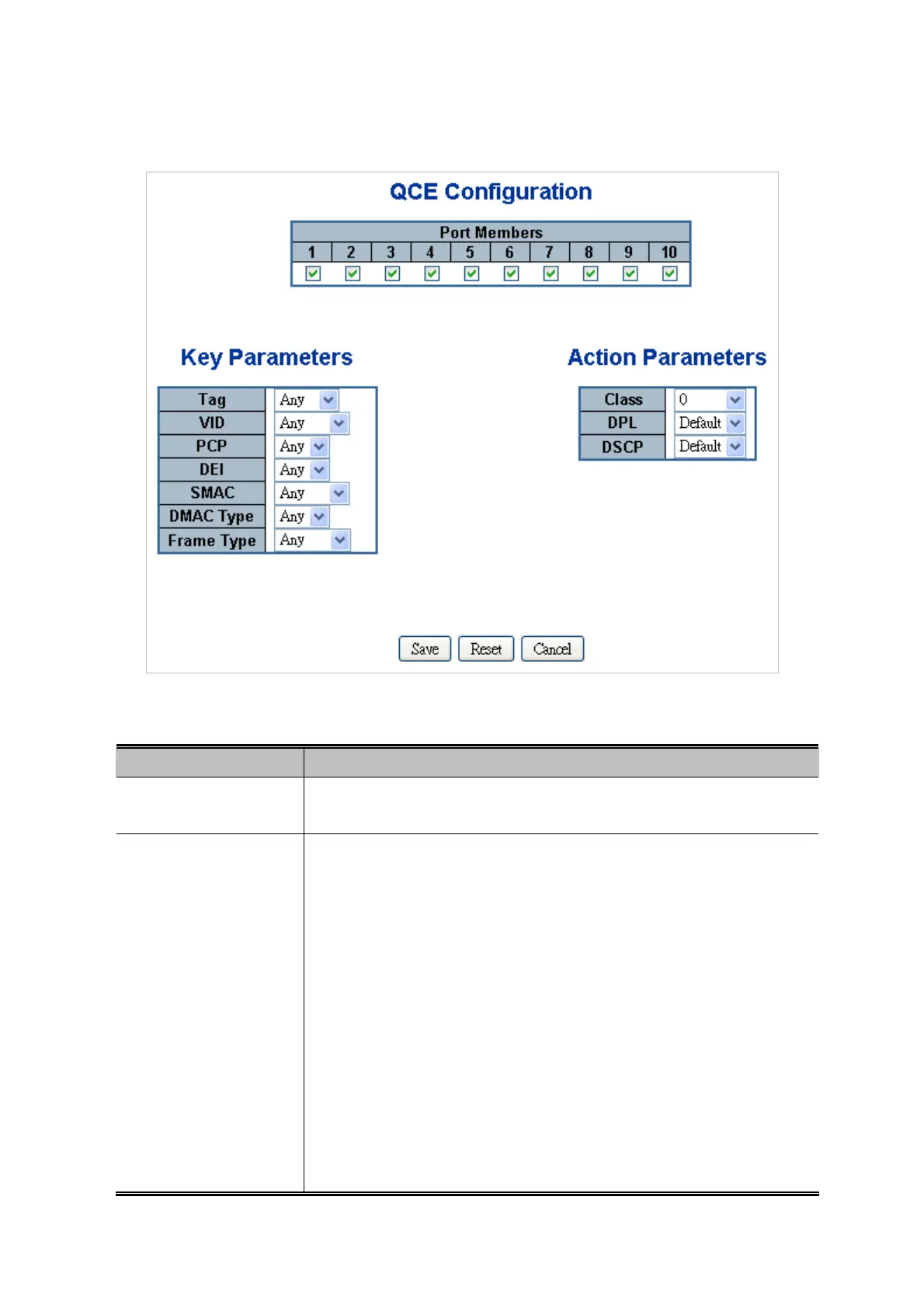
The QCE Configuration screen in Figure 4-9-14 appears.
Figure 4-9-14: QCE Configuration Page Screenshot
The page includes the following fields:
Object Description
Port Members
Check the checkbox button in case you what to make any port member of the
QCL entry. By default all ports will be checked
Key Parameters
Key configuration is described as below:
Tag Value of Tag field can be 'Any', 'Untag' or 'Tag'.
VID Valid value of VLAN ID can be any value in the range 1-4095 or 'Any'; user
can enter either a specific value or a range of VIDs.
PCP Priority Code Point: Valid value PCP are specific(0, 1, 2, 3, 4, 5, 6, 7) or
range(0-1, 2-3, 4-5, 6-7, 0-3, 4-7) or 'Any'.
DEI Drop Eligible Indicator: Valid value of DEI can be any of values between 0, 1
or 'Any'.
SMAC Source MAC address: 24 MS bits (OUI) or 'Any'.
DMAC Type Destination MAC type: possible values are unicast(UC),
multicast(MC), broadcast(BC) or 'Any'.
Frame Type Frame Type can have any of the following values:
205











 To Next Page