ITC Operating mode
5.7 Operating ITC
ITC V3, ITC V3 PRO
124 Operating Instructions, 03/2024, A5E42761061-AF
Operating the on-screen keyboard
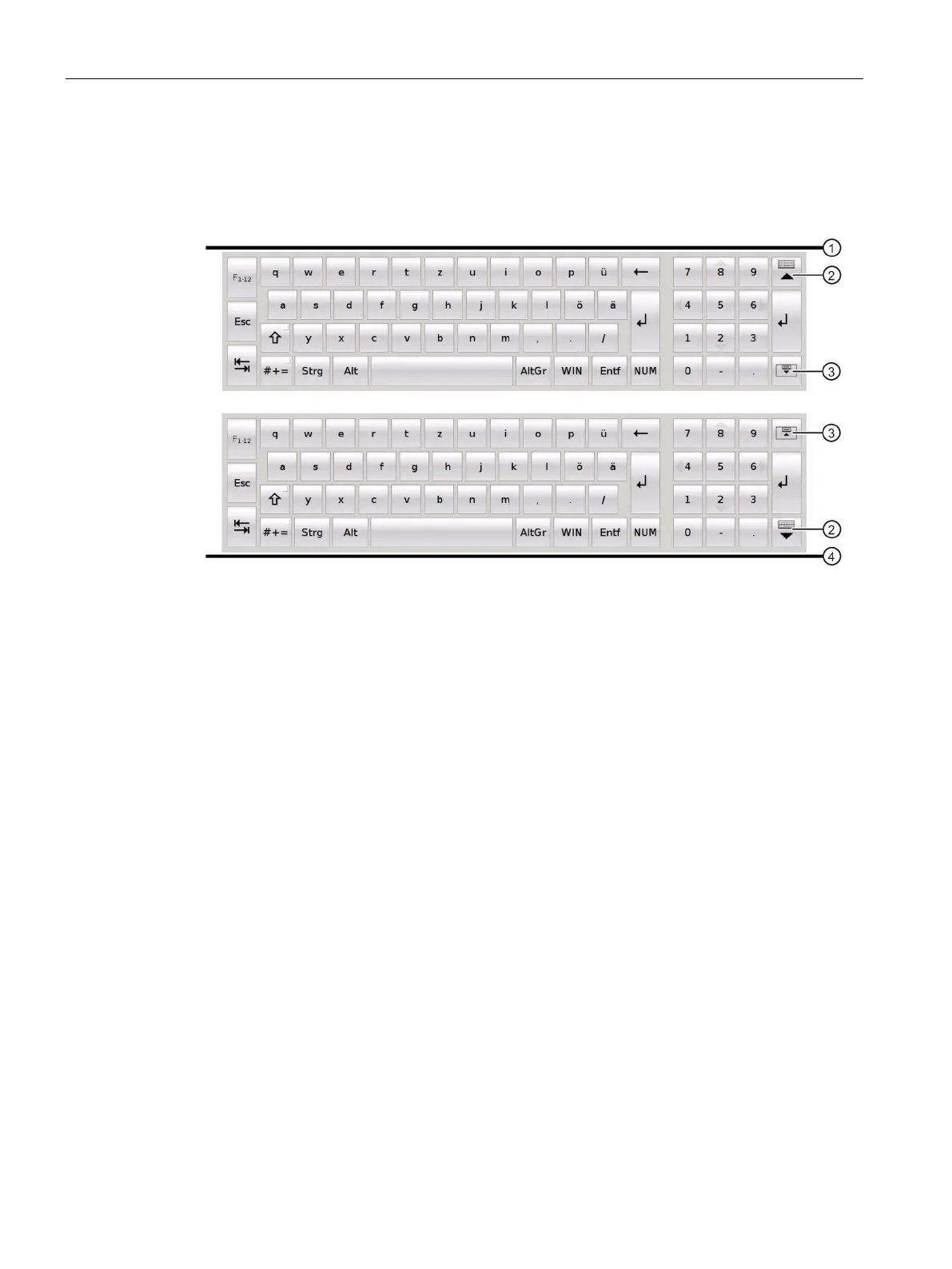
You operate the on-screen keyboard by directly touching the keys of the keyboard on the
touch screen. The functions of the keys on the on-screen keyboard are basically the same as
those on an external keyboard.
You position the screen keyboard as follows:
• In the desktop settings, you can position the on-screen keyboard at the top ① or bottom
④ edge of the screen.
• Depending on the position at the screen edge, the buttons ② and ③ on the right change:
• The button ② closes the on-screen keyboard.
• The button ③ moves the on-screen keyboard to the other edge of the screen (top or
bottom).
Windows key
The "Win" key corresponds to the Windows key on a mechanical keyboard. You use this key to
open the Windows Start menu.
Number pad
The on-screen keyboard has a separate number pad that you open with the "NUM" key. If you
have connected an external keyboard, you cannot make any entries via the number pad of
the external keyboard.
Latch function
If you keep the buttons <Ctrl>, <Alt>, <AltGr> and <WIN> pressed for some time, they are
permanently enabled as though they are being pressed even after you have released them.










 To Next Page