Installing and connecting the device
3.3 Installing a PRO device
ITC V3, ITC V3 PRO
54 Operating Instructions, 03/2024, A5E42761061-AF
Procedure
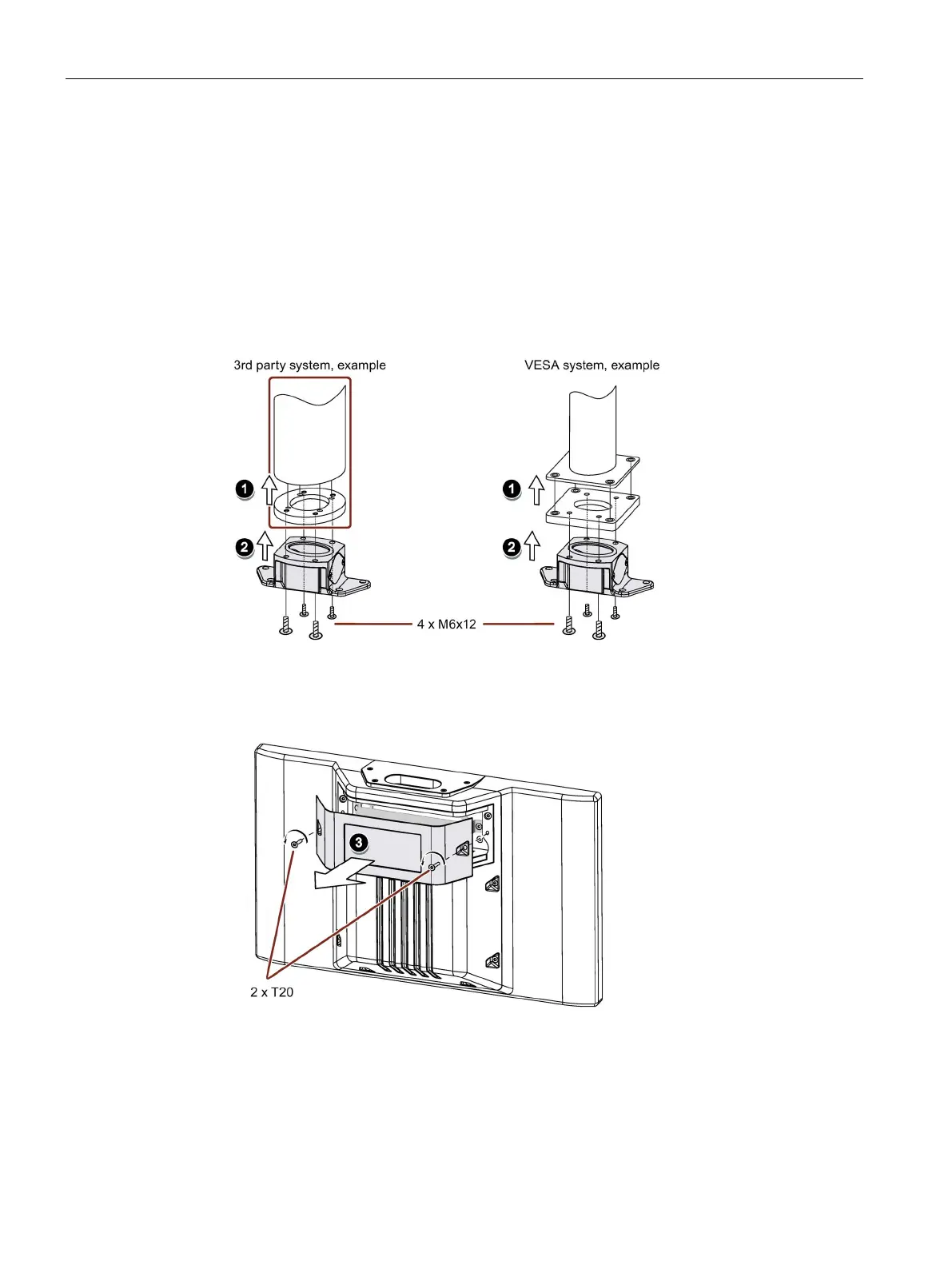
This section describes the mounting of the device to a support arm system using example
figures. Installation on a pedestal is carried out in the same way. For PRO devices for support
arm (not extendable, flange top), the base adapter is screwed on from the top of the device.
For PRO devices for pedestal (extendable, flange bottom) the base adapter is screwed on
from the bottom of the device. A PRO device for support arm system cannot be used on a
pedestal and vice versa.
1. If an adapter plate for the Siemens base adapter is included in your support arm system,
attach the adapter plate to the support arm with 4 M6x12 screws. Pay attention to the
torque that is specified for the support arm.
2. Attach the base adapter with 4 M6x12 screws to the mechanical interface of the support
arm from below. Pay attention to the torque that is specified for the support arm.
3. Loosen the 2 screws of the terminal compartment cover and remove the terminal
compartment cover.










 To Next Page