Installing and connecting the device
3.3 Installing a PRO device
ITC V3, ITC V3 PRO
Operating Instructions, 03/2024, A5E42761061-AF
57
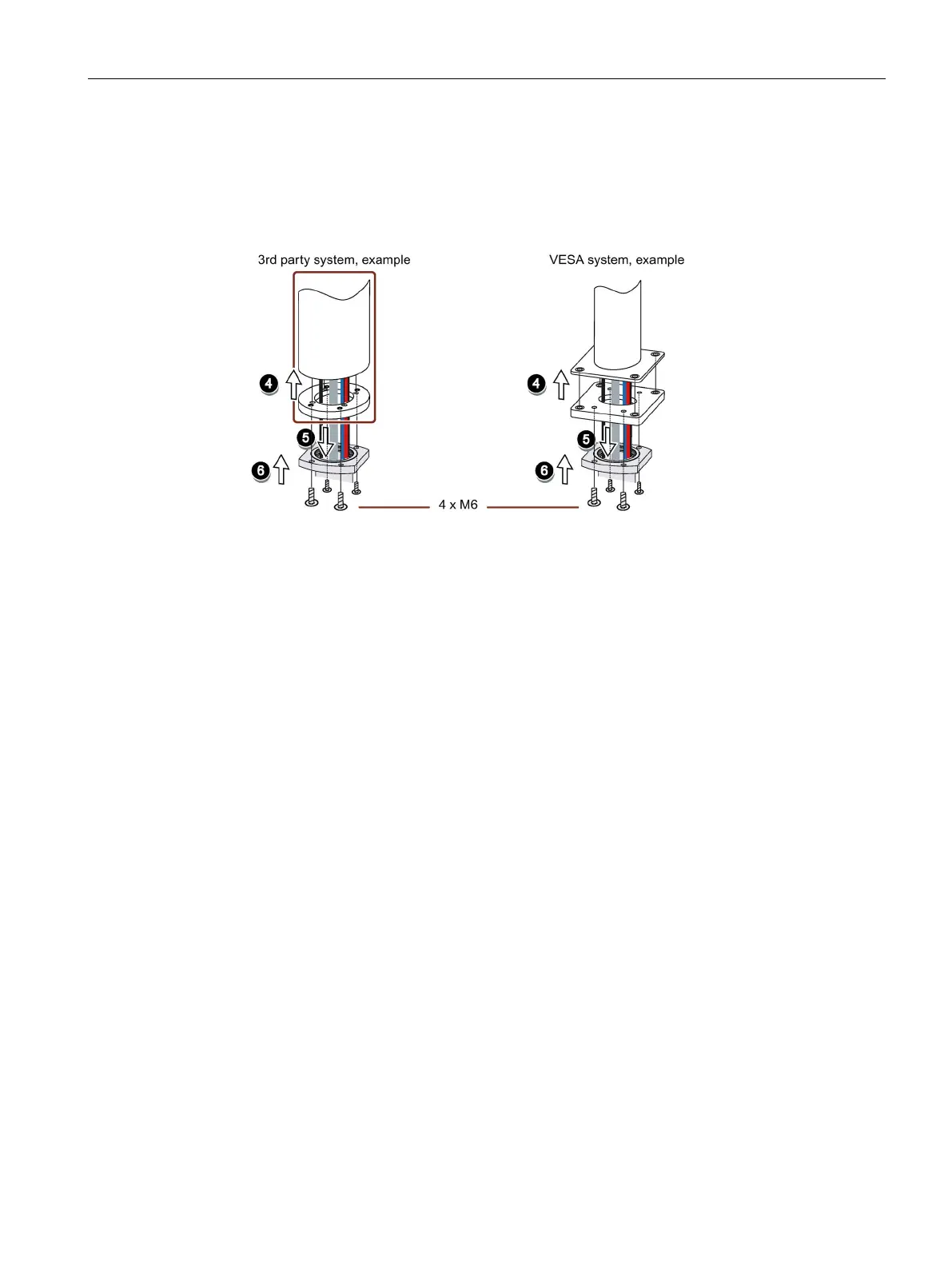
4. If you use an adapter plate from a Siemens VESA adapter set, attach the adapter plate to the
support arm with four M6x12 screws.
If you use an adapter plate suitable for the Siemens flange mount adapter, attach the
adapter plate to the support arm using the appropriate mounting hardware.
When tightening the screws, adhere to the torque that is specified for the support arm.
5. Insert all connection cables through the opening of the flange mount adapter or 48.3 mm
round tube into the connection compartment of the PRO device. Make sure that the
connection cables are not damaged.
6. If you use an adapter plate from a Siemens VESA adapter set, attach the flange mount
adapter to the support arm from the bottom with four M6 screws, 16 mm to 20 mm in
length.
If you do not use an adapter plate or use a differnt one, attach the flange mount adapter
to the support arm from the bottom with four M6 screws. The length of the screws
depends on the specifications for the support arm and must be at least 16 mm to ensure
secure fastening of the flange mount adapter.
The screws are not included in the product package of the PRO device. Pay attention to
the torque that is specified for the support arm. Make sure that the connection cables are
not crushed.
7. Connect all cables according to the description in the section below.
8. Fasten the terminal compartment cover to the device with the 2 associated screws, torque
1.5 Nm. Check that the seal is sitting correctly.
9. Attach the lower cover from the product package to the PRO device with 4 M4x12 screws,
torque 1.5 Nm. Alternatively, you can extend the PRO device by adding an Extension Unit at
the bottom. Observe the associated documentation.
See also
System components for PRO devices (Page 25)










 To Next Page