CD600 Plus - User’s Manual
A.6
CD600
ERTEX2
ICS2.0P - RS232/RS485 Converter
1
2
3
G
L
N
NC
RxD
GND
2
1
4
3
5
RS2
32
TxD
NC
LIN
E
RS4
85
1
2
3
GND
TERMIN
TOR
MODE
W2/W3
HALF DUPLE
W2/W3
FULL DUPLE
ON
1-2
W1
OFF
2-3
smar
+5VDC
RS232/RS485 Converter
232 Tx
232 Rx
+
COM
RS232
Cabo Serial
I
2.
P
D
Pl
Serial Cable
RS232
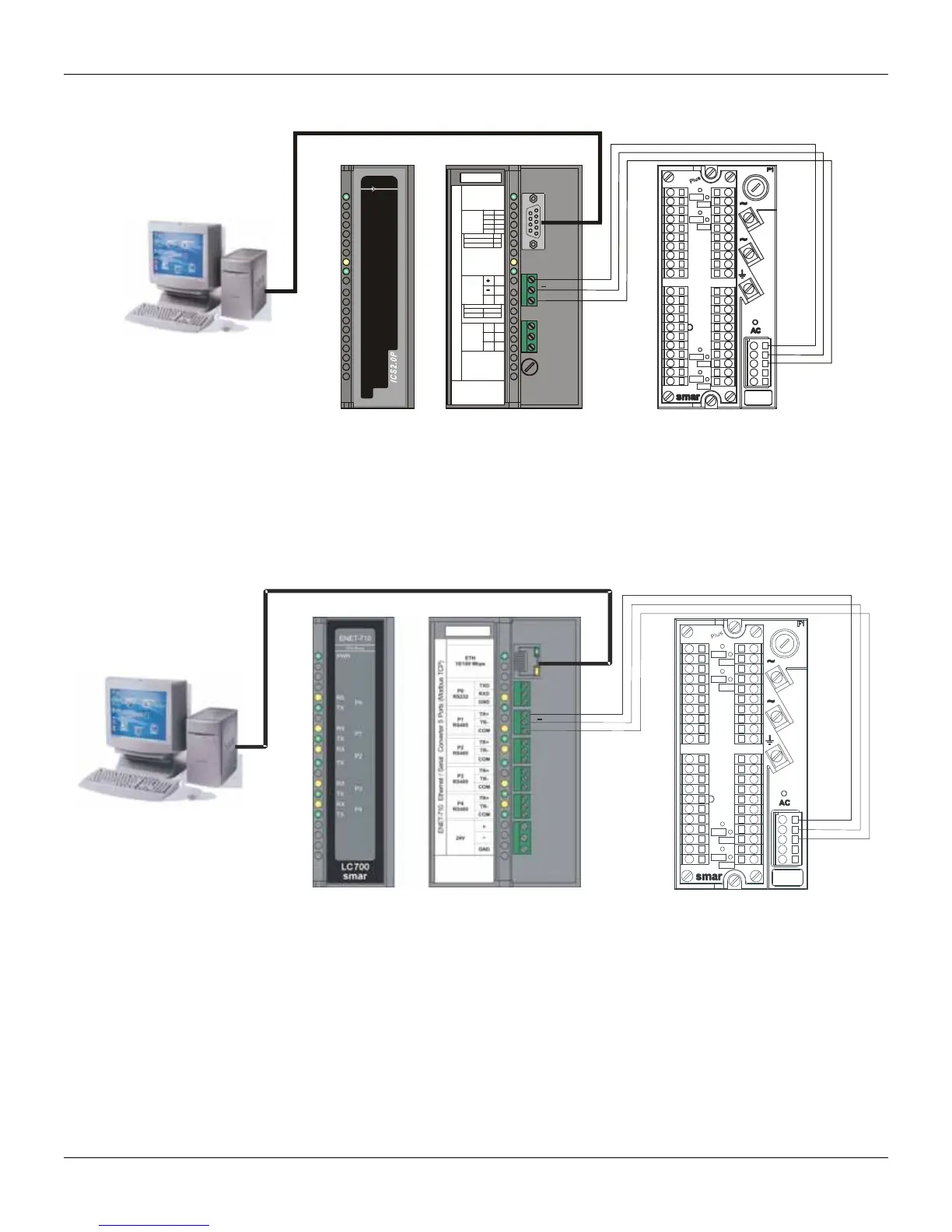
Figure 8 – CD600 Plus Wiring diagram with ICS2.0 interface.
2 – Using Ethernet connection
To establish an Ethernet connection, connect the ENET-710 interface in the RS485 terminal of the
CD600 Plus. See figure 9. Refers to the ENET-710 manual for more details.
CD600
ERTEX2
CROSS
Ethernet Cable
+
CD600 PlusENET-710
COM
Figure 9 - CD600 PLUS wiring diagram with an ENET-710 interface
Refers to the communication section of the CD600 Plus user manual for more details about the
communication blocks configuration.



 To Next Page