CD600 Plus - User's Manual
4.8
Function 06 - Front View (FV)
Operation
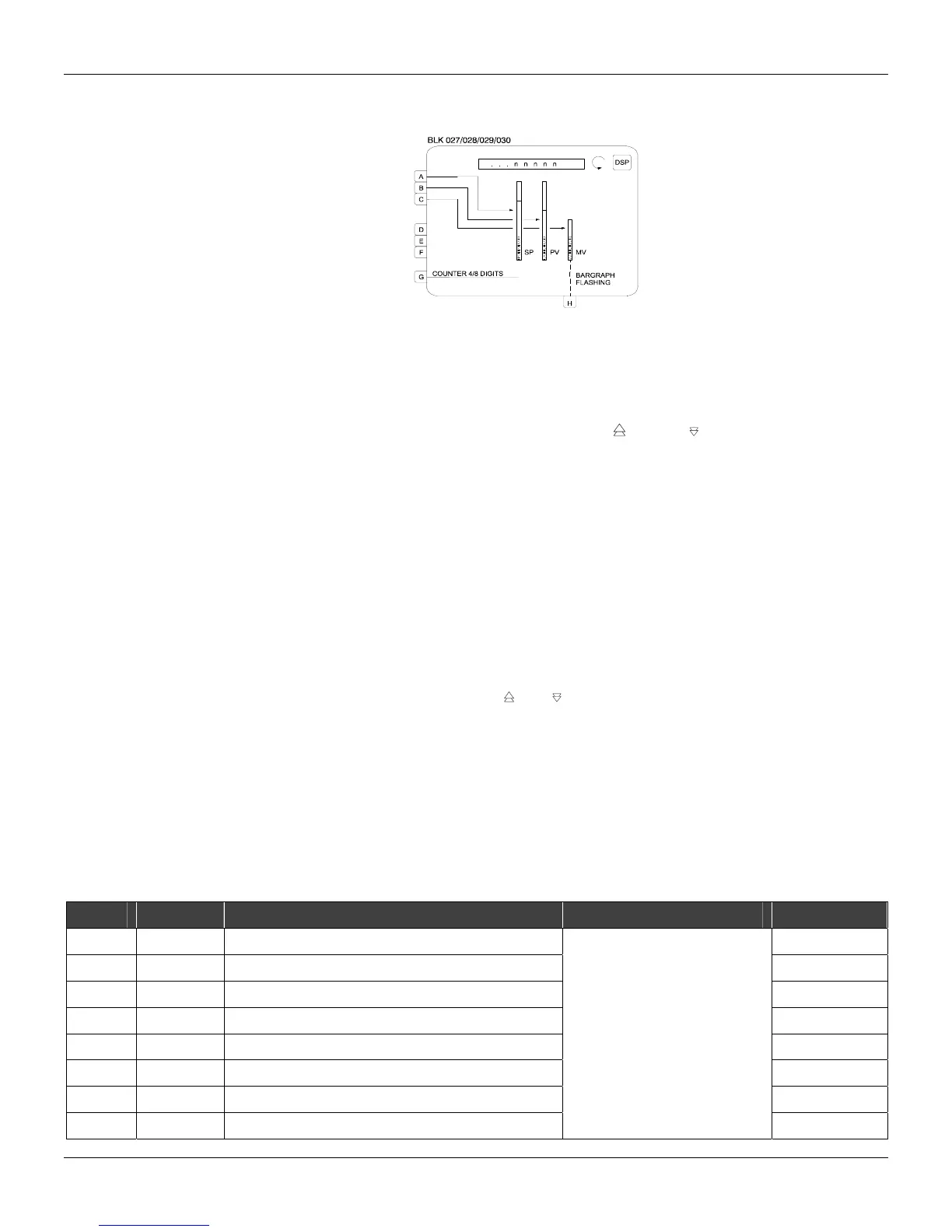
This block leads inputs A, B, C to bargraphs SP, PV and MV respectively, and in the default
condition, associates these inputs to the mnemonics SP, PV and MV on the display.
Thus, the use of this block is limited to one per loop.
Inputs A, B, D, E, F and G can be visualized on the alphanumeric display and scrolled by key
<DSP>. Input C will be visualized only by pressing key < > or key < >.
Blocks that have manual adjustment registers, operated by keys <Δ> or <∇> must be connected to
the Loop Visualization block. An adjustment can be performed only while the variable is being
visualized; the LED "Adjust" indicates that adjustment can be done.
The blocks with the manual adjustment feature are Local/Remote Selector, Setpoint Generator,
Internal/ External Selector and Constant Adjuster.
The blocks with adjustment capability have the outputs identified by numbers equal or greater than
225. The Input Selector block also allows manual adjustment of blocks with this feature whose
output is connected to the Input of the Input Selector block. Notice that its output numbering is
greater than 225.
VISUALIZATION
All inputs, except C and G, may have the three-character mnemonics changed and the indication
configured in engineering units.
Input C appears on the display when < > or < > is pressed.
Input G, if connected to a block of the Function 18 - Totalization or Function 19 - Pulse
Totalization Input, will show an eight-digit number. Connecting it to any other block, it will operate
as a 4 digit display.
Input H - Bargraph Flashing - can be used to blink the MV bar. It is activated with a high logic level
signal. This input can be used, for example, to show a deviation or break in the current output from a
block of Function 02 - Current Output.
If one of the inputs A, B, D, E or F be shown in the Alphanumeric Display and its indication in
engineering units exceeds 10000, the display will show the message "++++" instead of the input
value. If this indication be lower than -10000, the message displayed will be " - - - -".
TYPE MNEM DESCRIPTION RANGE DEFAULT
I LIA
Input A - SP
0
I LIB
Input B - PV
0
I LIC
Input C – MV
0
I LID
Input D
0
I LIE
Input E
0
I LIF
Input F
0
I LIG
Input G - Counter type Input
0
I LIH
Input H - blink MV bargraph
Addresses
0 to 170 / 225 to 240
0



 To Next Page