14215700-IG, Edition 8.0
April 2018, Original document
31
Configuration Overview - Spectralink IP-DECT Server
200
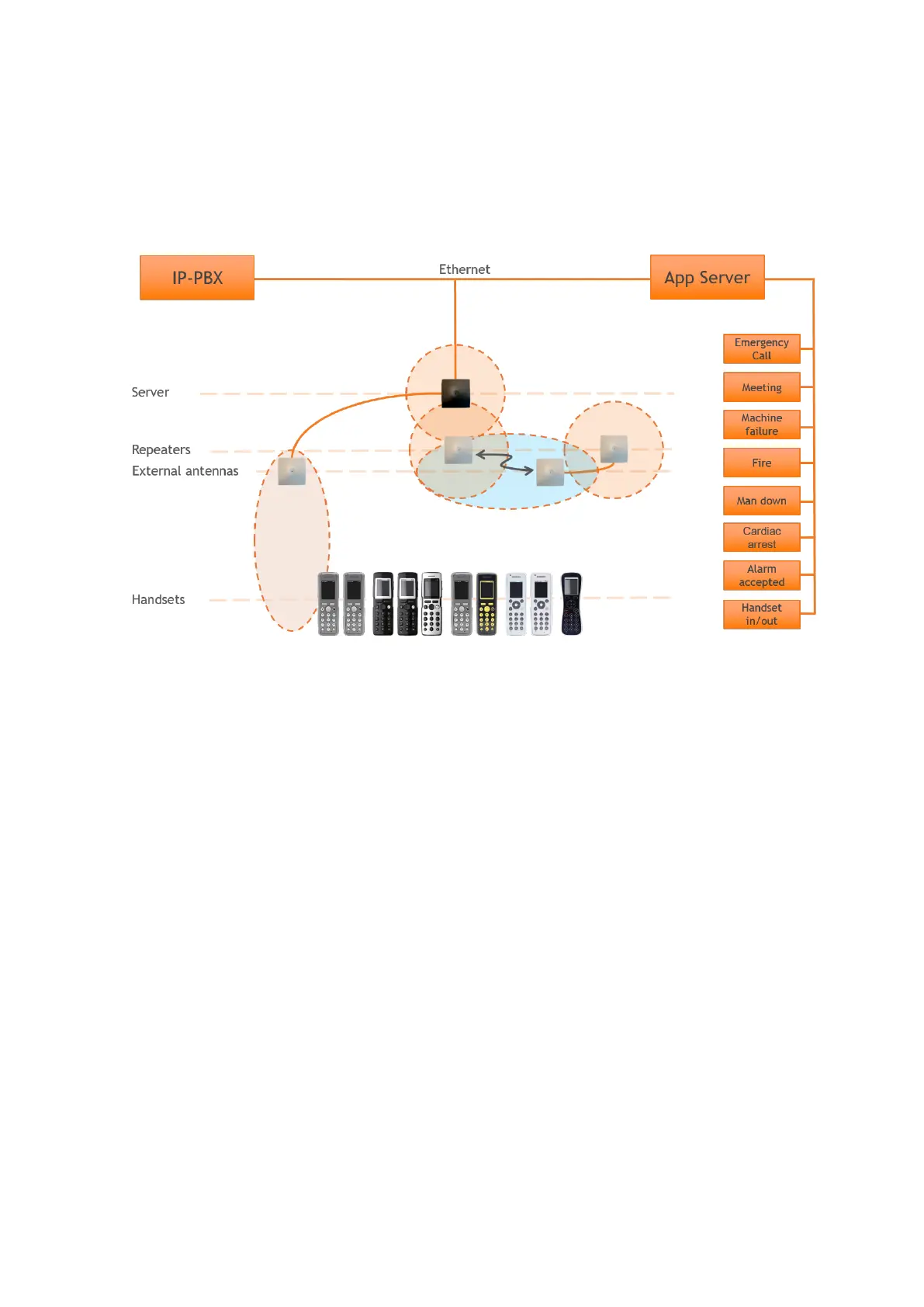
The Spectralink IP-DECT Server 200 is typically configured as illustrated below:
The Spectralink IP-DECT Server 200 connects with Ethernet as well as the IP-PBX and 3rd party
application server.
Optional wireless repeaters can be used to extend the coverage of the Spectralink IP-DECT Server
200. External directional antennas are also optional and can be used with the Spectralink IP-DECT
Server 200 in physically complex environments which are challenging to cover with the built-in base
station or repeaters.
External antennas can also be used to create long distance coverage to bridge two locations belong-
ing to the same DECT system. Spectralink DECT Repeaters can make use of external antennas as
well and create a link from a remote location to the main coverage area. There is no speech cov-
erage in the linking area which is symbolized by the light blue color.
All Spectralink 7000 Handsets are supported. The Spectralink IP-DECT Server 200 itself connects
with the LAN via the ethernet interface, and an optional 3rd party application can communicate over
LAN with the Spectralink IP-DECT Server 200.
Spectralink IP-DECT Server 200/400/6500 Installation and Configuration Guide



 To Next Page