14215700-IG, Edition 8.0
April 2018, Original document
139
Registering Users and Subscribing Spec-
tralink DECT Handsets
You must register a user and subscribe a handset before you can use it.
l When registering users, you enter information about each user's settings (such as; IPEI, user-
name (handset serial number), access code etc.) in the system database.
For more information about the handsets serial number, see "Identifying IPEI on Spectralink
Handset" on page48.
l When subscribing handset, you subscribe a handset to a registered user with a matching
IPEI.
Note:
If the user is not registered in the system database, subscription of the handset is
not possible.
Registering a User
To register users, you use the web based Administration Page of the server.
To Register/Create a New User
1. Click Users, and then click List Users.
2. Click New to create a new user.
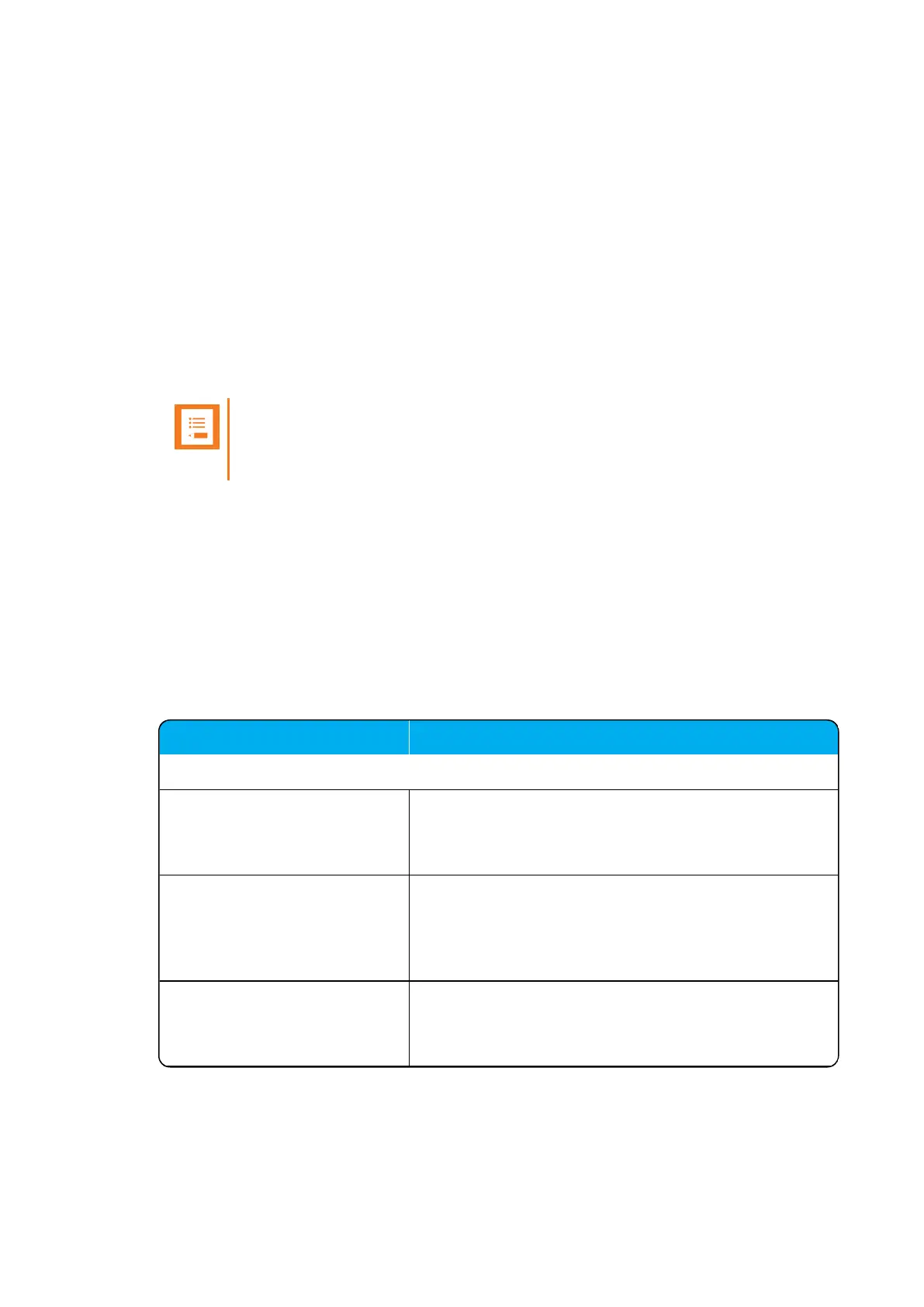
3. On the User page, enter the following data:
Field Setting
User - DECT device
Model After registration of user and subscription of handset, this
field will contain information about the handset model.
E.g. Spectralink7742
Software part number After registration of user and subscription of handset, this
field will contain information about the software part-
number.
E.g. 14225100
Firmware After registration of user and subscription of handset, this
field will contain information about the firmware version.
E.g. PCSJA.
Spectralink IP-DECT Server 200/400/6500 Installation and Configuration Guide



 To Next Page